

Webhooks documentation light mode
Webhooks documentation dark mode

Overview

When configuring a Pearl, you can set up webhooks to receive real-time notifications at key moments of the call lifecycle. The webhooks available to you depend on whether your Pearl is configured for Inbound or Outbound activity.

Inbound Pearl

Access to the Call Webhook only.

Outbound Pearl

Access to both the Call Webhook and the Lead Webhook.
The Call Webhook payload is identical whether it originates from an Inbound or Outbound Pearl. The Lead Webhook is exclusive to Outbound campaigns, as leads are a concept specific to outbound call management.

Webhook Types


Webhook Version

Select the version that matches your Pearl configuration. V2 is the recommended version and is selected by default.
In V2, all JSON payload keys use camelCase (e.g. pearlId, phoneNumber, collectedData).

Call Webhook Payload

The Call Webhook is triggered at the start and at the end of every call. It provides comprehensive data about the call, including its outcome, duration, transcript, and any information collected during the conversation.
Available for both Inbound and Outbound Pearls.

Payload Fields

FieldTypeDescription
idstringThe unique identifier of the call.
pearlIdstringThe unique identifier of the Pearl used during this call.
startTimedatetimeThe date and time when the call processing started.
conversationStatusint (enum)The status of the conversation. See Conversation Statuses below.
statusint (enum)The overall technical status of the call. See Call Statuses below.
fromstringThe phone number from which the call was made.
tostringThe phone number to which the call was made.
namestringThe name associated with the call, if available.
durationintegerThe duration of the call in seconds.
recordingstring (URL)A URL to the call recording, if recording is enabled.
transcriptobject[]The full conversation transcript as a list of messages. See Transcript Message below.
summarystringA concise AI-generated summary of the conversation.
collectedInfoobject[]Structured data points collected during the call. See Collected Info below.
tagsstring[]Tags or labels triggered during the conversation based on your Pearl configuration.
isCallTransferredbooleanWhether the call was transferred to a human agent or external number.
overallSentimentint (enum)The overall emotional tone detected from the client. See Sentiment Values below.
leadIdstringThe unique identifier of the associated lead, if the call is linked to one. Otherwise null.

Conversation Statuses

ValueCodeDescription
NeedRetry10The call will be retried.
InCallQueue20The call is queued and waiting to be placed.
OnCall40The call is currently in progress.
VoiceMailLeft70Pearl reached voicemail and left a message.
Success100The conversation ended with a successful outcome as defined in the Pearl.
NotSuccessful110The conversation ended without achieving the defined success criteria.
Completed130The conversation was completed (neutral outcome).
Unreachable150The lead could not be reached after all attempts.
Blacklisted220The number is blacklisted and will not be contacted.
QueueAbandon300The call was abandoned while in the queue.
Error500An error occurred during the conversation.
The definition of Success and NotSuccessful is configured at the Pearl level. Refer to the Create a Pearl page for more details.

Call Statuses

ValueCodeDescription
InProgress3The call is currently active.
Completed4The call ended normally.
Busy5The line was busy when the call was placed.
Failed6The call could not be connected due to a technical issue.
NoAnswer7The call was not answered within the configured ring duration.
Canceled8The call was canceled before being connected.

Transcript Message

Each entry in the transcript array represents a single message in the conversation.
FieldTypeDescription
roleint (enum)The speaker: Pearl (2) or Client (3).
contentstringThe text content of the message.
startTimefloatThe timestamp (in seconds) when the message started.
endTimefloatThe timestamp (in seconds) when the message ended.

Collected Info

Each entry in the collectedInfo array represents a variable captured during the call.
FieldTypeDescription
idstringThe ID of the variable as configured in your Pearl.
namestringThe display name of the variable.
valueanyThe value collected for this variable during the call.

Sentiment Values

ValueCodeDescription
Negative1Clear signals of anger, disappointment, or distress.
SlightlyNegative2Some negative emotions present, but overall tone remains close to neutral.
Neutral3Balanced, objective, or factual - no significant positive or negative leanings.
SlightlyPositive4More positive cues than negative, though enthusiasm is mild.
Positive5Positive emotions, enthusiasm, satisfaction, or gratitude.

Example Payload

{
  "id": "64f3c300e4b0d3a5f1c9e299",
  "pearlId": "64f3b9ffe4b0d3a5f1c9e100",
  "startTime": "2024-06-01T10:15:00Z",
  "conversationStatus": "Success",
  "status": "Completed",
  "from": "+18005550100",
  "to": "+14155552671",
  "name": "John Doe",
  "duration": 142,
  "recording": "https://recordings.nlpearl.ai/calls/64f3c300e4b0d3a5f1c9e299.mp3",
  "transcript": [
    {
      "role": "Pearl",
      "content": "Hi John, this is Pearl calling on behalf of Acme Corp. How are you today?",
      "startTime": 0.0,
      "endTime": 4.2
    },
    {
      "role": "Client",
      "content": "I'm good, thanks. What's this about?",
      "startTime": 4.8,
      "endTime": 7.1
    }
  ],
  "summary": "The lead was informed about the Premium plan and expressed interest in a follow-up.",
  "collectedInfo": [
    {
      "id": "var_001",
      "name": "Interested In Plan",
      "value": "Premium"
    }
  ],
  "tags": ["interested", "callback-requested"],
  "isCallTransferred": false,
  "overallSentiment": "SlightlyPositive",
  "leadId": "64f3c2a1e4b0d3a5f1c9e271"
}

Lead Webhook Payload

The Lead Webhook is triggered every time a lead changes status - at the beginning and at the end of a call. It contains all relevant information about the lead and its current state.
Available for Outbound Pearls only.

Payload Fields

FieldTypeDescription
idstring (ObjectId)The unique identifier of the lead in the NLPearl.AI system.
pearlIdstringThe unique identifier of the Pearl associated with this lead.
externalIdstringThe ID from an external system such as a CRM, for cross-referencing.
phoneNumberstringThe phone number of the lead.
timeZonestringThe time zone assigned to the lead.
statusint (enum)The current status of the lead. See Lead Statuses below.
createddatetimeThe date and time when the lead was created.
callsIdstring[]A list of all call IDs associated with this lead.
callDataobject (key-value)Custom variables provided before the call to personalize the Pearl conversation.
collectedDataobject (key-value)Data collected during the call. Keys correspond to variable IDs configured in the Pearl.

callData vs collectedData

callDatacollectedData
WhenProvided before the callFilled during the call
PurposePersonalizes the Pearl’s script and openingCaptures outcomes and responses from the conversation
Example{ "firstName": "John", "plan": "Premium" }{ "confirmBooking": true, "rideTime": "Friday 12:00" }

Lead Statuses

ValueCodeDescription
New1The lead has just been added, no call attempted yet.
NeedRetry10The call will be retried according to the retry configuration.
InCallQueue20The lead is queued and waiting for a call to be placed.
WrongCountryCode30The phone number does not match the campaign’s country code.
OnCall40The lead is currently in an active call.
VoiceMailLeft70Pearl reached voicemail and left a personalized message.
Success100The conversation ended with a successful outcome as defined in the Pearl.
NotSuccessful110The conversation ended without achieving the success criteria.
Completed130All attempts are done (neutral outcome).
Unreachable150The lead could not be reached after all retry attempts.
Blacklisted220The number is blacklisted and will not be contacted.
QueueAbandon300The call was abandoned while in the queue.
Error500An error occurred while processing this lead.
The definition of Success and NotSuccessful is set at the Pearl level. Refer to the Create a Pearl page for details.

Example Payload

{
  "id": "64f3c2a1e4b0d3a5f1c9e271",
  "pearlId": "64f3b9ffe4b0d3a5f1c9e100",
  "externalId": "crm-lead-00482",
  "phoneNumber": "+14155552671",
  "timeZone": "America/New_York",
  "status": "Success",
  "created": "2024-06-01T09:00:00Z",
  "callsId": [
    "64f3c300e4b0d3a5f1c9e299"
  ],
  "callData": {
    "firstName": "John",
    "email": "john.doe@example.com",
    "plan": "Premium"
  },
  "collectedData": {
    "confirmBooking": true,
    "dropOffLocation": "Orly Airport",
    "rideTime": "Friday at 12:00",
    "userIntent": "Book a taxi to the airport"
  }
}

Differences Between V1 and V2

V1V2
JSON key formatPascalCasecamelCase
Lead: campaign referenceOutboundIdpearlId
Lead: post-call collected data❌ Not availablecollectedData
Call: entity referenceRelatedId❌ Removed

Setting Up Webhooks

You can configure webhook URLs directly in your Pearl or outbound campaign settings.
1

Open Your Campaign Settings

Navigate to the Pearl or outbound campaign you want to configure and open its settings panel.
2

Locate the Webhook Section

Scroll to the Webhooks section in the configuration form.
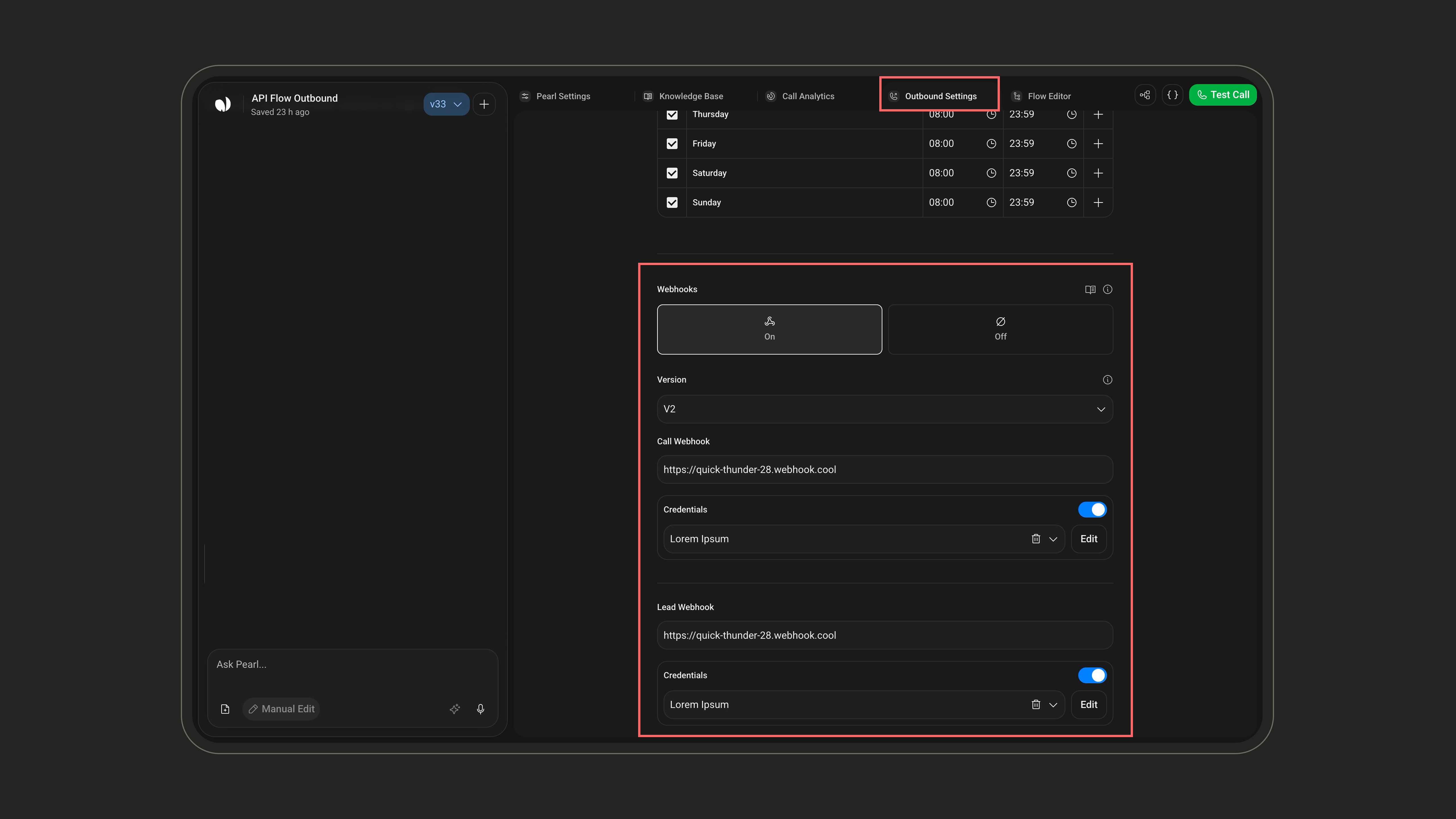
Webhook settings on light mode
Webhook settings on dark mode
3

Enter Your Webhook URLs

Provide the endpoint URLs for the webhooks you want to receive:
  • Call Webhook - available for Inbound and Outbound Pearls.
  • Lead Webhook - available for Outbound Pearls only.
Your server must respond with an HTTP 200 OK to acknowledge receipt.
Make sure your webhook endpoint is publicly accessible and responds within a reasonable timeout. NLPearl.AI does not retry failed webhook deliveries by default.