> ## Documentation Index
> Fetch the complete documentation index at: https://developers.nlpearl.ai/llms.txt
> Use this file to discover all available pages before exploring further.

# Twilio Integration

> Learn how to integrate your Twilio account with NLPearl.AI and use your Twilio phone numbers.

<div className="block dark:hidden">
  <Frame>
    <div className="p-1">
      <img src="https://mintcdn.com/nlpearl/DSJnNLmkdffV1qq-/images/light_mode/phone_number_twilio-cover.png?fit=max&auto=format&n=DSJnNLmkdffV1qq-&q=85&s=e0668072d108cce9b8299472095feb59" alt="Send Email action interface on light mode" className="rounded-[14px]" width="6000" height="2000" data-path="images/light_mode/phone_number_twilio-cover.png" />
    </div>
  </Frame>
</div>

<div className="hidden dark:block">
  <Frame>
    <div className="p-1">
      <img src="https://mintcdn.com/nlpearl/OLkkXJCUYovrG0y1/images/dark_mode/phone_number_twilio-cover.png?fit=max&auto=format&n=OLkkXJCUYovrG0y1&q=85&s=fcfc4e97e832bdd50510fdc5c2a930d3" alt="Send Email action interface on dark mode" className="rounded-[14px]" width="6000" height="2000" data-path="images/dark_mode/phone_number_twilio-cover.png" />
    </div>
  </Frame>
</div>

Integrate your Twilio account with NLPearl.AI to use your existing Twilio phone numbers on our platform.
This integration allows you to leverage your Twilio numbers for inbound and outbound campaigns,
providing access to a wide range of phone numbers from various countries while ensuring compliance with local regulations.

***

### How to Integrate Your Twilio Account

Follow these steps to integrate your Twilio account with NLPearl.AI:

<Steps>
  <Step title="Go to Phone Numbers Settings">
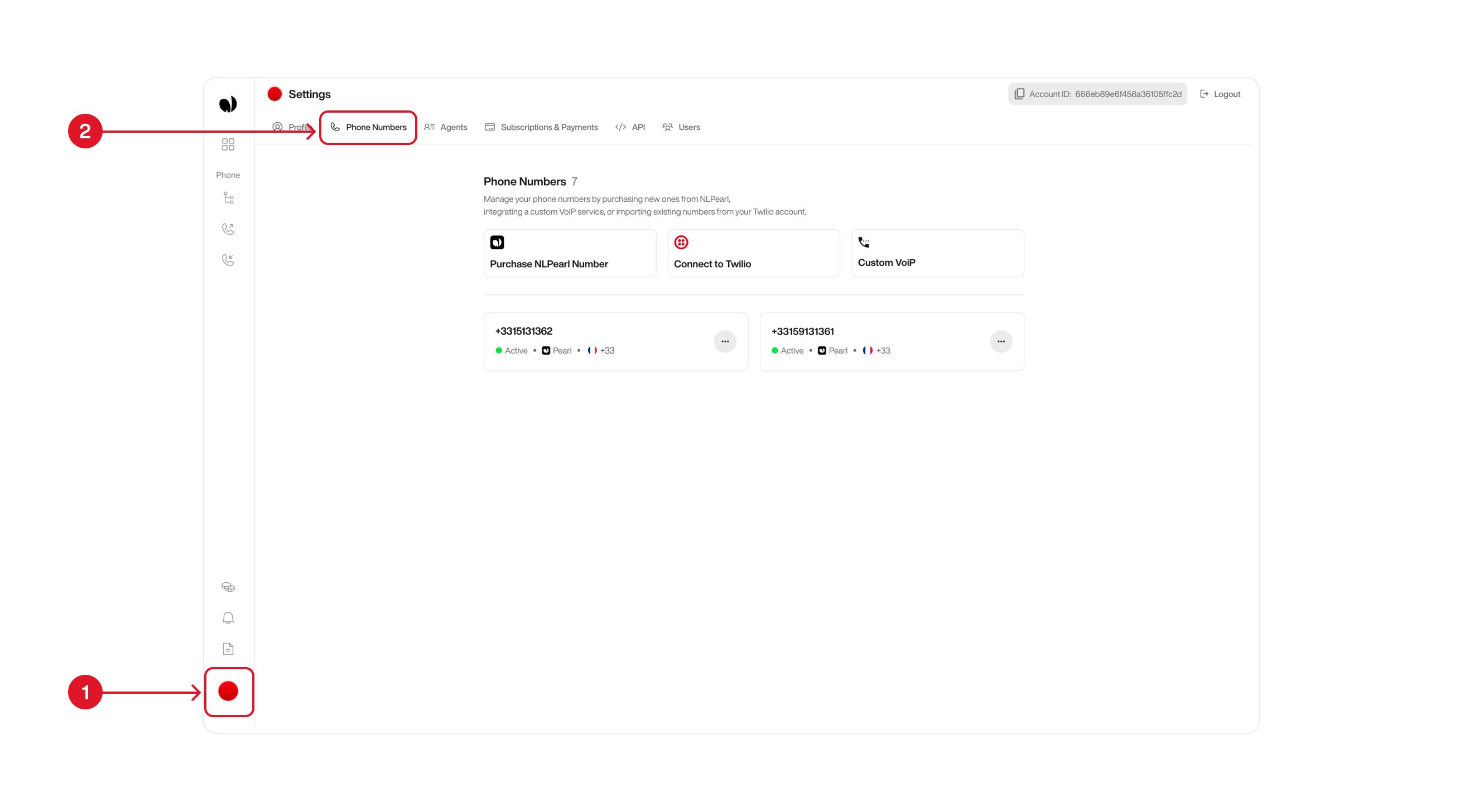
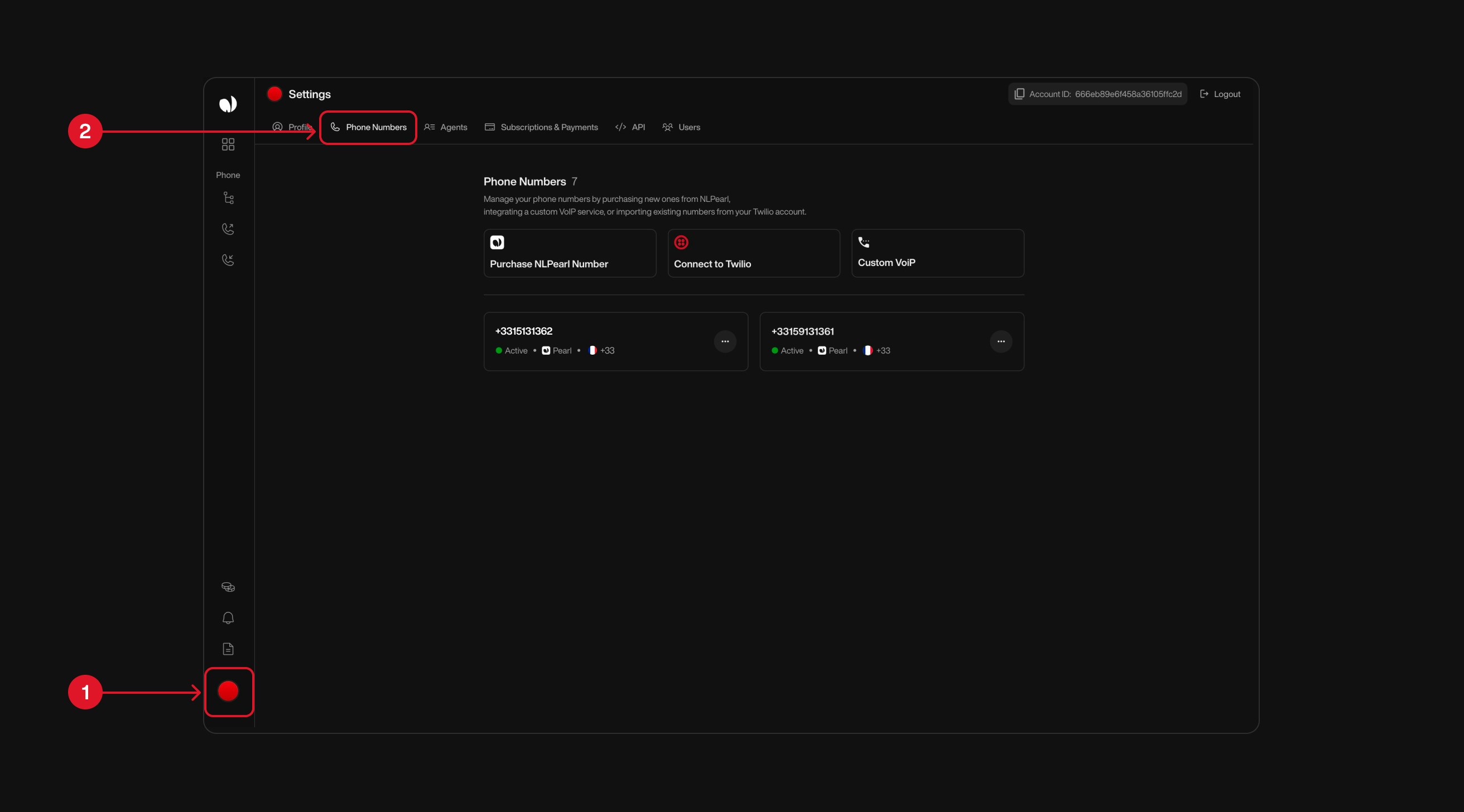
    Start by clicking your **profile card** <span style={{ color: '#f87171', fontWeight: 600 }}>(1)</span> at the bottom-left corner of the sidebar. This opens the Settings panel.

    From there, go to the **Phone Numbers tab** <span style={{ color: '#f87171', fontWeight: 600 }}>(2)</span> to manage or purchase phone numbers linked to your account.

    <div className="block dark:hidden">
      <Frame>
        <div className="p-1">
          <img src="https://mintcdn.com/nlpearl/DSJnNLmkdffV1qq-/images/light_mode/phone_number_tab.jpg?fit=max&auto=format&n=DSJnNLmkdffV1qq-&q=85&s=b07ae17b8961515657dbc4a11b3df9f1" alt="Send Email action interface on light mode" className="rounded-[14px]" width="2624" height="1456" data-path="images/light_mode/phone_number_tab.jpg" />
        </div>
      </Frame>
    </div>

    <div className="hidden dark:block">
      <Frame>
        <div className="p-1">
          <img src="https://mintcdn.com/nlpearl/OLkkXJCUYovrG0y1/images/dark_mode/phone_number_tab.jpg?fit=max&auto=format&n=OLkkXJCUYovrG0y1&q=85&s=ea8dbbd01d61f0c0f2e3e852f54b20cf" alt="Send Email action interface on dark mode" className="rounded-[14px]" width="2624" height="1456" data-path="images/dark_mode/phone_number_tab.jpg" />
        </div>
      </Frame>
    </div>
  </Step>

  <Step title="Click on Connect to Twilio">
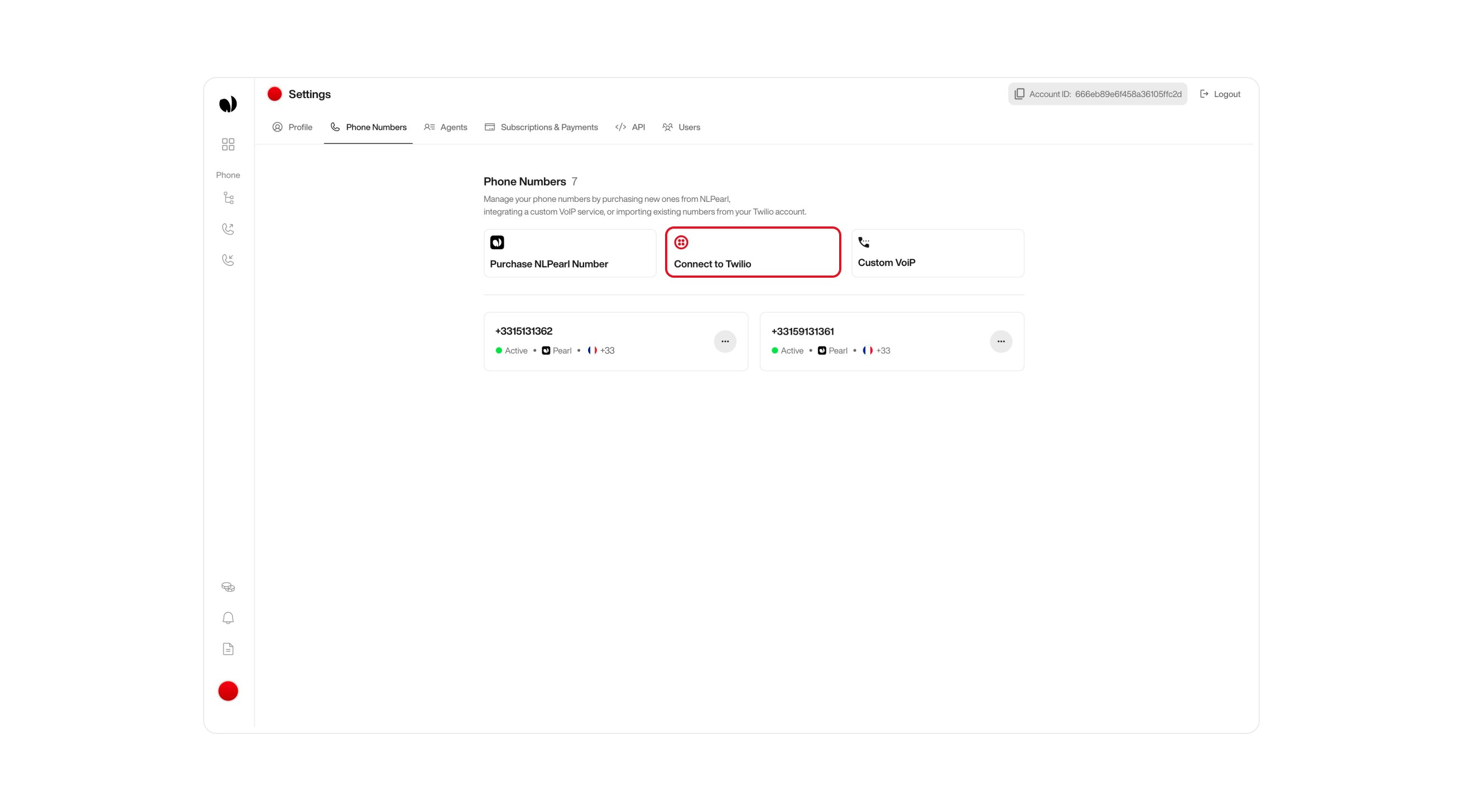
    In the **Phone Numbers** tab, locate the **Connect to Twilio** button in the center of the screen.

    Click this button to link your Twilio account and access the list of available phone numbers provided by Twilio.

    <div className="block dark:hidden">
      <Frame>
        <div className="p-1">
          <img src="https://mintcdn.com/nlpearl/DSJnNLmkdffV1qq-/images/light_mode/phone_number_twilio-connect.jpg?fit=max&auto=format&n=DSJnNLmkdffV1qq-&q=85&s=ad0dbef3a44ee3fb5008a1d9534b4c9f" alt="Send Email action interface on light mode" className="rounded-[14px]" width="2624" height="1456" data-path="images/light_mode/phone_number_twilio-connect.jpg" />
        </div>
      </Frame>
    </div>

    <div className="hidden dark:block">
      <Frame>
        <div className="p-1">
          <img src="https://mintcdn.com/nlpearl/OLkkXJCUYovrG0y1/images/dark_mode/phone_number_twilio-connect.jpg?fit=max&auto=format&n=OLkkXJCUYovrG0y1&q=85&s=68bd21db74db67a1c4bc9498c62a4a35" alt="Send Email action interface on dark mode" className="rounded-[14px]" width="2624" height="1456" data-path="images/dark_mode/phone_number_twilio-connect.jpg" />
        </div>
      </Frame>
    </div>
  </Step>

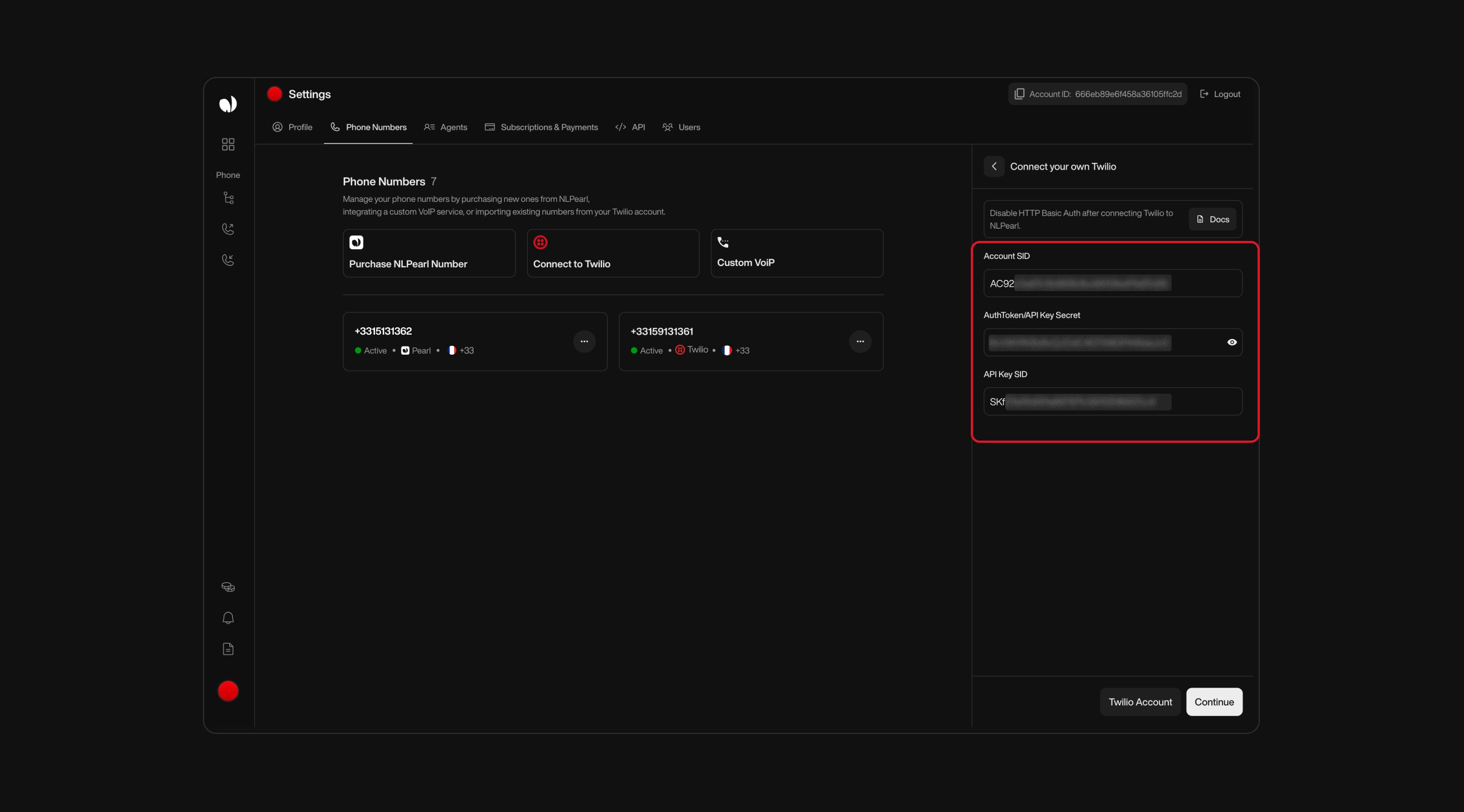
  <Step title="Connect to Twilio with Credentials">
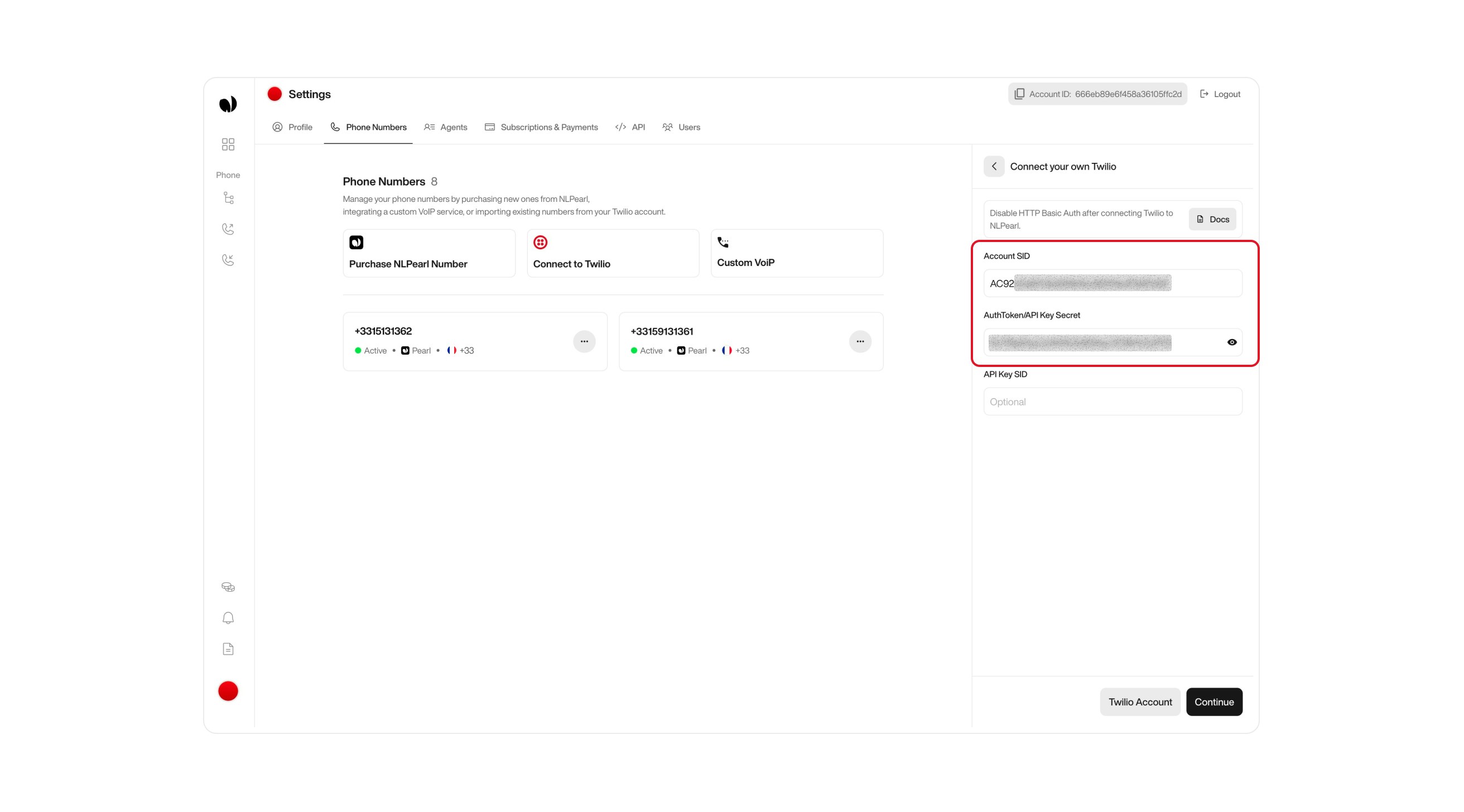
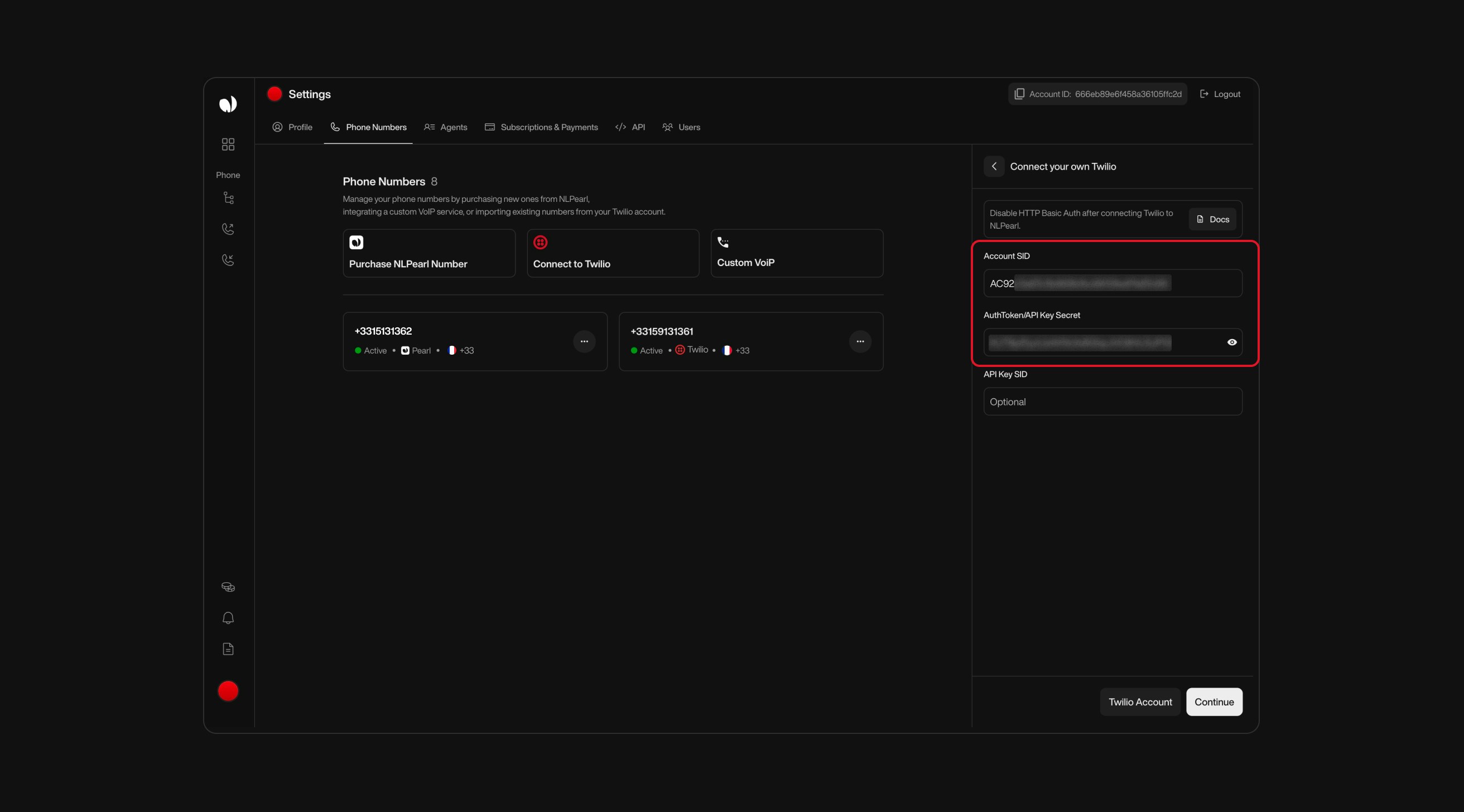
    Once you click the **Connect to Twilio** button, you'll be prompted to link your Twilio account. There are two ways to authenticate:

    #### Option 1: Use Account SID + Auth Token

    This is the simplest method. Use it if you prefer to connect directly with your main Twilio credentials.

    * **Account SID**: Enter your Twilio Account SID.
    * **Auth Token**: Enter your Twilio Auth Token.

    <div className="block dark:hidden">
      <Frame>
        <div className="p-1">
          <img src="https://mintcdn.com/nlpearl/DSJnNLmkdffV1qq-/images/light_mode/phone_number_twilio-credential_option1.jpg?fit=max&auto=format&n=DSJnNLmkdffV1qq-&q=85&s=c9f42ca81b1a702c568693254ce7e4f5" alt="Send Email action interface on light mode" className="rounded-[14px]" width="2624" height="1456" data-path="images/light_mode/phone_number_twilio-credential_option1.jpg" />
        </div>
      </Frame>
    </div>

    <div className="hidden dark:block">
      <Frame>
        <div className="p-1">
          <img src="https://mintcdn.com/nlpearl/OLkkXJCUYovrG0y1/images/dark_mode/phone_number_twilio-credential_option1.jpg?fit=max&auto=format&n=OLkkXJCUYovrG0y1&q=85&s=9e3029fd0d58d8a216d27b768eb57e4c" alt="Send Email action interface on dark mode" className="rounded-[14px]" width="2624" height="1456" data-path="images/dark_mode/phone_number_twilio-credential_option1.jpg" />
        </div>
      </Frame>
    </div>

    ***

    <Note>
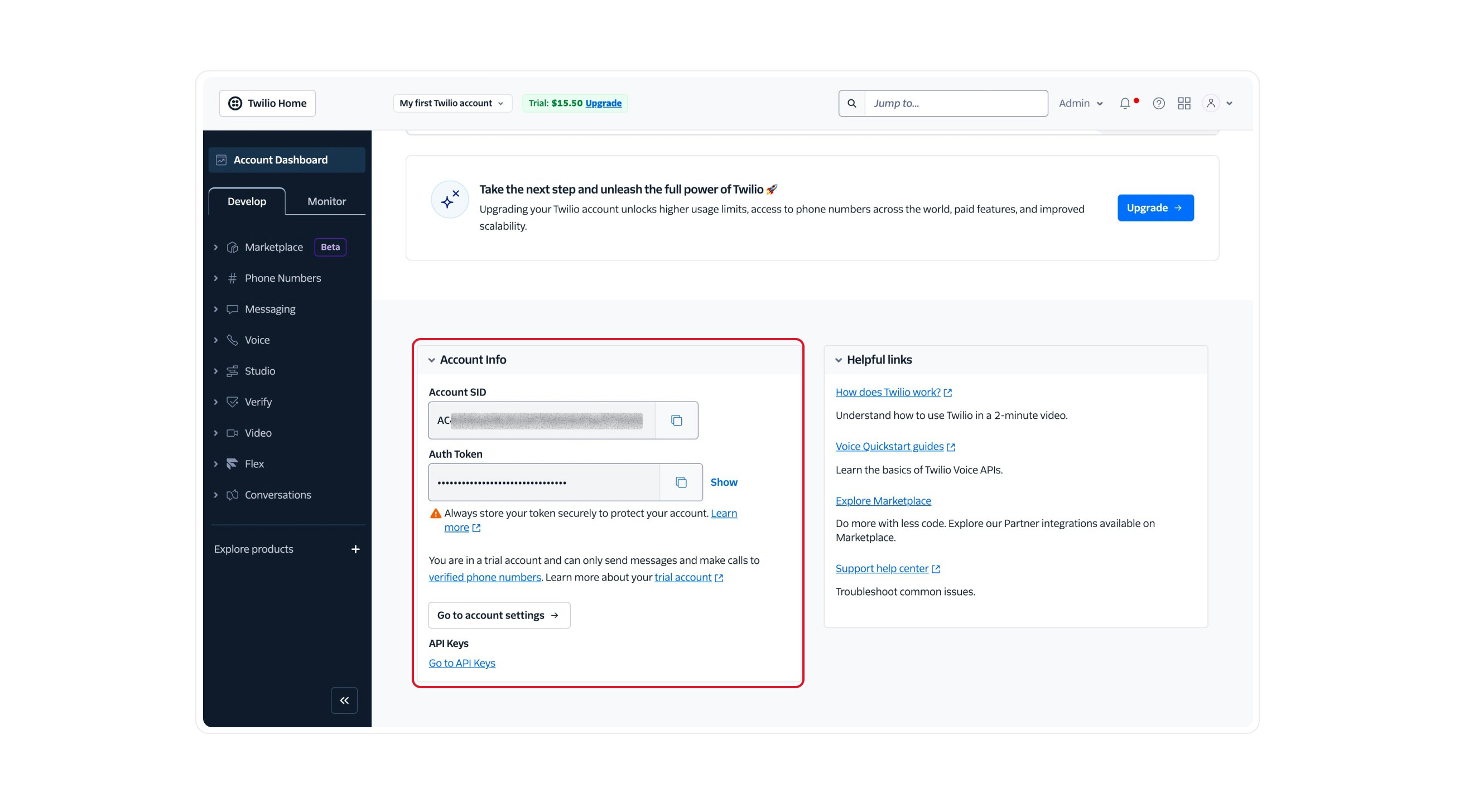
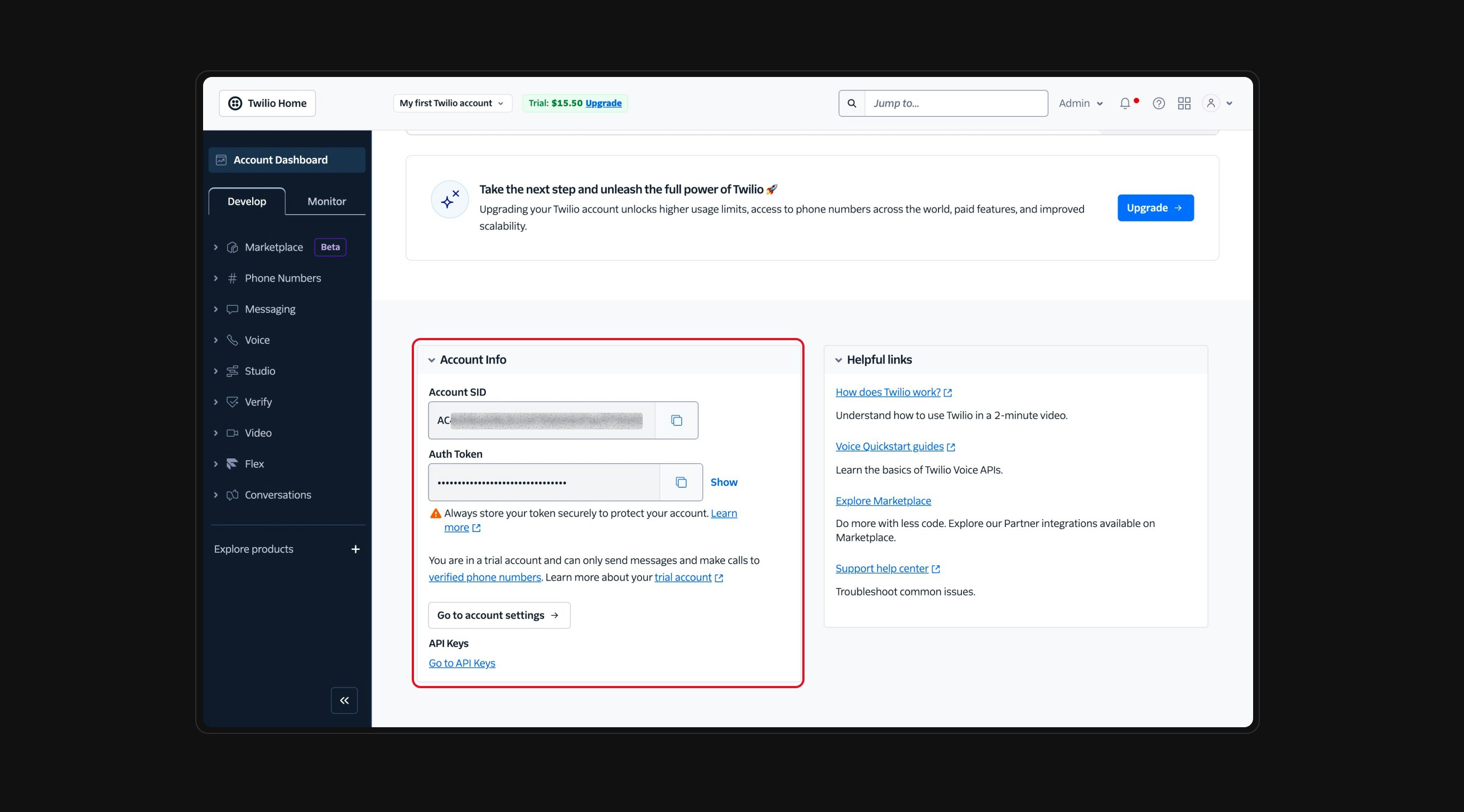
      You can find both values in your [Twilio Console](https://www.twilio.com/console), under the **Account Info** section at the bottom of the dashboard.

      <div className="block dark:hidden">
        <Frame>
          <div className="p-1">
            <img src="https://mintcdn.com/nlpearl/DSJnNLmkdffV1qq-/images/light_mode/phone_number_twilio-credential_where1.jpg?fit=max&auto=format&n=DSJnNLmkdffV1qq-&q=85&s=26d6b8866af4cfe4ddb4724158087e6e" alt="Send Email action interface on light mode" className="rounded-[14px]" width="2624" height="1456" data-path="images/light_mode/phone_number_twilio-credential_where1.jpg" />
          </div>
        </Frame>
      </div>

      <div className="hidden dark:block">
        <Frame>
          <div className="p-1">
            <img src="https://mintcdn.com/nlpearl/OLkkXJCUYovrG0y1/images/dark_mode/phone_number_twilio-credential_where1.jpg?fit=max&auto=format&n=OLkkXJCUYovrG0y1&q=85&s=4e601e9919d9a11b39f77f0791076905" alt="Send Email action interface on dark mode" className="rounded-[14px]" width="2624" height="1456" data-path="images/dark_mode/phone_number_twilio-credential_where1.jpg" />
          </div>
        </Frame>
      </div>
    </Note>

    ***

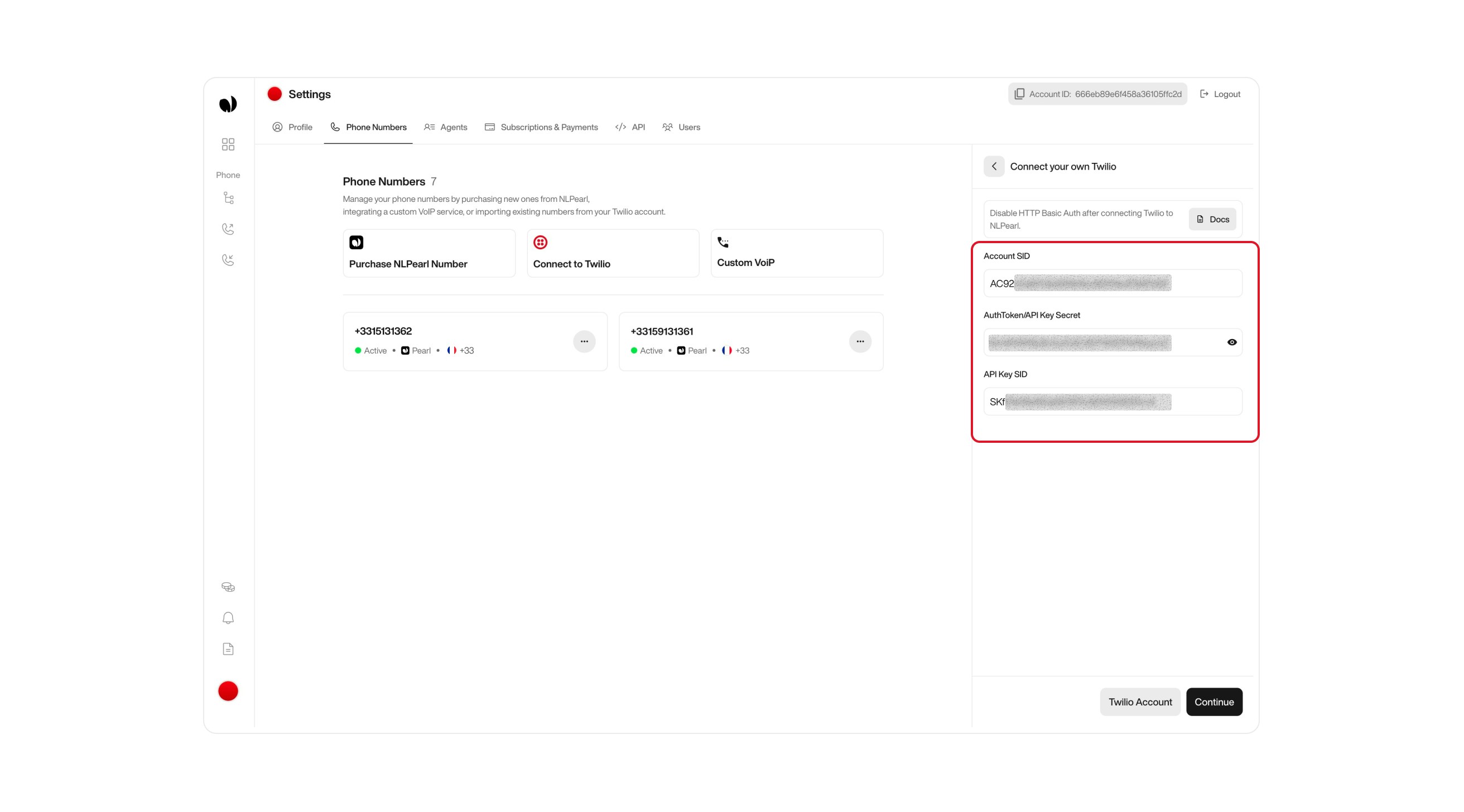
    #### Option 2: Use API Credentials (more secure)

    If you prefer a more secure or limited-access integration, use API credentials.

    * **Account SID**: Same as above.
    * **API Key SID**: Enter your Twilio API Key SID.
    * **API Secret Key**: Enter your Twilio API Secret Key.

    <div className="block dark:hidden">
      <Frame>
        <div className="p-1">
          <img src="https://mintcdn.com/nlpearl/DSJnNLmkdffV1qq-/images/light_mode/phone_number_twilio-credential_option2.jpg?fit=max&auto=format&n=DSJnNLmkdffV1qq-&q=85&s=481608408cd50a2094312c6a0ad8c95b" alt="Send Email action interface on light mode" className="rounded-[14px]" width="2624" height="1456" data-path="images/light_mode/phone_number_twilio-credential_option2.jpg" />
        </div>
      </Frame>
    </div>

    <div className="hidden dark:block">
      <Frame>
        <div className="p-1">
          <img src="https://mintcdn.com/nlpearl/OLkkXJCUYovrG0y1/images/dark_mode/phone_number_twilio-credential_option2.jpg?fit=max&auto=format&n=OLkkXJCUYovrG0y1&q=85&s=74f52e10b7b434b737bcf8d1ac8b9b98" alt="Send Email action interface on dark mode" className="rounded-[14px]" width="2624" height="1456" data-path="images/dark_mode/phone_number_twilio-credential_option2.jpg" />
        </div>
      </Frame>
    </div>

    ***

    <Note>
      To connect via API Key authentication, you’ll need to generate API credentials from your Twilio Console.

      <Steps>
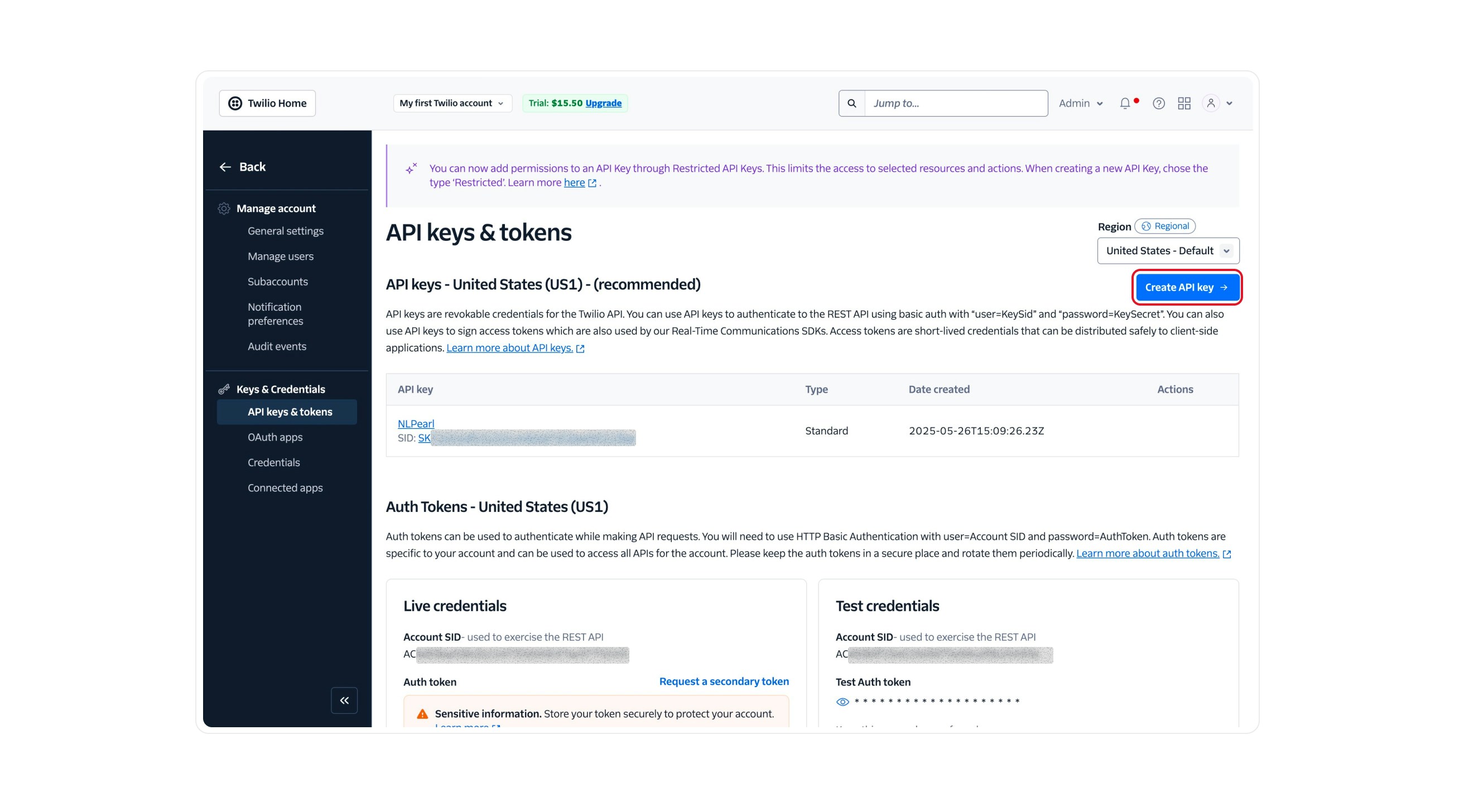
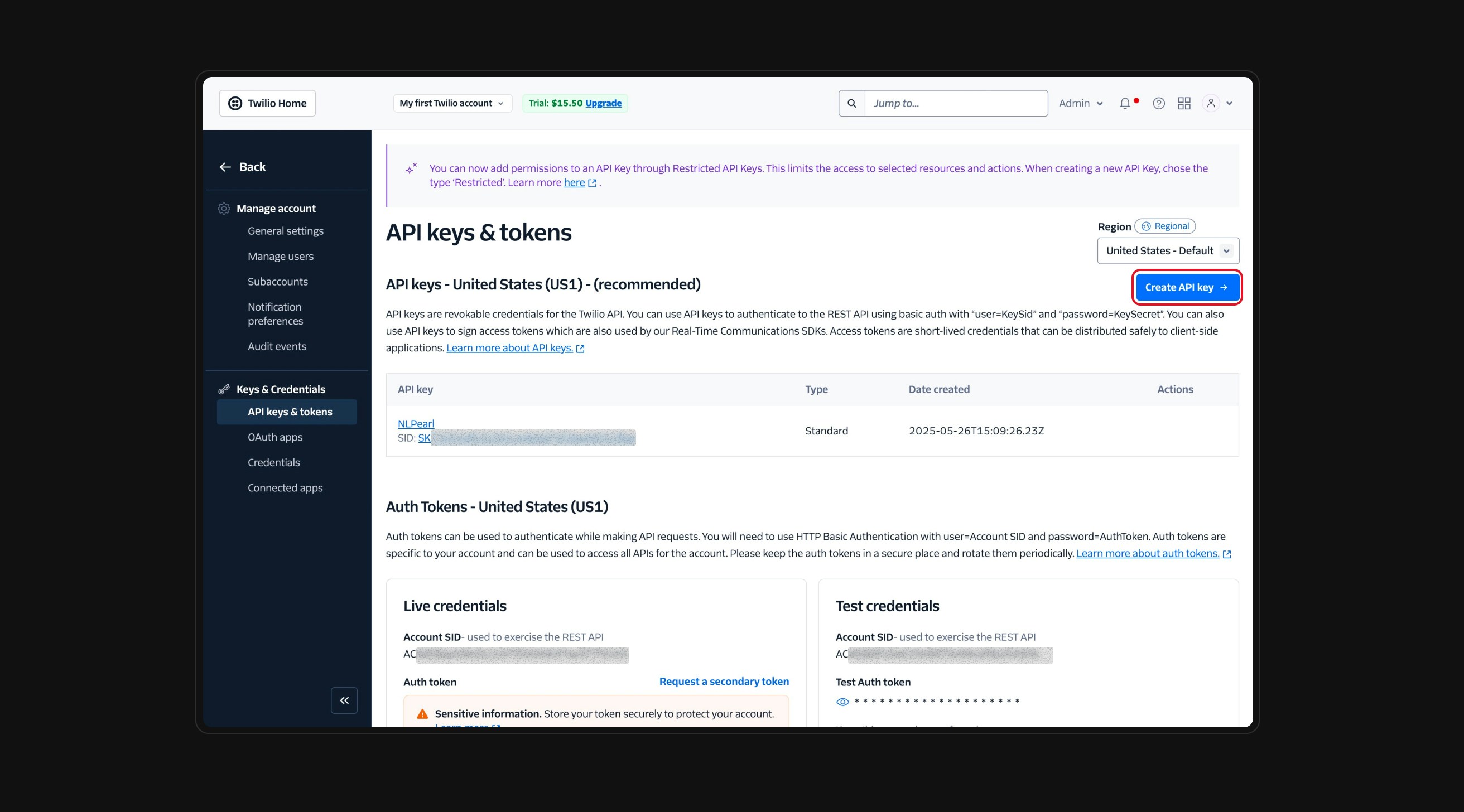
        <Step title="Go to Twilio API Keys Settings">
          Visit the [Twilio API Keys page](https://www.twilio.com/console/project/api-keys) in your console. This is where all your existing keys are listed, and where you can create new ones.

          Click the **Create API Key** button on the top right of the API Keys page.

          <Frame>
            <div className="block dark:hidden">
              <img src="https://mintcdn.com/nlpearl/DSJnNLmkdffV1qq-/images/light_mode/phone_number_twilio1.jpg?fit=max&auto=format&n=DSJnNLmkdffV1qq-&q=85&s=8bbc61d9645c927069f943cf127a947c" alt="Twilio API Key settings – Light" className="rounded-[14px] w-full" width="2624" height="1456" data-path="images/light_mode/phone_number_twilio1.jpg" />
            </div>

            <div className="hidden dark:block">
              <img src="https://mintcdn.com/nlpearl/OLkkXJCUYovrG0y1/images/dark_mode/phone_number_twilio1.jpg?fit=max&auto=format&n=OLkkXJCUYovrG0y1&q=85&s=578be02321d173ceaa0815b171e305db" alt="Twilio API Key settings – Dark" className="rounded-[14px] w-full" width="2624" height="1456" data-path="images/dark_mode/phone_number_twilio1.jpg" />
            </div>
          </Frame>
        </Step>

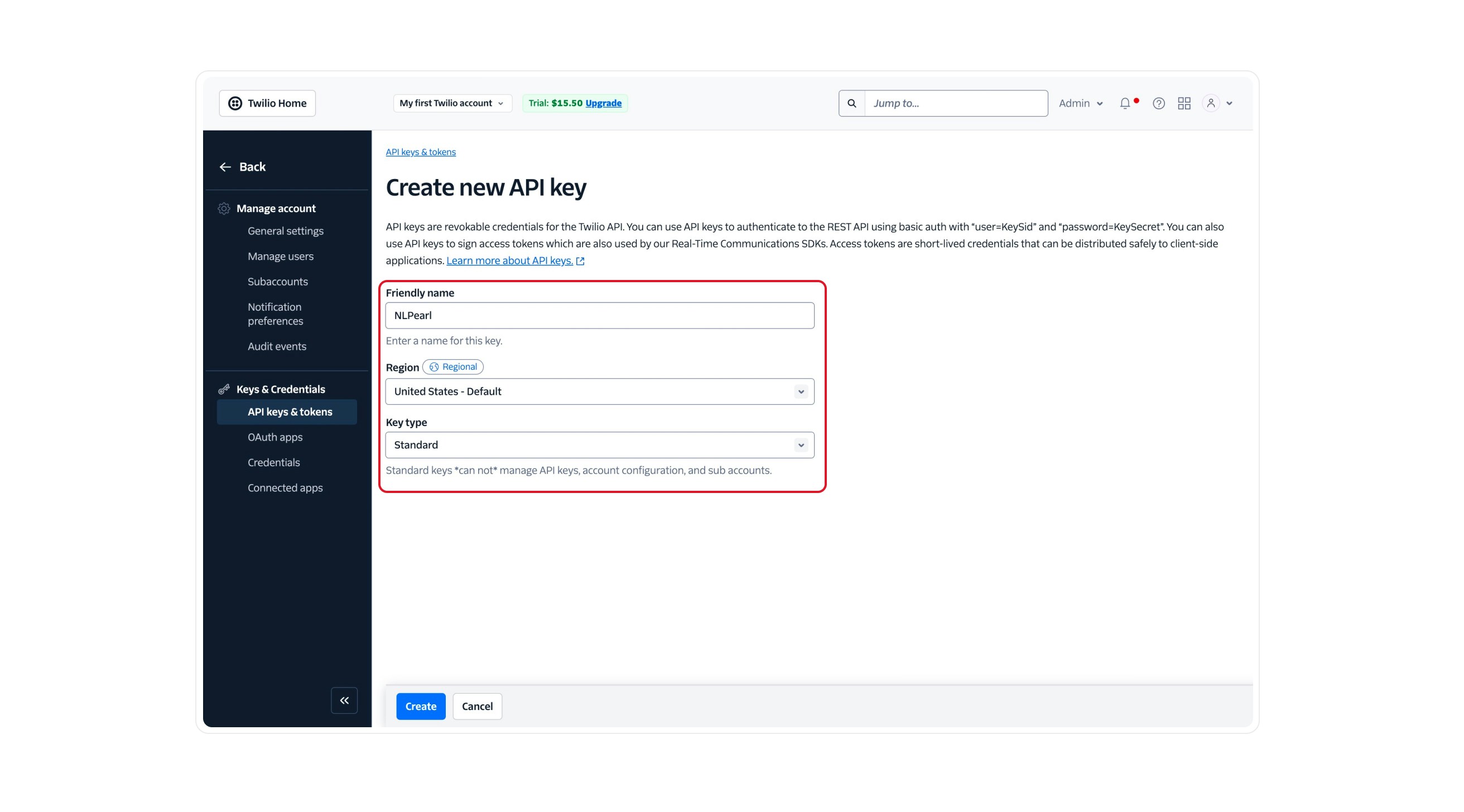
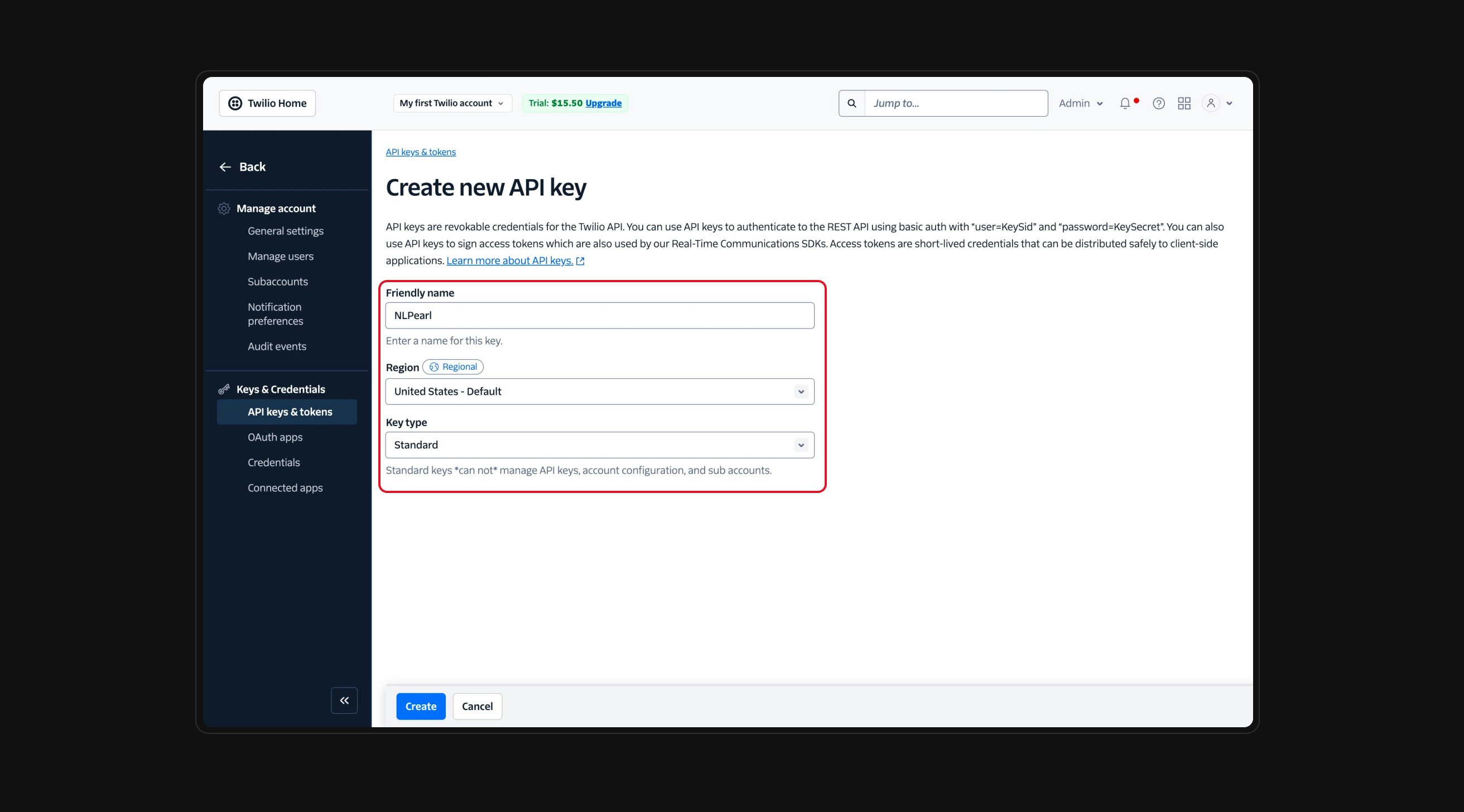
        <Step title="Select Standard Key Type">
          Give your key a name and select **Standard** as the key type. Then click **Create**.

          <Frame>
            <div className="block dark:hidden">
              <img src="https://mintcdn.com/nlpearl/DSJnNLmkdffV1qq-/images/light_mode/phone_number_twilio2.jpg?fit=max&auto=format&n=DSJnNLmkdffV1qq-&q=85&s=0be7dc4500ec8e95e4cd74b7a3e4f2be" alt="Create API Key – Light" className="rounded-[14px] w-full" width="2624" height="1456" data-path="images/light_mode/phone_number_twilio2.jpg" />
            </div>

            <div className="hidden dark:block">
              <img src="https://mintcdn.com/nlpearl/OLkkXJCUYovrG0y1/images/dark_mode/phone_number_twilio2.jpg?fit=max&auto=format&n=OLkkXJCUYovrG0y1&q=85&s=6a4d96e60a8b491b703cc52d5c019e5c" alt="Create API Key – Dark" className="rounded-[14px] w-full" width="2624" height="1456" data-path="images/dark_mode/phone_number_twilio2.jpg" />
            </div>
          </Frame>
        </Step>

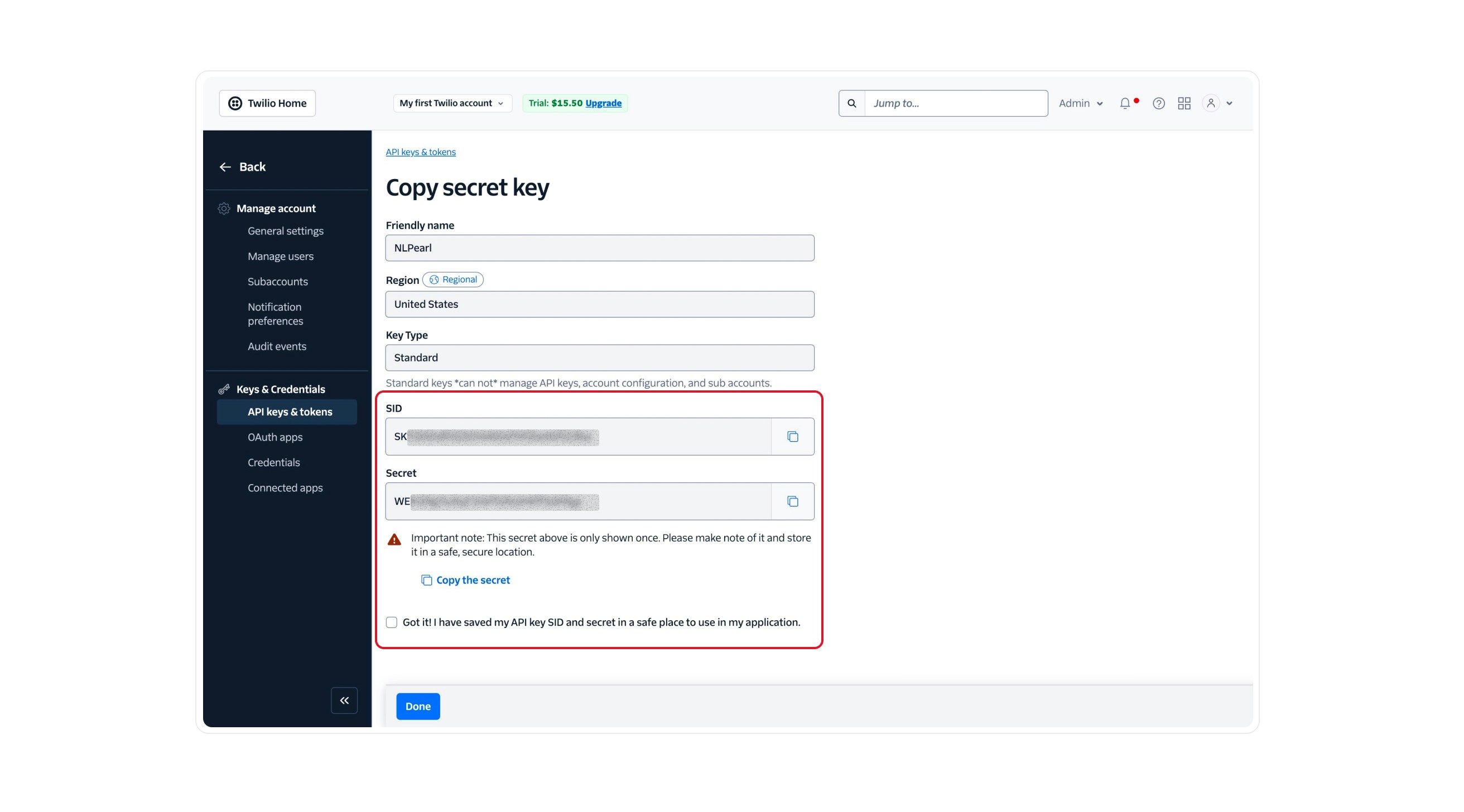
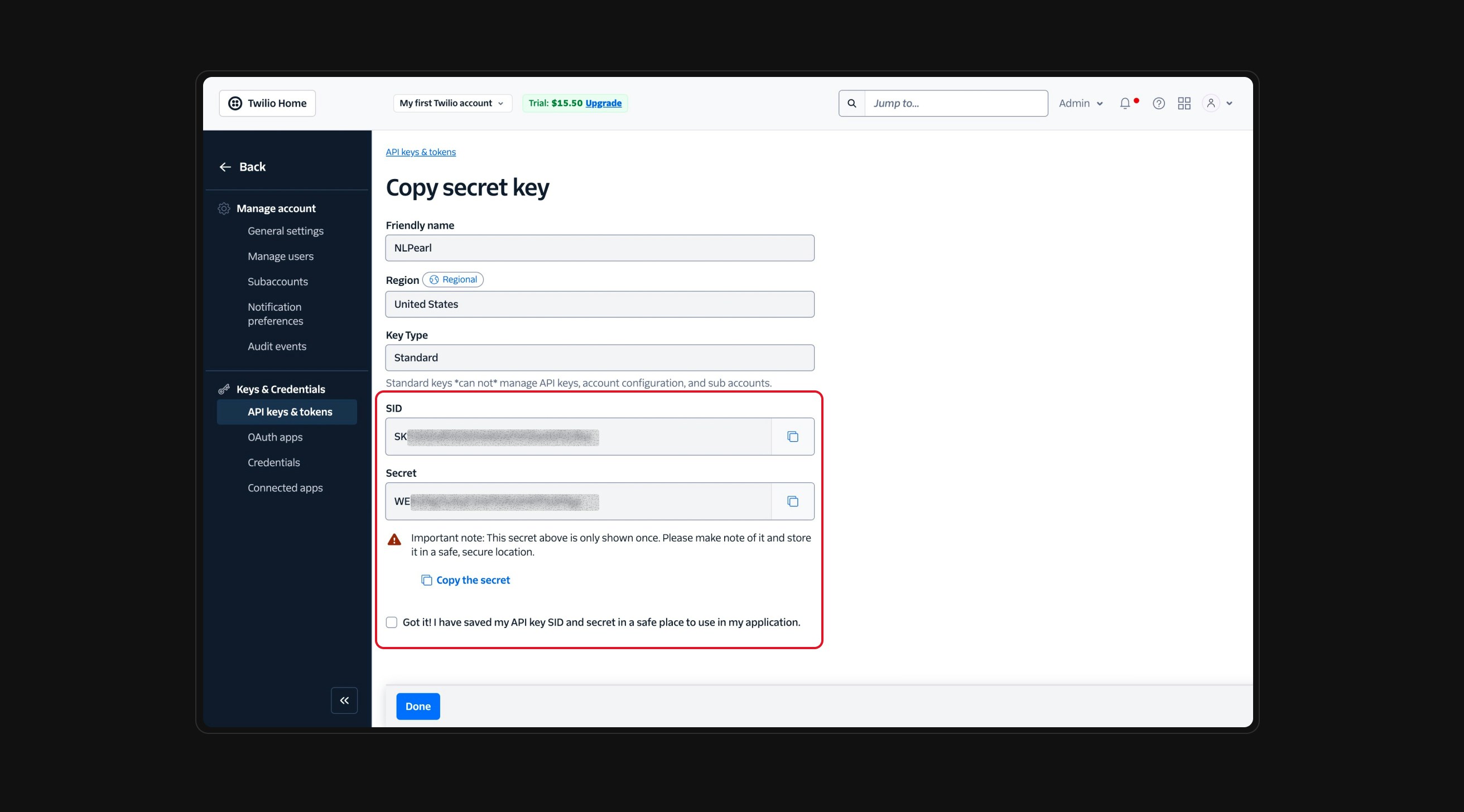
        <Step title="Copy the SID and Secret">
          Once the key is created, Twilio will display both the **SID** and the **Secret**.

          <Warning>
            You will only see the **Secret Key** once — make sure to copy and store it somewhere safe.
          </Warning>

          <Frame>
            <div className="block dark:hidden">
              <img src="https://mintcdn.com/nlpearl/DSJnNLmkdffV1qq-/images/light_mode/phone_number_twilio3.jpg?fit=max&auto=format&n=DSJnNLmkdffV1qq-&q=85&s=cff5e628ae9e9306372388e7bb3bedae" alt="Select key type – Light" className="rounded-[14px] w-full" width="2624" height="1456" data-path="images/light_mode/phone_number_twilio3.jpg" />
            </div>

            <div className="hidden dark:block">
              <img src="https://mintcdn.com/nlpearl/OLkkXJCUYovrG0y1/images/dark_mode/phone_number_twilio3.jpg?fit=max&auto=format&n=OLkkXJCUYovrG0y1&q=85&s=4be8fbb5cc8e5e6fc5aee7d89a06bc63" alt="Select key type – Dark" className="rounded-[14px] w-full" width="2624" height="1456" data-path="images/dark_mode/phone_number_twilio3.jpg" />
            </div>
          </Frame>
        </Step>
      </Steps>
    </Note>
  </Step>

  <Step title="Import Your Twilio Phone Numbers">
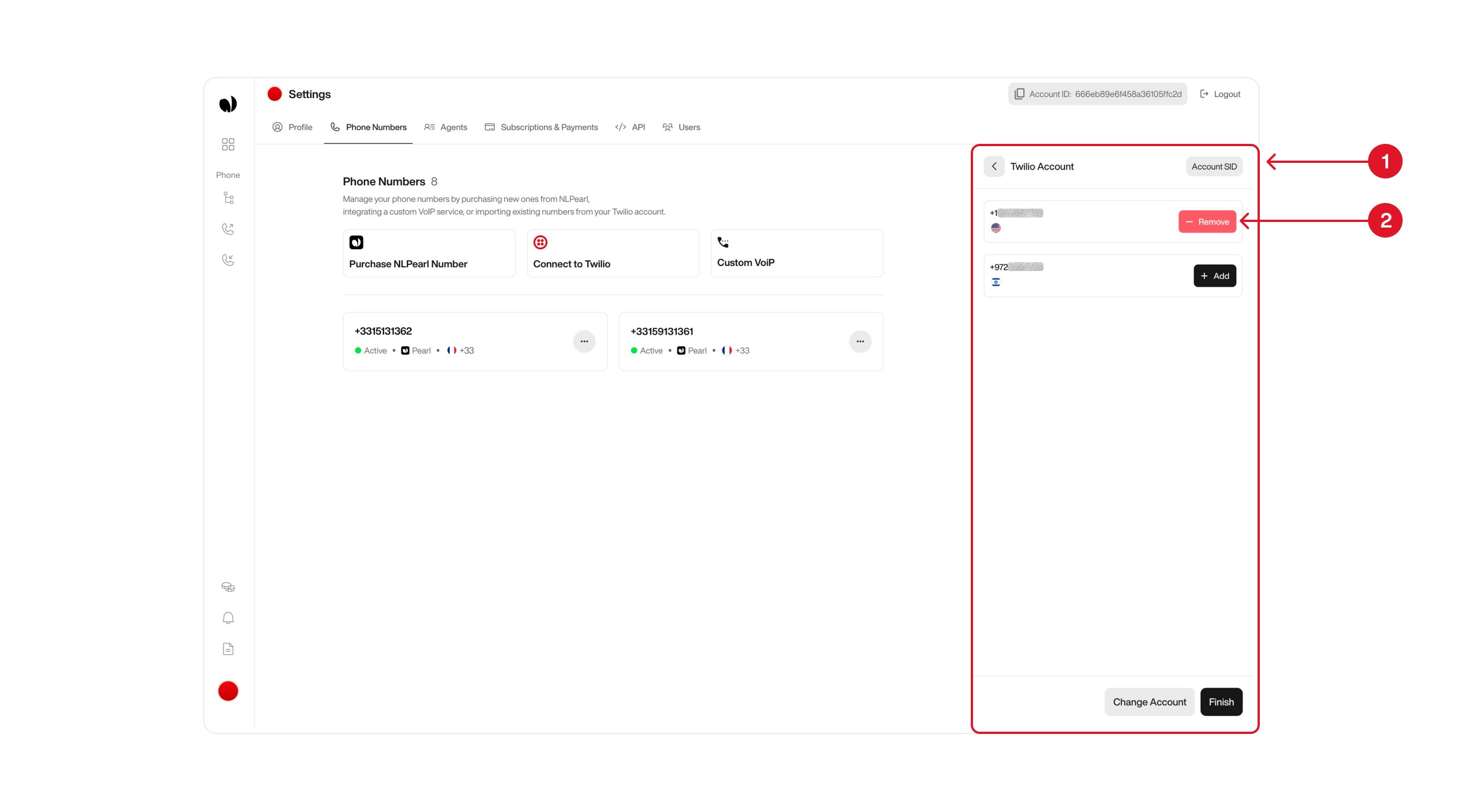
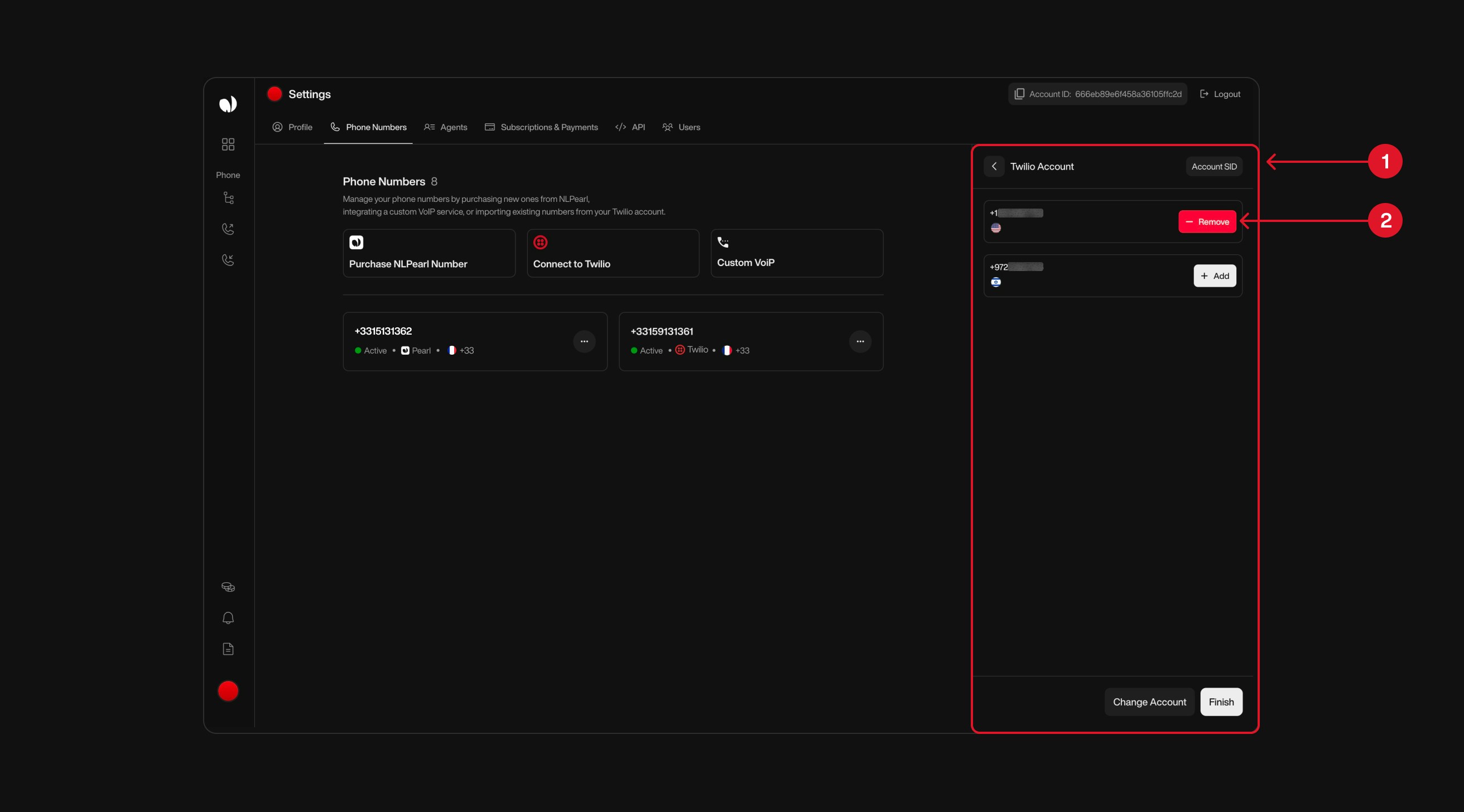
    Once your Twilio account is connected, a list of all available phone numbers will appear.

    To import a number into NLPearl, click the **Add** button next to it <span style={{ color: '#f87171', fontWeight: 600 }}>(2)</span>.

    When you’re done, click **Finish** to complete the import process.

    The selected numbers will immediately appear in your NLPearl account. You can return to this screen at any time to import additional numbers — especially if you’ve added new ones to your Twilio account later on.

    <div className="block dark:hidden">
      <Frame>
        <div className="p-1">
          <img src="https://mintcdn.com/nlpearl/DSJnNLmkdffV1qq-/images/light_mode/phone_number_twilio-list-phone.jpg?fit=max&auto=format&n=DSJnNLmkdffV1qq-&q=85&s=733dfbce5962f3119e56b1322e8d2316" alt="Send Email action interface on light mode" className="rounded-[14px]" width="2624" height="1456" data-path="images/light_mode/phone_number_twilio-list-phone.jpg" />
        </div>
      </Frame>
    </div>

    <div className="hidden dark:block">
      <Frame>
        <div className="p-1">
          <img src="https://mintcdn.com/nlpearl/OLkkXJCUYovrG0y1/images/dark_mode/phone_number_twilio-list-phone.jpg?fit=max&auto=format&n=OLkkXJCUYovrG0y1&q=85&s=27454a20a25e7212d93abc5e0e1ac0da" alt="Send Email action interface on dark mode" className="rounded-[14px]" width="2624" height="1456" data-path="images/dark_mode/phone_number_twilio-list-phone.jpg" />
        </div>
      </Frame>
    </div>
  </Step>

  <Step title="Manage Multiple Twilio Accounts">
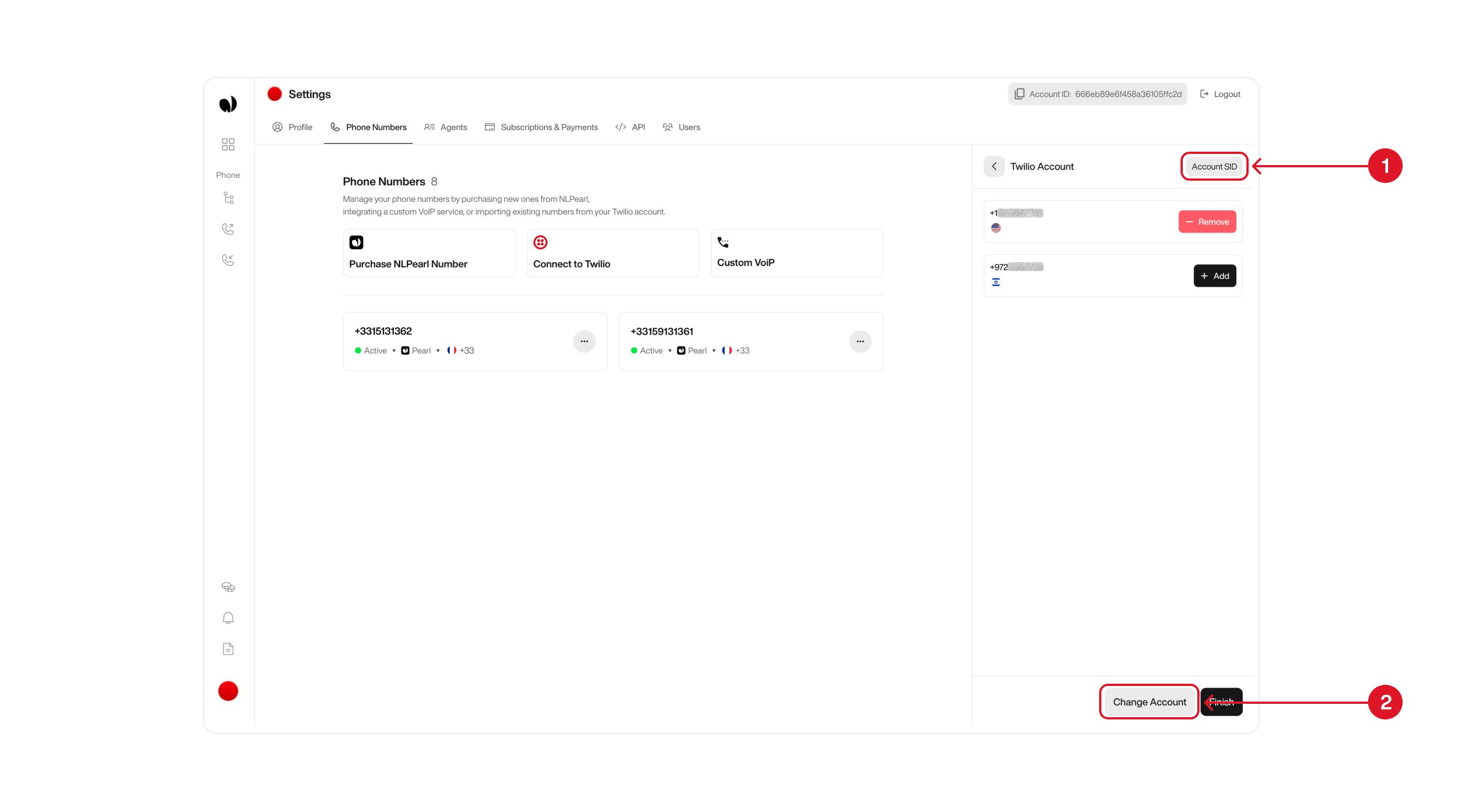
    If you use multiple Twilio accounts with different sets of phone numbers, you can easily switch between them without losing your imported data.

    On the Twilio integration page, locate the current account section <span style={{ color: '#f87171', fontWeight: 600 }}>(1)</span>. Hovering over it will display the **Twilio Account SID** currently in use.

    Click the **Change Account** button at the bottom <span style={{ color: '#f87171', fontWeight: 600 }}>(2)</span> to enter new Twilio credentials.

    <Info>
      Already imported phone numbers will remain linked to your NLPearl account — switching accounts won’t affect them.
    </Info>

    You can repeat this process at any time to import phone numbers from another Twilio account.

    <div className="block dark:hidden">
      <Frame>
        <div className="p-1">
          <img src="https://mintcdn.com/nlpearl/DSJnNLmkdffV1qq-/images/light_mode/phone_number_twilio-manage-account.jpg?fit=max&auto=format&n=DSJnNLmkdffV1qq-&q=85&s=6e40eb2d4a9e63bc3aac72f618991138" alt="Send Email action interface on light mode" className="rounded-[14px]" width="2624" height="1456" data-path="images/light_mode/phone_number_twilio-manage-account.jpg" />
        </div>
      </Frame>
    </div>

    <div className="hidden dark:block">
      <Frame>
        <div className="p-1">
          <img src="https://mintcdn.com/nlpearl/OLkkXJCUYovrG0y1/images/dark_mode/phone_number_twilio-manage-account.jpg?fit=max&auto=format&n=OLkkXJCUYovrG0y1&q=85&s=1f3a7db7df54f0524c98986ae29a1fc3" alt="Send Email action interface on dark mode" className="rounded-[14px]" width="2624" height="1456" data-path="images/dark_mode/phone_number_twilio-manage-account.jpg" />
        </div>
      </Frame>
    </div>
  </Step>
</Steps>

<Card title="Deleting Phone Numbers" icon="circle-info" iconType="light">
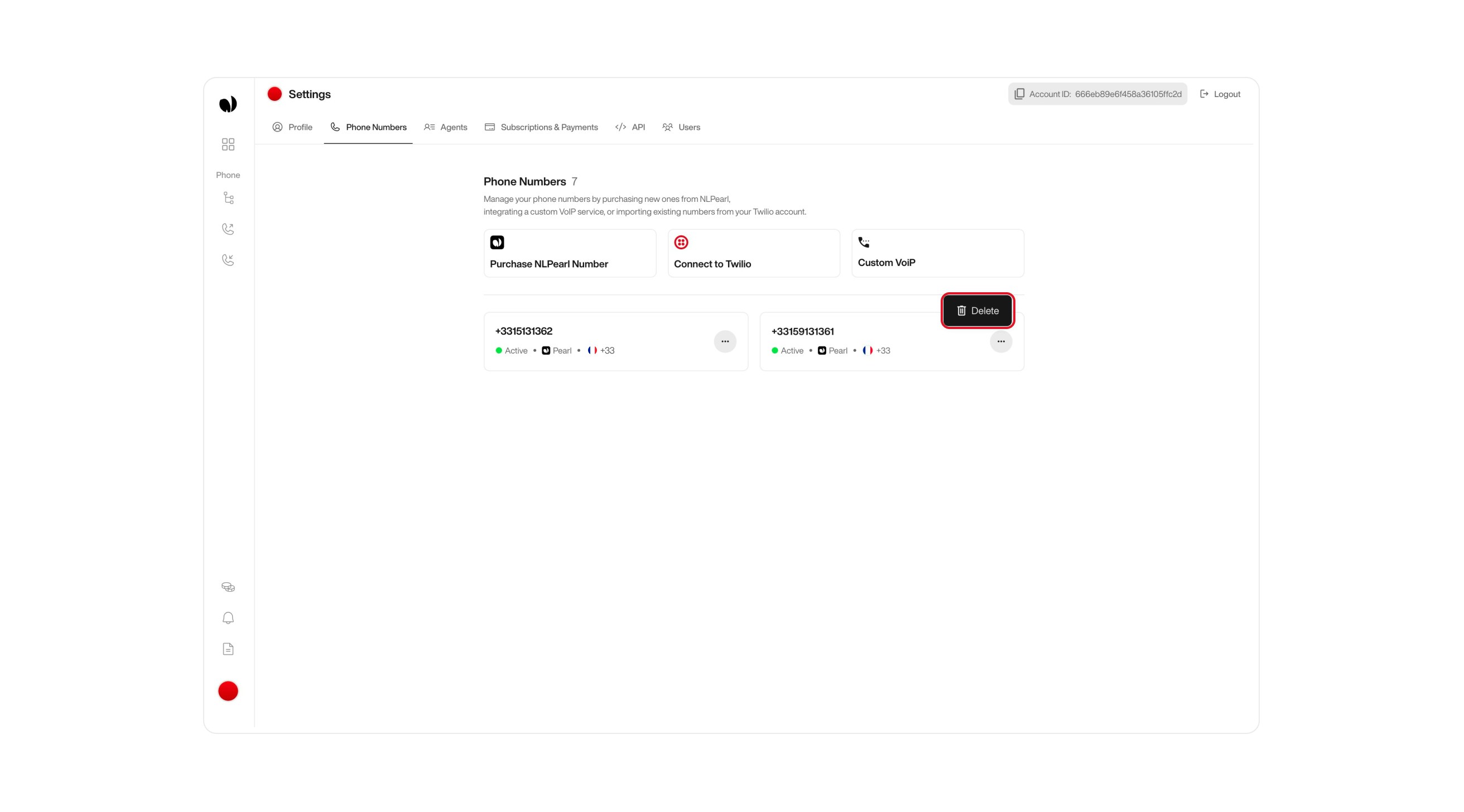
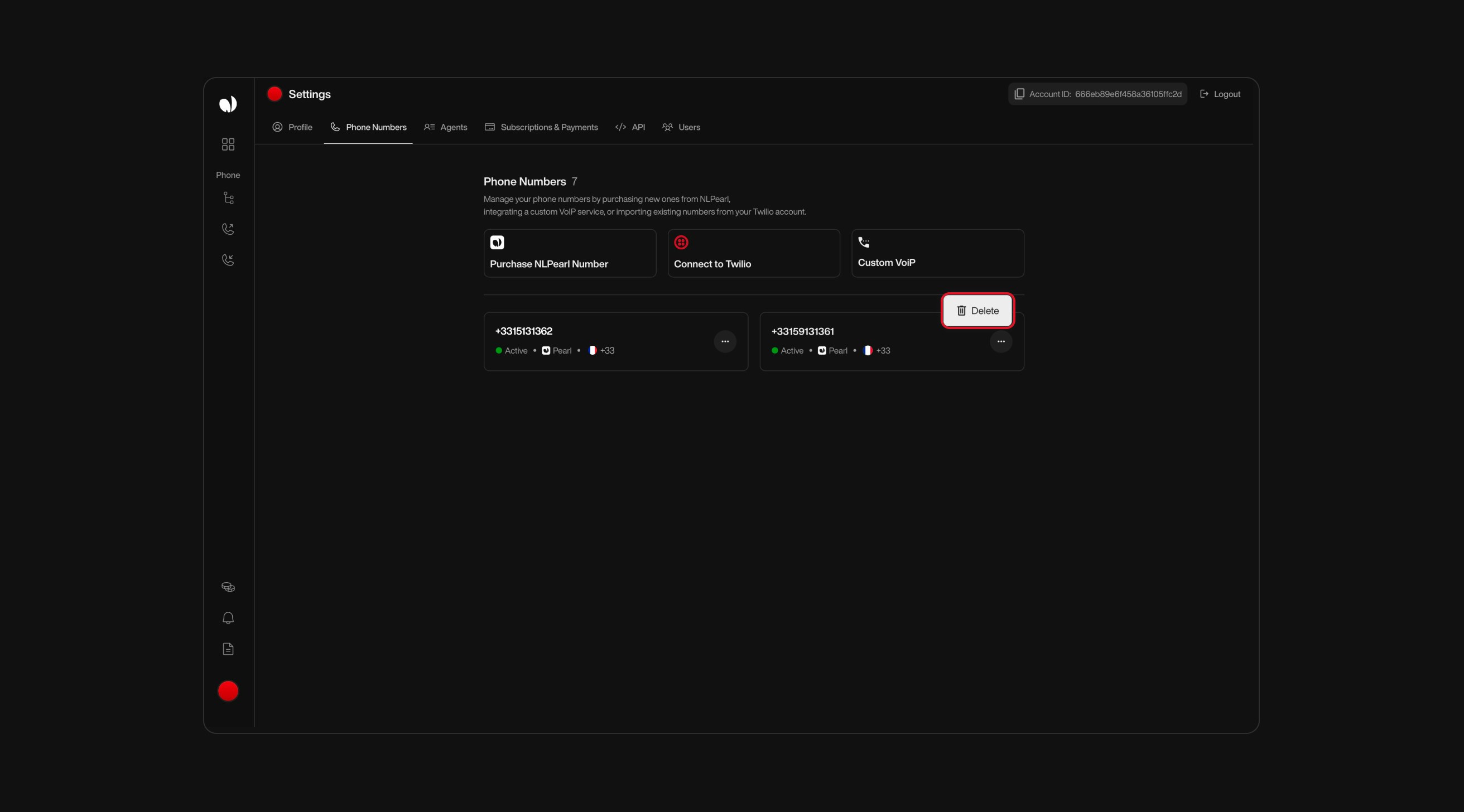
  If you no longer need a phone number, you can schedule it for deletion directly from your settings.

  Start by going to the **Phone Numbers** section in your Settings. From there, locate the number you want to remove and click the **Delete** button next to it.

  <div className="block dark:hidden">
    <Frame>
      <div className="p-1">
        <img src="https://mintcdn.com/nlpearl/DSJnNLmkdffV1qq-/images/light_mode/phone_number_delete.jpg?fit=max&auto=format&n=DSJnNLmkdffV1qq-&q=85&s=a5d80cb0e04575a1e289083410ea3850" alt="Send Email action interface on light mode" className="rounded-[14px]" width="2624" height="1456" data-path="images/light_mode/phone_number_delete.jpg" />
      </div>
    </Frame>
  </div>

  <div className="hidden dark:block">
    <Frame>
      <div className="p-1">
        <img src="https://mintcdn.com/nlpearl/OLkkXJCUYovrG0y1/images/dark_mode/phone_number_delete.jpg?fit=max&auto=format&n=OLkkXJCUYovrG0y1&q=85&s=c2f47eec60b829c8d8d8f7491babcccf" alt="Send Email action interface on dark mode" className="rounded-[14px]" width="2624" height="1456" data-path="images/dark_mode/phone_number_delete.jpg" />
      </div>
    </Frame>
  </div>

  A confirmation step will appear to make sure you really want to delete the selected number. The phone number will be removed from your NLPearl account immediately.

  <Info>
    Deleting a phone number from NLPearl does not delete it from your Twilio account. Ensure that the phone number isn't used in any running activities before deleting it from the platform.
  </Info>
</Card>

***

<a id="disabling-http-basic-authentication-for-media-access" />

### Disabling HTTP Basic Authentication for Media Access

To ensure full functionality, disable HTTP Basic Authentication for media access in Twilio:

<Steps>
  <Step title="Access Twilio Voice Settings">
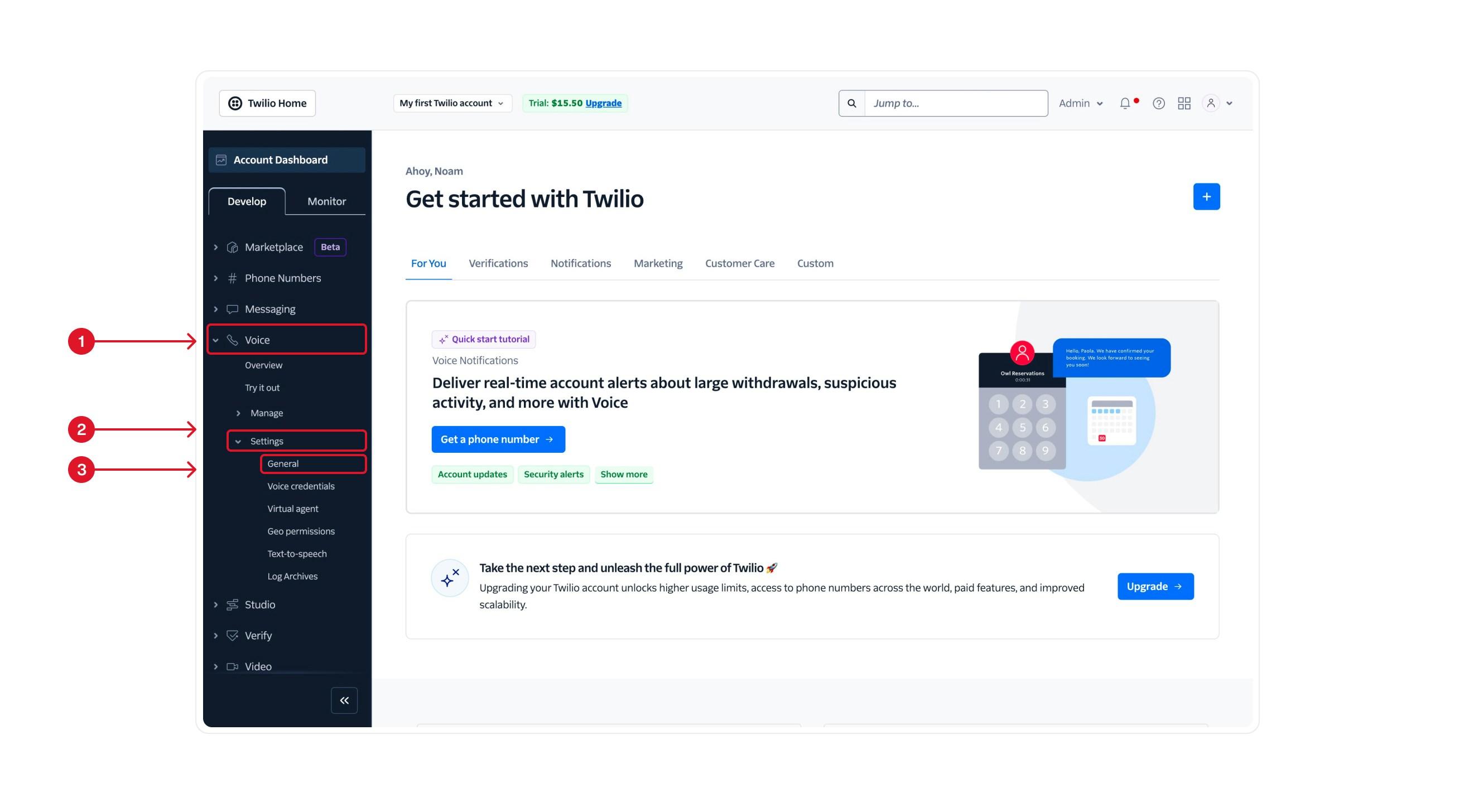
    Start by logging into your **Twilio dashboard**. In the left-hand navigation, click on **Voice** <span style={{ color: '#f87171', fontWeight: 600 }}>(1)</span> to open the voice-related settings. Under the Voice section, select **Manage** <span style={{ color: '#f87171', fontWeight: 600 }}>(2)</span>, then click on **General** <span style={{ color: '#f87171', fontWeight: 600 }}>(3)</span> to access the general voice configuration panel.

    <div className="block dark:hidden">
      <Frame>
        <div className="p-1">
          <img src="https://mintcdn.com/nlpearl/DSJnNLmkdffV1qq-/images/light_mode/phone_number_twilio-1.jpg?fit=max&auto=format&n=DSJnNLmkdffV1qq-&q=85&s=ced43b2984638d3d662f62fa951b4db5" alt="Send Email action interface on light mode" className="rounded-[14px]" width="2624" height="1456" data-path="images/light_mode/phone_number_twilio-1.jpg" />
        </div>
      </Frame>
    </div>

    <div className="hidden dark:block">
      <Frame>
        <div className="p-1">
          <img src="https://mintcdn.com/nlpearl/OLkkXJCUYovrG0y1/images/dark_mode/phone_number_twilio-1.jpg?fit=max&auto=format&n=OLkkXJCUYovrG0y1&q=85&s=d6d7ffe35c6f9f09feec579a3c3f244b" alt="Send Email action interface on dark mode" className="rounded-[14px]" width="2624" height="1456" data-path="images/dark_mode/phone_number_twilio-1.jpg" />
        </div>
      </Frame>
    </div>
  </Step>

  <Step title="Disable HTTP Basic Authentication in Twilio">
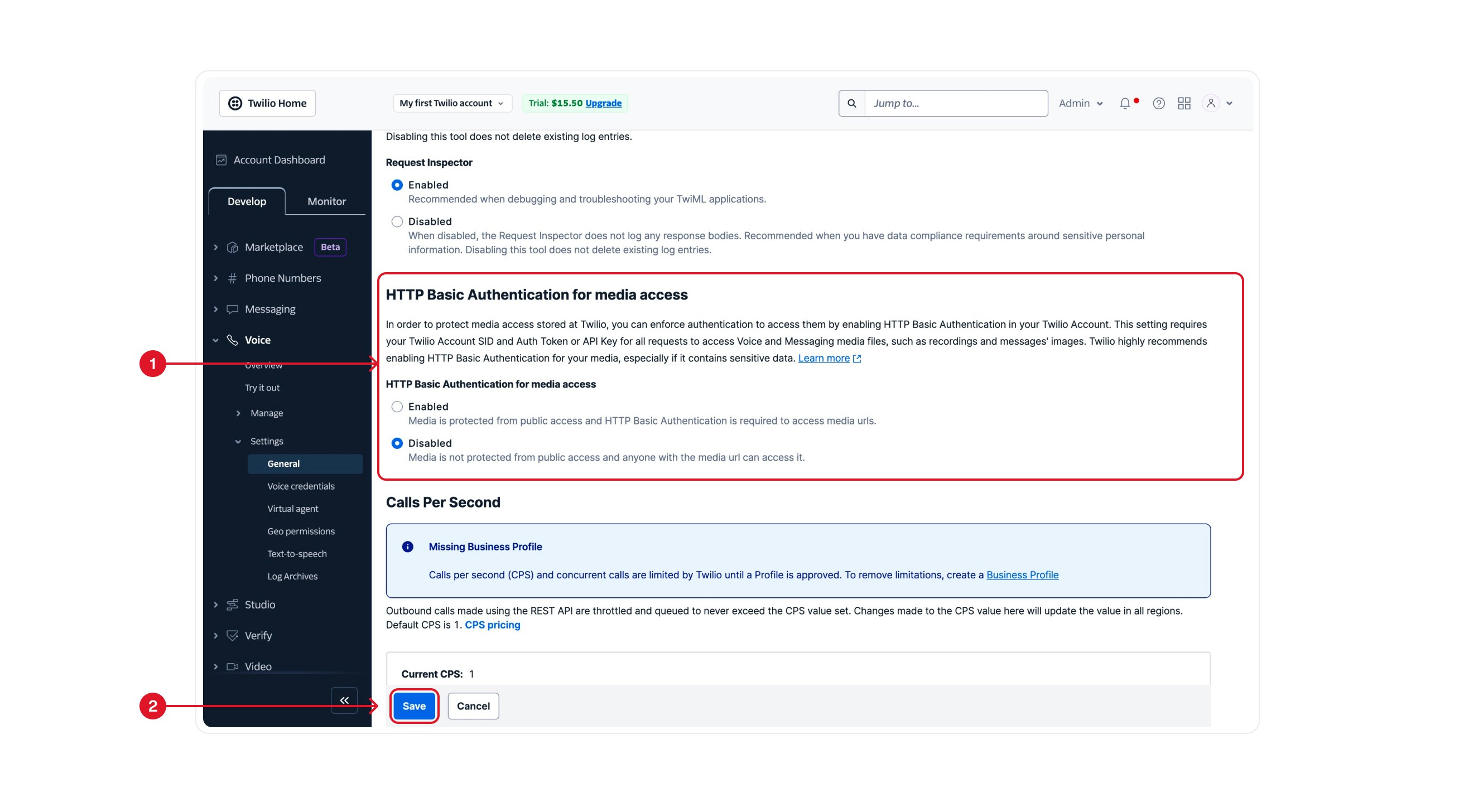
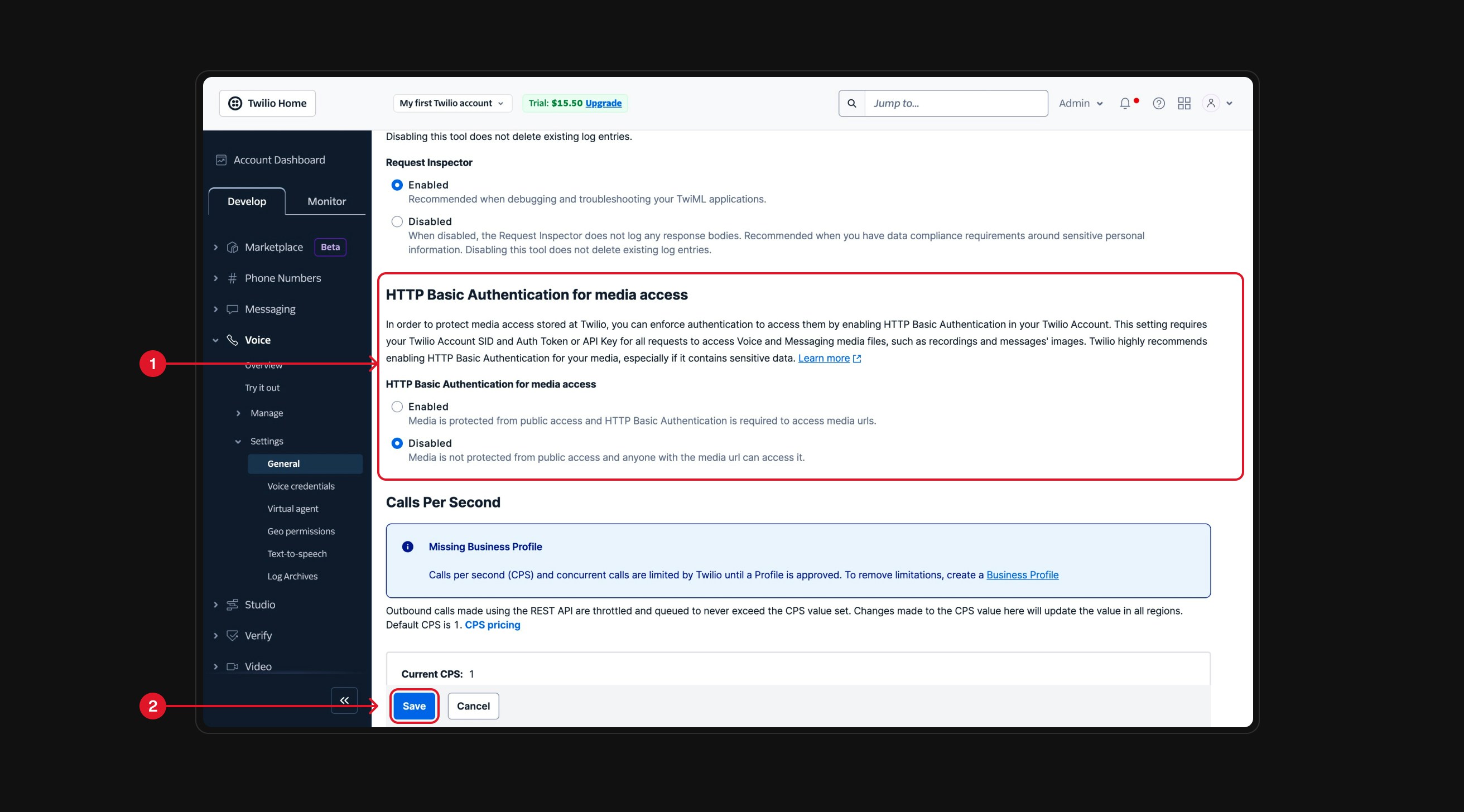
    Once you're in the **Voice > General** settings, scroll down to the **HTTP Basic Authentication for media access** section.

    Under this section, select **Disable** to allow media URLs to be publicly accessible <span style={{ color: '#f87171', fontWeight: 600 }}>(1)</span>. Then, click the **Save** button at the bottom of the page <span style={{ color: '#f87171', fontWeight: 600 }}>(2)</span> to apply your changes.

    <div className="block dark:hidden">
      <Frame>
        <div className="p-1">
          <img src="https://mintcdn.com/nlpearl/DSJnNLmkdffV1qq-/images/light_mode/phone_number_twilio-2.jpg?fit=max&auto=format&n=DSJnNLmkdffV1qq-&q=85&s=2a72765fcfc0f69c4ceec54b5b3053bc" alt="Send Email action interface on light mode" className="rounded-[14px]" width="2624" height="1456" data-path="images/light_mode/phone_number_twilio-2.jpg" />
        </div>
      </Frame>
    </div>

    <div className="hidden dark:block">
      <Frame>
        <div className="p-1">
          <img src="https://mintcdn.com/nlpearl/OLkkXJCUYovrG0y1/images/dark_mode/phone_number_twilio-2.jpg?fit=max&auto=format&n=OLkkXJCUYovrG0y1&q=85&s=81e2613607809d4a96f522139e30bd75" alt="Send Email action interface on dark mode" className="rounded-[14px]" width="2624" height="1456" data-path="images/dark_mode/phone_number_twilio-2.jpg" />
        </div>
      </Frame>
    </div>

    <Note>
      By disabling this setting, you ensure that NLPearl.AI can access and use media resources without authentication issues.
    </Note>
  </Step>
</Steps>

***

<Info>
  ### Advantages of Twilio Integration

  * **Access to Global Phone Numbers**: Use phone numbers from countries not directly supported by NLPearl.AI by purchasing them through Twilio.

  * **Compliance with Country Regulations**: Twilio handles country-specific regulations, allowing you to purchase numbers that comply with local laws.

  * **Leverage Existing Numbers**: Utilize the phone numbers you already own in Twilio without needing to acquire new ones.
</Info>

<Warning>
  ### Important Considerations

  * **Phone Number Management**: Purchase and manage phone numbers through your Twilio account. NLPearl.AI allows you to use these numbers within our platform.

  * **Removing Phone Numbers**: Deleting a phone number from NLPearl.AI doesn't affect its status in your Twilio account.

  * **Running Activities**: Before deleting a phone number from NLPearl.AI, ensure it's not assigned to any active campaigns or activities to prevent disruptions.
</Warning>

***

If you need assistance with the integration process or have questions about using Twilio phone numbers with NLPearl.AI, please refer to our support resources or contact our support team.