> ## Documentation Index
> Fetch the complete documentation index at: https://developers.nlpearl.ai/llms.txt
> Use this file to discover all available pages before exploring further.
# Transfer Call Node
Available for **Pearl Voice** only.
The **Transfer Call** node hands the live call off to another phone number, so your Pearl can bring a human or another line into the conversation.
**What it does**: Transfers the live call to another phone number.
**When to use**: Escalate to a human, route to a manager, or forward to another department.
A Transfer Call node can be triggered in **two ways**:
* **Reached through a transition**: like any other node, when a previous node routes to it. It fires as soon as the flow reaches it, and the **When to trigger** field is hidden (it isn't needed).
* **As a floating node**: with **no** incoming transition. Then **When to trigger** becomes required, and Pearl can jump to the transfer from **anywhere** in the conversation whenever that condition is met.
You can use both patterns in one flow: place scripted transfers inline via transitions, and keep a floating transfer for exceptions like "the customer asks for a manager."
***
## How to Configure
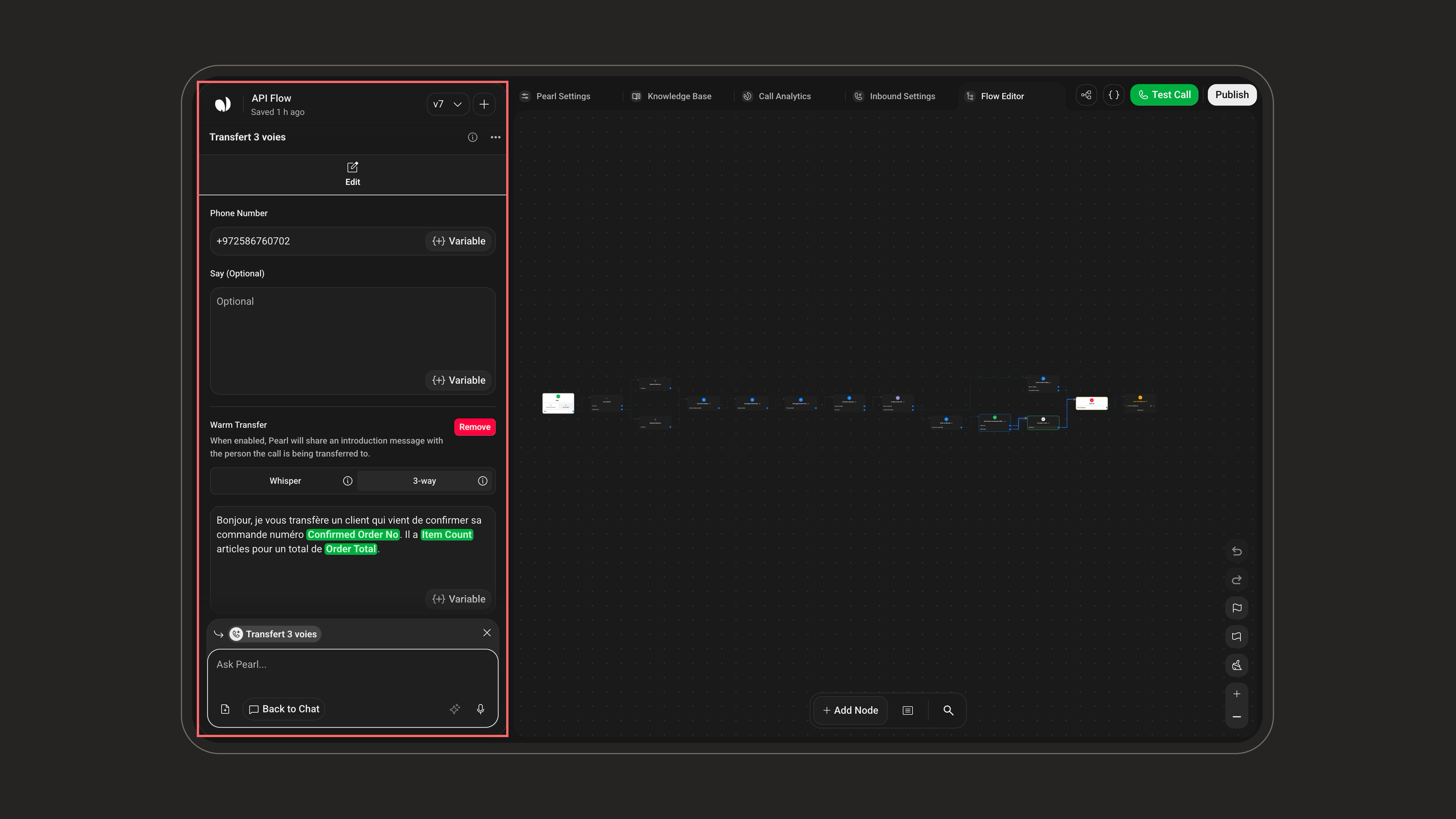 Destination in international format (e.g., `+12025551234`) or a variable.
When enabled, Pearl attempts to show the **client's number** to the recipient during the transfer, instead of Pearl's own number.
Test this first. If transfers fail with it on, turn it off.
A line Pearl says to the **caller** right before transferring (e.g. *"I'm connecting you to a specialist now."*).
Describe when Pearl should trigger the transfer, e.g. *"If the client needs a manager or has an emergency."* This field only appears when the node has no incoming transition.
Introduce the call to the recipient before Pearl drops off. See [Transfer types](#transfer-types) below.
***
## Transfer types
A Transfer Call can happen in two ways, controlled by the **Warm Transfer** toggle.
**Direct transfer (Warm Transfer off).** Pearl connects the caller straight to the destination number without speaking to the recipient first. The recipient picks up with no context. This is the default.
**Warm transfer (Warm Transfer on).** Before dropping off, Pearl introduces the call to the recipient with an intro message, then leaves the two parties connected. Choose how the intro is delivered:
| Mode | Who hears the intro | Caller during intro | Use it to |
| --------------------- | ------------------------- | ------------------------ | ------------------------------------------------------ |
| **Whisper** (default) | Recipient only | On hold, doesn't hear it | Privately brief the recipient (e.g. sensitive context) |
| **3-way** | Both caller and recipient | Present, hears it | Give an open, seamless handover |
Destination in international format (e.g., `+12025551234`) or a variable.
When enabled, Pearl attempts to show the **client's number** to the recipient during the transfer, instead of Pearl's own number.
Test this first. If transfers fail with it on, turn it off.
A line Pearl says to the **caller** right before transferring (e.g. *"I'm connecting you to a specialist now."*).
Describe when Pearl should trigger the transfer, e.g. *"If the client needs a manager or has an emergency."* This field only appears when the node has no incoming transition.
Introduce the call to the recipient before Pearl drops off. See [Transfer types](#transfer-types) below.
***
## Transfer types
A Transfer Call can happen in two ways, controlled by the **Warm Transfer** toggle.
**Direct transfer (Warm Transfer off).** Pearl connects the caller straight to the destination number without speaking to the recipient first. The recipient picks up with no context. This is the default.
**Warm transfer (Warm Transfer on).** Before dropping off, Pearl introduces the call to the recipient with an intro message, then leaves the two parties connected. Choose how the intro is delivered:
| Mode | Who hears the intro | Caller during intro | Use it to |
| --------------------- | ------------------------- | ------------------------ | ------------------------------------------------------ |
| **Whisper** (default) | Recipient only | On hold, doesn't hear it | Privately brief the recipient (e.g. sensitive context) |
| **3-way** | Both caller and recipient | Present, hears it | Give an open, seamless handover |
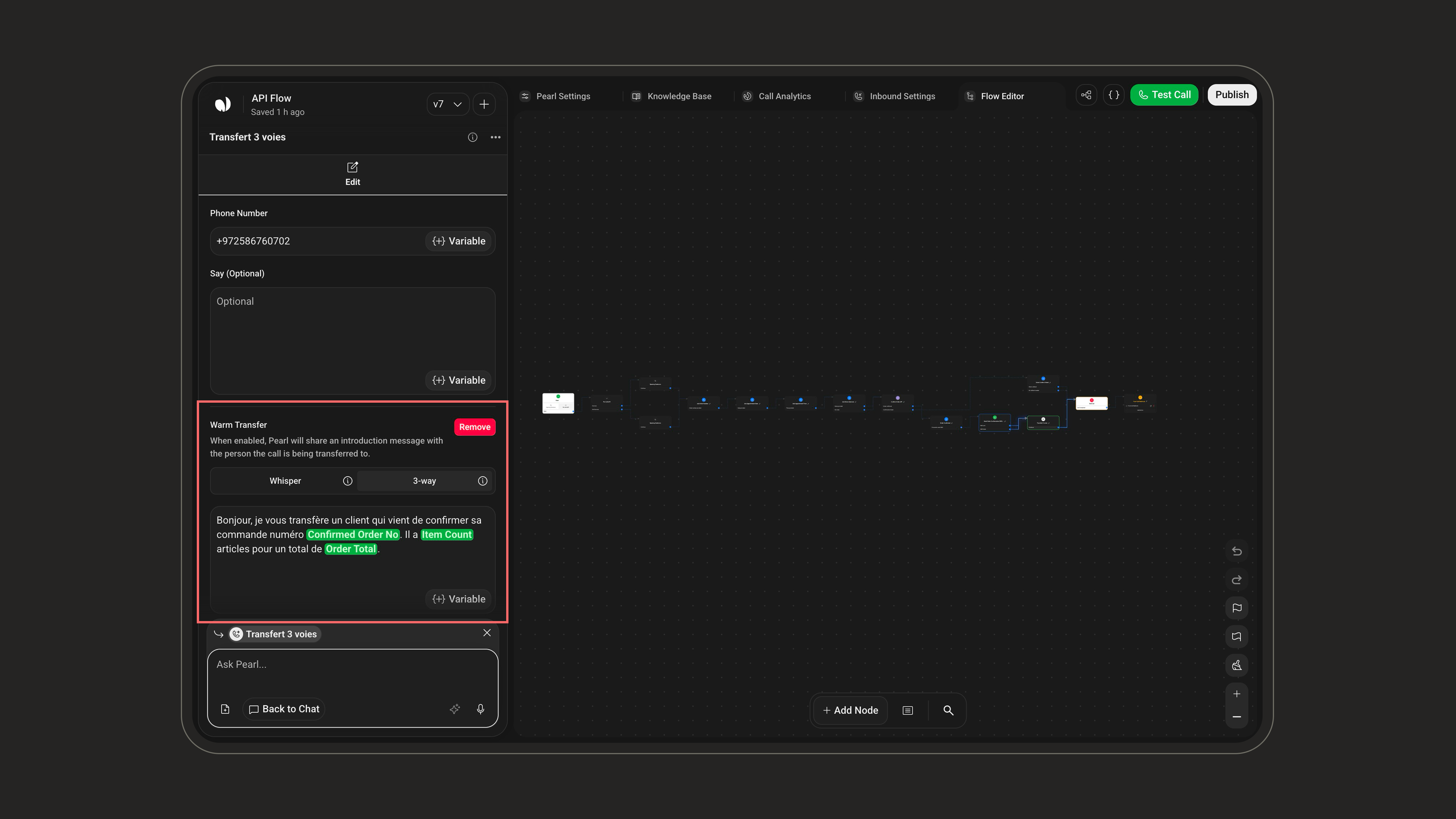 **Two different messages, don't confuse them:**
* **Say (optional)**: what Pearl says to the **caller** right before transferring.
* **Warm Transfer message**: what Pearl says to the **recipient** (and, in 3-way, also to the caller) to introduce the call. Required when Warm Transfer is on. Pearl says this, then drops off.
**Example intros**
* Whisper: `Hi, I'm on the line with {firstName} regarding {reason}. I'll transfer the call to you now.`
* 3-way: `Hi, I'm on the line with {firstName} calling about {reason}. I'll leave you both to it. Thanks!`
**Pearl Voice only.** Pearl Text uses the [**Hand‑Off**](/pages/text/handoff_action) node to route conversations to a human.
Transfer Call is **terminal**: the call leaves Pearl, so the node has no outgoing transitions. Validation flags *"Missing Phone Number"*, and *"Missing Trigger Description"* when the node is floating.
### Important Considerations
**Country Code Matching**: Your Pearl will be connected to an activity with a specific phone number assigned to it.
If the phone number you choose for the transfer call does not match the country code of the activity's assigned phone number, the Pearl cannot be linked to that activity.
Ensure that the phone numbers are compatible to be able to assign it to your Inbound/Outbound Activity.
**Two different messages, don't confuse them:**
* **Say (optional)**: what Pearl says to the **caller** right before transferring.
* **Warm Transfer message**: what Pearl says to the **recipient** (and, in 3-way, also to the caller) to introduce the call. Required when Warm Transfer is on. Pearl says this, then drops off.
**Example intros**
* Whisper: `Hi, I'm on the line with {firstName} regarding {reason}. I'll transfer the call to you now.`
* 3-way: `Hi, I'm on the line with {firstName} calling about {reason}. I'll leave you both to it. Thanks!`
**Pearl Voice only.** Pearl Text uses the [**Hand‑Off**](/pages/text/handoff_action) node to route conversations to a human.
Transfer Call is **terminal**: the call leaves Pearl, so the node has no outgoing transitions. Validation flags *"Missing Phone Number"*, and *"Missing Trigger Description"* when the node is floating.
### Important Considerations
**Country Code Matching**: Your Pearl will be connected to an activity with a specific phone number assigned to it.
If the phone number you choose for the transfer call does not match the country code of the activity's assigned phone number, the Pearl cannot be linked to that activity.
Ensure that the phone numbers are compatible to be able to assign it to your Inbound/Outbound Activity.
