> ## Documentation Index
> Fetch the complete documentation index at: https://developers.nlpearl.ai/llms.txt
> Use this file to discover all available pages before exploring further.
# Hand-Off Node
Available for **Pearl Text** only.
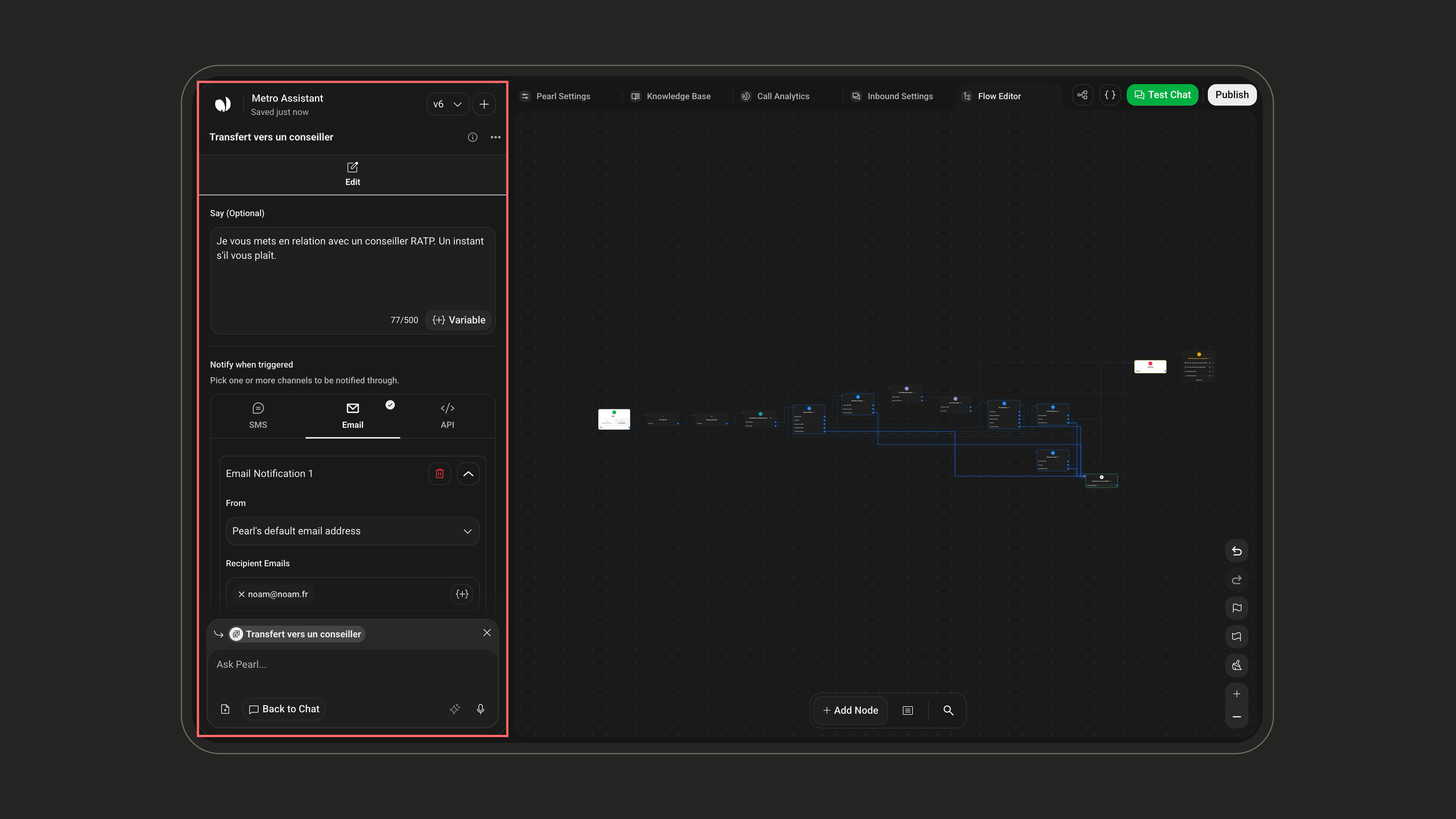
The **Hand-Off** node passes the conversation from Pearl to one of your human agents. When it triggers, Pearl stops replying in the chat and the conversation waits for a human to pick it up from the NLPearl platform.
**What it does**: Hands the text conversation from Pearl over to a human agent.
**When to use**: Escalate to a person, route to sales or support, or step in when Pearl can't help.
It's the text-chat equivalent of transferring a call to a live agent. A hand-off only stops Pearl from replying, it does **not** close or end the conversation. The customer can keep writing, and their messages wait for you in **Human Takeover**.
 ***
## When it triggers
There are two ways to reach the Hand-Off node. Use either, or both together.
| Trigger | How it works | Best for |
| ------------------------ | ----------------------------------------------------------------------------------------------------------------------------------------------------------------------------------------------------------------- | --------------------------------------------------------------------- |
| **From a previous node** | Connect a transition from any node to the Hand-Off node. The hand-off runs when the flow follows that transition. | A fixed step in your flow, e.g. right after a "Talk to sales" choice. |
| **With a condition** | In the **When to trigger** field, describe in plain language when Pearl should hand off (e.g. *"If the client asks to speak to a human."*). Pearl evaluates it throughout the conversation. Up to 250 characters. | Catching intent that can come up at any point. |
Combine both: a fixed transition for the obvious path, and a **When to trigger** condition to catch everything else.
***
## How to configure
Have Pearl send one last message before it stops replying, for example to let the customer know a human is taking over. Up to 500 characters, and you can insert variables. Leave it empty for a silent hand-off.
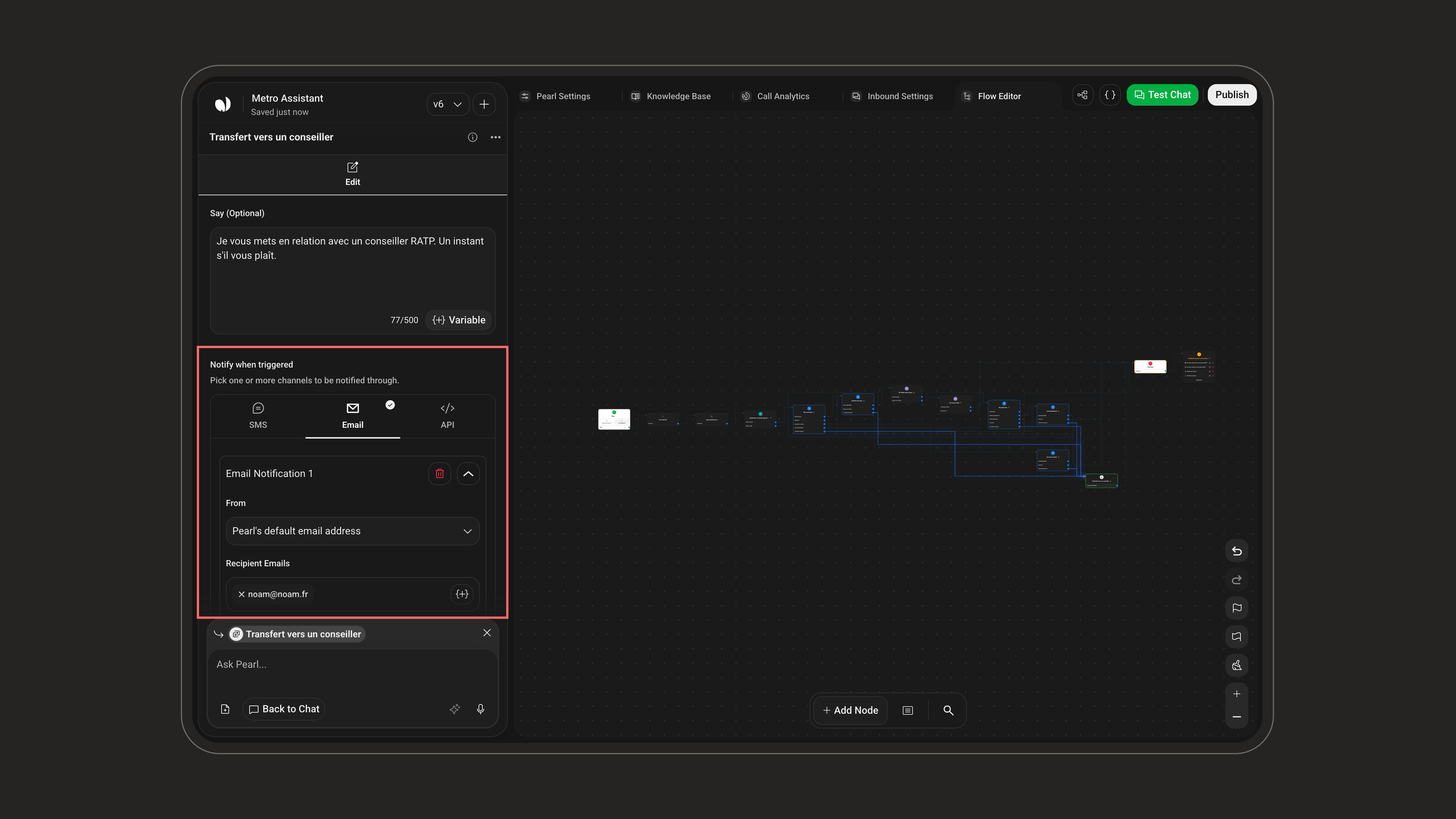
Alert your team so someone picks the conversation up quickly. Set up notifications across three channels and add up to **3 of each**, mix them freely.
***
## When it triggers
There are two ways to reach the Hand-Off node. Use either, or both together.
| Trigger | How it works | Best for |
| ------------------------ | ----------------------------------------------------------------------------------------------------------------------------------------------------------------------------------------------------------------- | --------------------------------------------------------------------- |
| **From a previous node** | Connect a transition from any node to the Hand-Off node. The hand-off runs when the flow follows that transition. | A fixed step in your flow, e.g. right after a "Talk to sales" choice. |
| **With a condition** | In the **When to trigger** field, describe in plain language when Pearl should hand off (e.g. *"If the client asks to speak to a human."*). Pearl evaluates it throughout the conversation. Up to 250 characters. | Catching intent that can come up at any point. |
Combine both: a fixed transition for the obvious path, and a **When to trigger** condition to catch everything else.
***
## How to configure
Have Pearl send one last message before it stops replying, for example to let the customer know a human is taking over. Up to 500 characters, and you can insert variables. Leave it empty for a silent hand-off.
Alert your team so someone picks the conversation up quickly. Set up notifications across three channels and add up to **3 of each**, mix them freely.
 | Field | Description |
| ----------- | ---------------------------------------------------------------- |
| **To** | One or more phone numbers to text. |
| **Content** | The message to send. Up to 1,000 characters; supports variables. |
| Field | Description |
| -------------------- | -------------------------------------------------------------- |
| **From** | The sender address. Defaults to Pearl's default email address. |
| **Recipient Emails** | One or more recipients. *Required.* |
| **CC** | Optional addresses to copy. |
| **Subject** | The email subject. *Required.* |
| **Content** | The email body. Up to 2,000 characters; supports variables. |
| Field | Description |
| --------------- | ---------------------------------------------------------------------- |
| **Name** | A label for this call, for your own reference. |
| **URL** | The endpoint to call, with the HTTP method (GET, POST, …). *Required.* |
| **Headers** | Optional key/value pairs sent with the request. |
| **Credentials** | Enable to include authentication credentials with the request. |
| **Test API** | Send a test request to confirm your setup before saving. |
Up to **3 notifications per channel**, so up to 3 SMS, 3 emails, and 3 API calls. Use the **+** button to add another within a channel.
Most fields accept variables through the **{'{+}'} Variable** button, the farewell message, SMS and email content, even the API URL, so you can drop in details like the customer's name or the conversation reference.
***
## Take over the conversation
After a hand-off, pick the conversation up yourself from the NLPearl platform. Open **Human Takeover**, available both during the live chat and after it, to read the customer's messages and reply directly.
| Field | Description |
| ----------- | ---------------------------------------------------------------- |
| **To** | One or more phone numbers to text. |
| **Content** | The message to send. Up to 1,000 characters; supports variables. |
| Field | Description |
| -------------------- | -------------------------------------------------------------- |
| **From** | The sender address. Defaults to Pearl's default email address. |
| **Recipient Emails** | One or more recipients. *Required.* |
| **CC** | Optional addresses to copy. |
| **Subject** | The email subject. *Required.* |
| **Content** | The email body. Up to 2,000 characters; supports variables. |
| Field | Description |
| --------------- | ---------------------------------------------------------------------- |
| **Name** | A label for this call, for your own reference. |
| **URL** | The endpoint to call, with the HTTP method (GET, POST, …). *Required.* |
| **Headers** | Optional key/value pairs sent with the request. |
| **Credentials** | Enable to include authentication credentials with the request. |
| **Test API** | Send a test request to confirm your setup before saving. |
Up to **3 notifications per channel**, so up to 3 SMS, 3 emails, and 3 API calls. Use the **+** button to add another within a channel.
Most fields accept variables through the **{'{+}'} Variable** button, the farewell message, SMS and email content, even the API URL, so you can drop in details like the customer's name or the conversation reference.
***
## Take over the conversation
After a hand-off, pick the conversation up yourself from the NLPearl platform. Open **Human Takeover**, available both during the live chat and after it, to read the customer's messages and reply directly.
