> ## Documentation Index
> Fetch the complete documentation index at: https://developers.nlpearl.ai/llms.txt
> Use this file to discover all available pages before exploring further.
# Generic
> Connect your own messaging system to a Pearl Text agent using asynchronous inbound and outbound webhooks.
***
## Generic Channel
The **Generic** channel connects your own messaging system to a Pearl Text agent. Use it with a web chat, mobile app, CRM inbox, or any custom platform instead of one of NLPearl's built-in integrations.
The integration uses two webhooks:
```text theme={null}
Your system ──POST──▶ NLPearl inbound URL (user messages and control actions)
Your system ◀──POST── Your outbound URL (Pearl replies and events)
```
The exchange is asynchronous. When you send a user message, NLPearl immediately returns `202 Accepted`. Pearl's reply is delivered shortly afterward as a separate `POST` request to your outbound URL.
***
## Set Up the Channel
On the platform, go to **Settings**, open **Text Channels**, then find **Generic** and click **Connect Generic**.
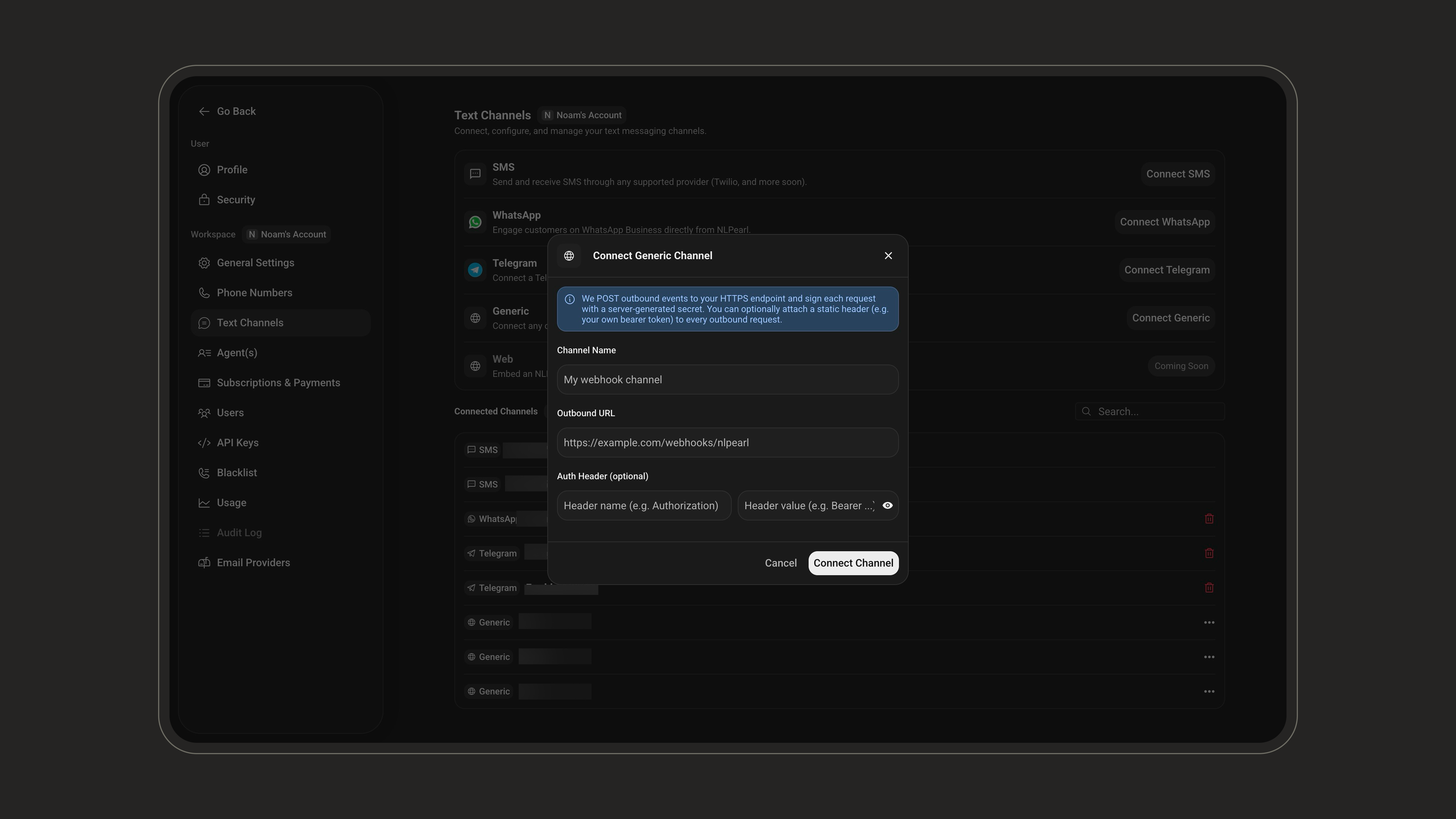
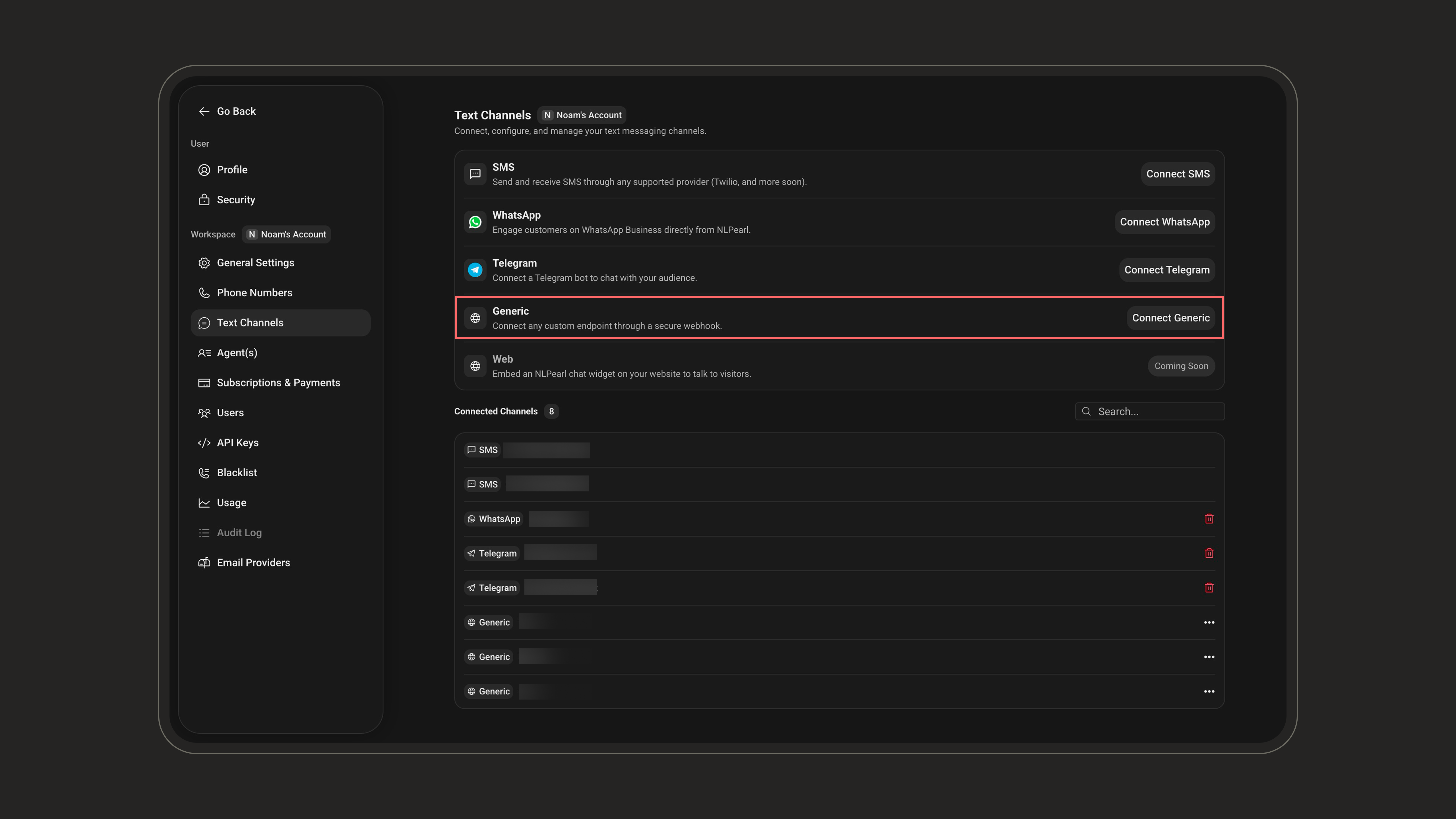 Enter the details NLPearl will use to send events to your system:
| Setting | Description |
| ---------------------------- | -------------------------------------------------------------------------------------------------------------------------- |
| **Channel Name** | A name that helps you identify this connection on the platform. |
| **Outbound URL** | An HTTPS endpoint that receives Pearl replies, typing indicators, handoffs, and conversation events. |
| **Auth Header** *(optional)* | A custom header name and value that NLPearl includes in every request to your outbound URL, such as your own bearer token. |
Enter the details NLPearl will use to send events to your system:
| Setting | Description |
| ---------------------------- | -------------------------------------------------------------------------------------------------------------------------- |
| **Channel Name** | A name that helps you identify this connection on the platform. |
| **Outbound URL** | An HTTPS endpoint that receives Pearl replies, typing indicators, handoffs, and conversation events. |
| **Auth Header** *(optional)* | A custom header name and value that NLPearl includes in every request to your outbound URL, such as your own bearer token. |
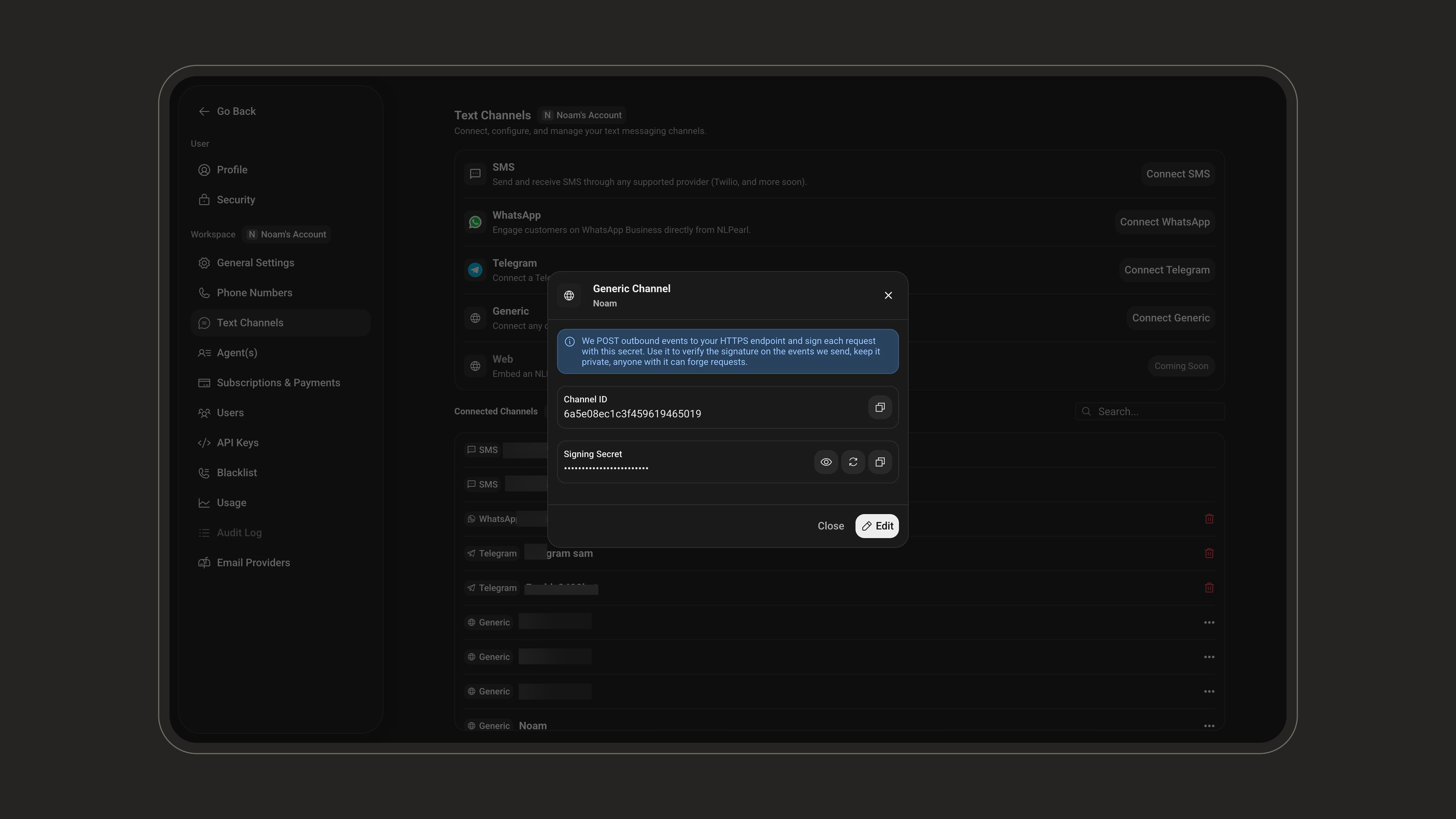
 Click **Connect Channel**. Open the connected channel to access the credentials required by your integration:
| Value | Description |
| ------------------ | ------------------------------------------------------------------------------------------------------------------------------------------ |
| **Channel ID** | Identifies the channel and forms part of its inbound URLs. |
| **Signing Secret** | Authenticates requests in both directions. Send it with every request to NLPearl, and use it to verify requests sent to your outbound URL. |
Click **Connect Channel**. Open the connected channel to access the credentials required by your integration:
| Value | Description |
| ------------------ | ------------------------------------------------------------------------------------------------------------------------------------------ |
| **Channel ID** | Identifies the channel and forms part of its inbound URLs. |
| **Signing Secret** | Authenticates requests in both directions. Send it with every request to NLPearl, and use it to verify requests sent to your outbound URL. |
 Treat the signing secret like a password. Never expose it in client-side code or commit it to source control.
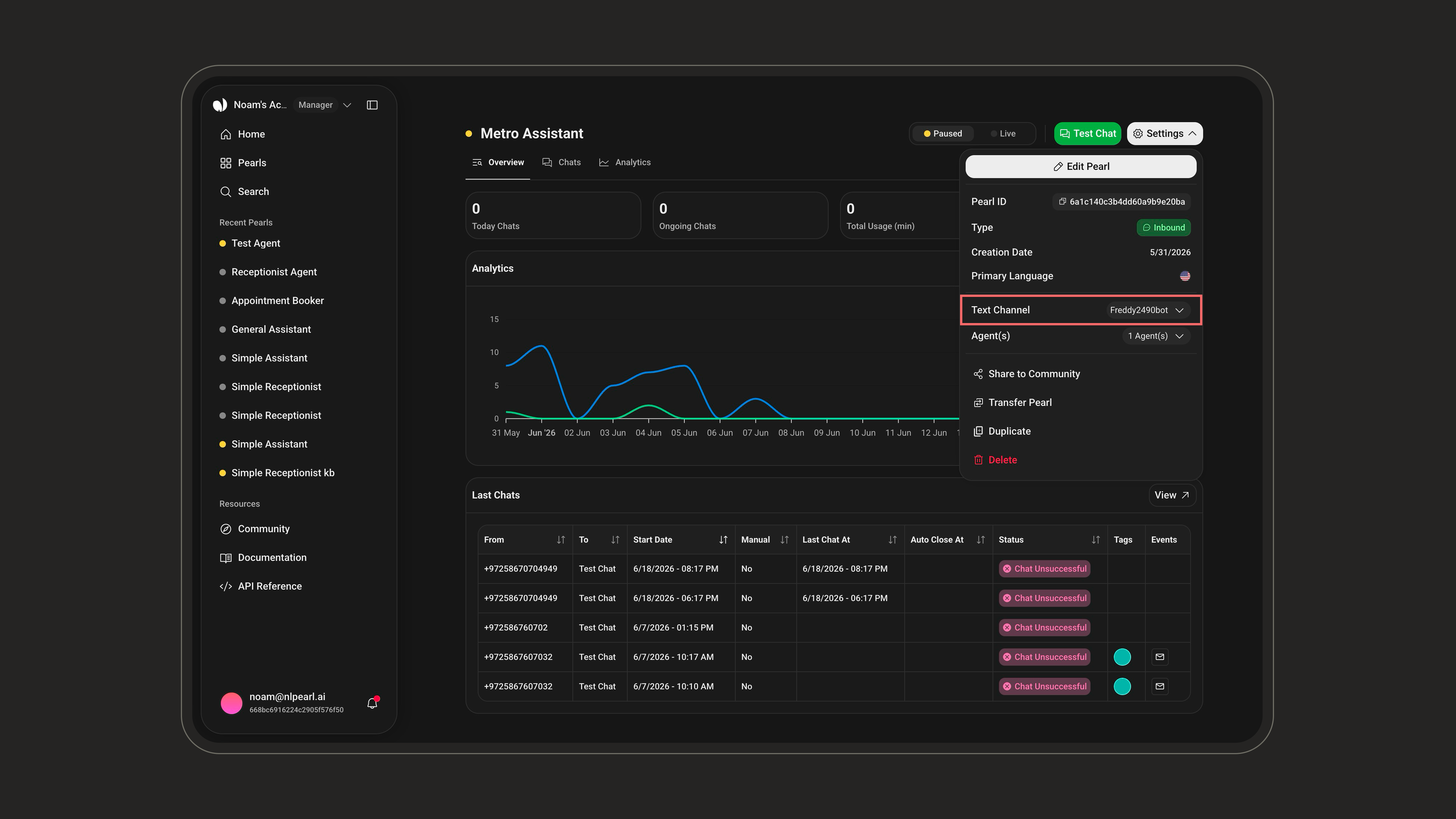
Open the Pearl that should handle these conversations. From its **Overview** page, open **Settings**, select **Text Channel**, and choose the Generic channel you created.
Treat the signing secret like a password. Never expose it in client-side code or commit it to source control.
Open the Pearl that should handle these conversations. From its **Overview** page, open **Settings**, select **Text Channel**, and choose the Generic channel you created.
 Your inbound base URL is:
```text theme={null}
https://text.inbound.platform.nlpearl.ai/Generic/{channelId}
```
***
## Send Requests to NLPearl
Send every request as JSON and include the channel secret:
```http theme={null}
Content-Type: application/json
X-Pearl-Secret:
```
### Send a User Message
Send a user message to:
```http theme={null}
POST {baseUrl}/Message
```
```json theme={null}
{
"messageId": "m-12345",
"chatId": "+1234567890",
"senderName": "Jane Doe",
"timestamp": "2026-07-17T09:30:00Z",
"text": "Hi, I need help with my order",
"attachments": [
{
"url": "https://your.cdn.example/receipt.jpg",
"contentType": "image/jpeg",
"filename": "receipt.jpg"
}
]
}
```
| Field | Required | Description |
| ------------- | -------- | ------------------------------------------------------------------------------------------------------------------------------------------------- |
| `chatId` | Yes | Your conversation identifier, phone number, or end-user ID. Messages with the same value belong to the same conversation. Maximum 200 characters. |
| `messageId` | No | Your unique message identifier. Include it so NLPearl can deduplicate retries. Maximum 200 characters. |
| `senderName` | No | The sender name displayed in the transcript. |
| `timestamp` | No | The message time as an ISO 8601 timestamp. Defaults to the current time. |
| `text` | No | The message text, up to 8,000 characters. |
| `attachments` | No | Up to five publicly accessible image, audio, PDF, or text files. Each file can be up to 20 MB. |
`chatId` is the conversation key. Every message with the same `chatId` belongs to the same conversation, and every outbound event for that conversation includes it.
Possible responses:
| Status | Meaning |
| ------ | --------------------------------------------------------------------------------------- |
| `202` | The message was accepted for asynchronous processing. |
| `400` | The payload is invalid, or the channel is not connected to a running Pearl. |
| `401` | The channel secret is invalid. |
| `404` | The channel does not exist. |
| `500` | A transient error occurred. You can safely retry when you provide a stable `messageId`. |
### Return Control to Pearl
After a human handoff, return the conversation to Pearl:
```http theme={null}
POST {baseUrl}/HandoffToPearl
```
```json theme={null}
{
"chatId": "+1234567890"
}
```
### End a Conversation
Close a conversation:
```http theme={null}
POST {baseUrl}/EndConversation
```
```json theme={null}
{
"chatId": "+1234567890"
}
```
Both control actions return `200` when successful or `404` when no active conversation exists for the supplied `chatId`.
***
## Receive Events from NLPearl
NLPearl sends each event to your outbound URL as a `POST` request with this envelope:
```json theme={null}
{
"type": "message",
"channelId": "6a59f7e02254e81f5533f11d",
"chatId": "+1234567890",
"timestamp": "2026-07-17T09:30:02.1234567Z",
"data": {}
}
```
### Event Types
| `type` | `data` | Meaning |
| -------------------- | ----------------------------- | -------------------------------------------------------------------------------------------------------------------- |
| `message` | `{ "messageId", "text" }` | Pearl's reply. Deliver it to your user. |
| `typing` | None | Pearl is composing a response. You can display a typing indicator. |
| `handoff` | `{ "reason", "riskReason"? }` | Pearl handed the conversation to a human. `reason` can be `agent_handoff`, `risk`, `max_turns_reached`, or `manual`. |
| `ai_resumed` | None | Pearl resumed control of the conversation. |
| `conversation_ended` | None | The conversation was closed by Pearl, because of inactivity, or through `EndConversation`. |
New event types may be added over time. Ignore types your integration does not recognize.
### Acknowledge Message Delivery
Your HTTP response controls delivery retries for `message` events:
| Your status | NLPearl behavior |
| ------------------------ | ----------------------------------------------------------------------------- |
| `2xx` | The message is marked as delivered. |
| `429` | Delivery is retried with backoff. |
| `408`, `5xx`, or timeout | Delivery is retried with backoff, then marked as failed if all attempts fail. |
| Other `4xx` | The failure is treated as permanent and is not retried. |
Other event types, including `typing` and `handoff`, are best-effort notifications and are not retried.
***
## Verify Webhook Signatures
NLPearl includes these headers in every request to your outbound URL:
```http theme={null}
X-Pearl-Timestamp: 1784281802
X-Pearl-Signature: 3f1a9c...
```
The signature is the hexadecimal result of:
```text theme={null}
HMAC-SHA256(secret, "{timestamp}.{rawBody}")
```
Verify the signature and reject old timestamps to protect your endpoint against forged requests and replay attacks:
```js theme={null}
const crypto = require("crypto");
function verifyPearlWebhook(req, rawBody, secret) {
const timestamp = req.headers["x-pearl-timestamp"];
const signature = req.headers["x-pearl-signature"];
if (!timestamp || !signature) {
return false;
}
const expected = crypto
.createHmac("sha256", secret)
.update(`${timestamp}.${rawBody}`)
.digest("hex");
const signatureBuffer = Buffer.from(signature, "hex");
const expectedBuffer = Buffer.from(expected, "hex");
return (
signatureBuffer.length === expectedBuffer.length &&
crypto.timingSafeEqual(signatureBuffer, expectedBuffer) &&
Math.abs(Date.now() / 1000 - Number(timestamp)) < 300
);
}
```
Compute the HMAC over the raw request body bytes before parsing the JSON. Re-serializing a parsed body can change its bytes and invalidate the signature.
If you configured a custom authentication header, NLPearl includes it alongside the signature headers.
***
## Handle Human Handoffs
Pearl sends a `handoff` event with the reason it stepped aside.
Let your human agent communicate with the user in your own system. Continue sending the user's messages to `/Message`; Pearl remains silent while handed off, but the transcript and inactivity timers stay up to date.
Call `/HandoffToPearl` when Pearl should resume, or `/EndConversation` when the conversation is complete. Your endpoint then receives `ai_resumed` or `conversation_ended`, respectively.
***
## Rotate the Secret
Open the connected Generic channel and click the **rotate** icon beside the Signing Secret to generate a new one.
Your inbound base URL is:
```text theme={null}
https://text.inbound.platform.nlpearl.ai/Generic/{channelId}
```
***
## Send Requests to NLPearl
Send every request as JSON and include the channel secret:
```http theme={null}
Content-Type: application/json
X-Pearl-Secret:
```
### Send a User Message
Send a user message to:
```http theme={null}
POST {baseUrl}/Message
```
```json theme={null}
{
"messageId": "m-12345",
"chatId": "+1234567890",
"senderName": "Jane Doe",
"timestamp": "2026-07-17T09:30:00Z",
"text": "Hi, I need help with my order",
"attachments": [
{
"url": "https://your.cdn.example/receipt.jpg",
"contentType": "image/jpeg",
"filename": "receipt.jpg"
}
]
}
```
| Field | Required | Description |
| ------------- | -------- | ------------------------------------------------------------------------------------------------------------------------------------------------- |
| `chatId` | Yes | Your conversation identifier, phone number, or end-user ID. Messages with the same value belong to the same conversation. Maximum 200 characters. |
| `messageId` | No | Your unique message identifier. Include it so NLPearl can deduplicate retries. Maximum 200 characters. |
| `senderName` | No | The sender name displayed in the transcript. |
| `timestamp` | No | The message time as an ISO 8601 timestamp. Defaults to the current time. |
| `text` | No | The message text, up to 8,000 characters. |
| `attachments` | No | Up to five publicly accessible image, audio, PDF, or text files. Each file can be up to 20 MB. |
`chatId` is the conversation key. Every message with the same `chatId` belongs to the same conversation, and every outbound event for that conversation includes it.
Possible responses:
| Status | Meaning |
| ------ | --------------------------------------------------------------------------------------- |
| `202` | The message was accepted for asynchronous processing. |
| `400` | The payload is invalid, or the channel is not connected to a running Pearl. |
| `401` | The channel secret is invalid. |
| `404` | The channel does not exist. |
| `500` | A transient error occurred. You can safely retry when you provide a stable `messageId`. |
### Return Control to Pearl
After a human handoff, return the conversation to Pearl:
```http theme={null}
POST {baseUrl}/HandoffToPearl
```
```json theme={null}
{
"chatId": "+1234567890"
}
```
### End a Conversation
Close a conversation:
```http theme={null}
POST {baseUrl}/EndConversation
```
```json theme={null}
{
"chatId": "+1234567890"
}
```
Both control actions return `200` when successful or `404` when no active conversation exists for the supplied `chatId`.
***
## Receive Events from NLPearl
NLPearl sends each event to your outbound URL as a `POST` request with this envelope:
```json theme={null}
{
"type": "message",
"channelId": "6a59f7e02254e81f5533f11d",
"chatId": "+1234567890",
"timestamp": "2026-07-17T09:30:02.1234567Z",
"data": {}
}
```
### Event Types
| `type` | `data` | Meaning |
| -------------------- | ----------------------------- | -------------------------------------------------------------------------------------------------------------------- |
| `message` | `{ "messageId", "text" }` | Pearl's reply. Deliver it to your user. |
| `typing` | None | Pearl is composing a response. You can display a typing indicator. |
| `handoff` | `{ "reason", "riskReason"? }` | Pearl handed the conversation to a human. `reason` can be `agent_handoff`, `risk`, `max_turns_reached`, or `manual`. |
| `ai_resumed` | None | Pearl resumed control of the conversation. |
| `conversation_ended` | None | The conversation was closed by Pearl, because of inactivity, or through `EndConversation`. |
New event types may be added over time. Ignore types your integration does not recognize.
### Acknowledge Message Delivery
Your HTTP response controls delivery retries for `message` events:
| Your status | NLPearl behavior |
| ------------------------ | ----------------------------------------------------------------------------- |
| `2xx` | The message is marked as delivered. |
| `429` | Delivery is retried with backoff. |
| `408`, `5xx`, or timeout | Delivery is retried with backoff, then marked as failed if all attempts fail. |
| Other `4xx` | The failure is treated as permanent and is not retried. |
Other event types, including `typing` and `handoff`, are best-effort notifications and are not retried.
***
## Verify Webhook Signatures
NLPearl includes these headers in every request to your outbound URL:
```http theme={null}
X-Pearl-Timestamp: 1784281802
X-Pearl-Signature: 3f1a9c...
```
The signature is the hexadecimal result of:
```text theme={null}
HMAC-SHA256(secret, "{timestamp}.{rawBody}")
```
Verify the signature and reject old timestamps to protect your endpoint against forged requests and replay attacks:
```js theme={null}
const crypto = require("crypto");
function verifyPearlWebhook(req, rawBody, secret) {
const timestamp = req.headers["x-pearl-timestamp"];
const signature = req.headers["x-pearl-signature"];
if (!timestamp || !signature) {
return false;
}
const expected = crypto
.createHmac("sha256", secret)
.update(`${timestamp}.${rawBody}`)
.digest("hex");
const signatureBuffer = Buffer.from(signature, "hex");
const expectedBuffer = Buffer.from(expected, "hex");
return (
signatureBuffer.length === expectedBuffer.length &&
crypto.timingSafeEqual(signatureBuffer, expectedBuffer) &&
Math.abs(Date.now() / 1000 - Number(timestamp)) < 300
);
}
```
Compute the HMAC over the raw request body bytes before parsing the JSON. Re-serializing a parsed body can change its bytes and invalidate the signature.
If you configured a custom authentication header, NLPearl includes it alongside the signature headers.
***
## Handle Human Handoffs
Pearl sends a `handoff` event with the reason it stepped aside.
Let your human agent communicate with the user in your own system. Continue sending the user's messages to `/Message`; Pearl remains silent while handed off, but the transcript and inactivity timers stay up to date.
Call `/HandoffToPearl` when Pearl should resume, or `/EndConversation` when the conversation is complete. Your endpoint then receives `ai_resumed` or `conversation_ended`, respectively.
***
## Rotate the Secret
Open the connected Generic channel and click the **rotate** icon beside the Signing Secret to generate a new one.
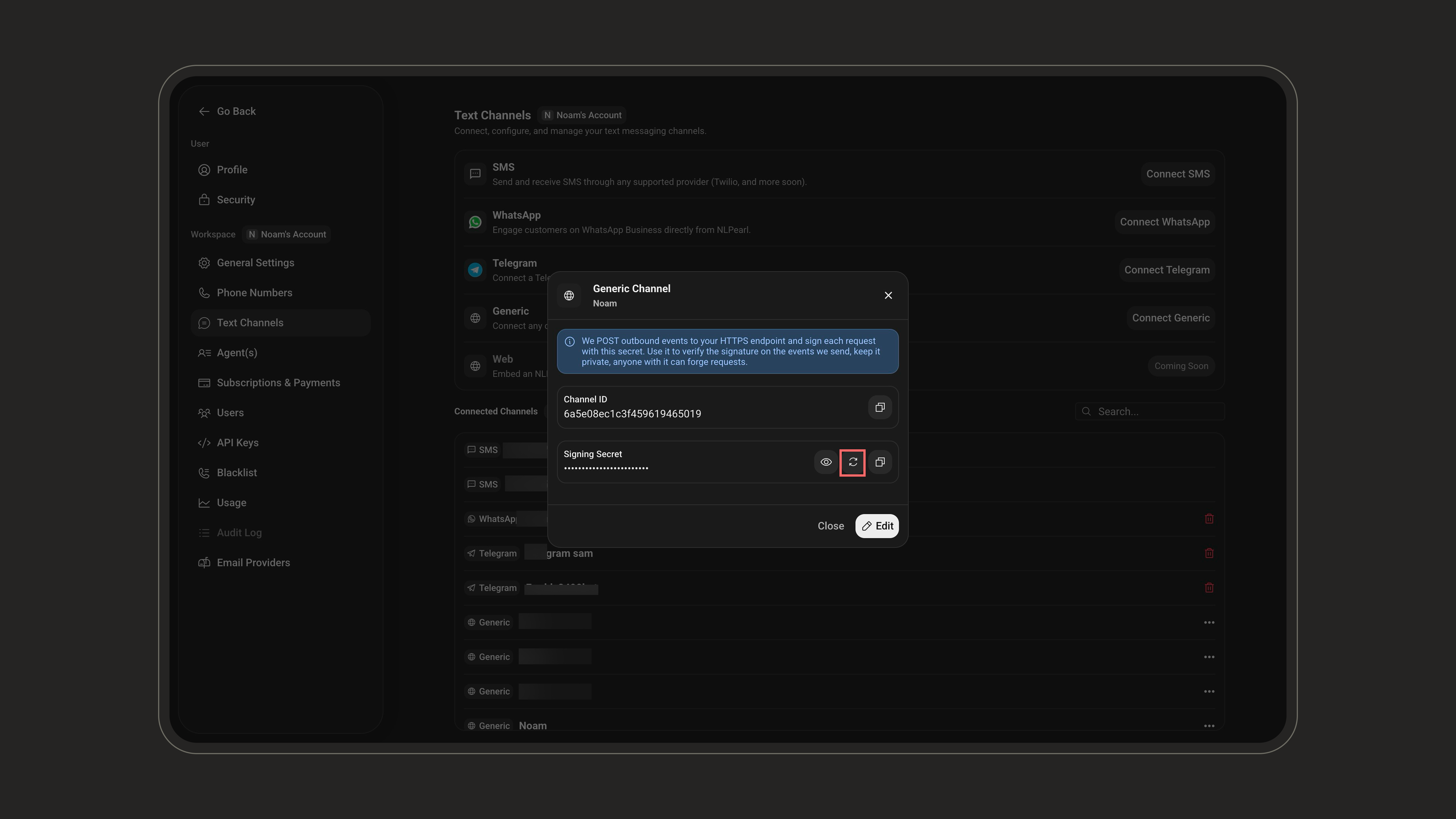 The previous secret becomes invalid immediately.
Update the secret used for both the `X-Pearl-Secret` request header and webhook signature verification at the same time. Otherwise, your inbound requests and outbound webhook verification will fail until both sides use the new value.
***
## Limits
| Limit | Value |
| ----------------------- | ---------------- |
| Text length | 8,000 characters |
| Attachments per message | 5 |
| Attachment size | 20 MB each |
| `chatId` length | 200 characters |
| `messageId` length | 200 characters |
The channel must be assigned to a running Pearl. If the Pearl is stopped or no Pearl is connected, inbound calls return `400` with `"This channel is not connected to a Pearl."`.
***
Configure how your Pearl handles incoming conversations, inactivity, transcripts, and webhooks.
The previous secret becomes invalid immediately.
Update the secret used for both the `X-Pearl-Secret` request header and webhook signature verification at the same time. Otherwise, your inbound requests and outbound webhook verification will fail until both sides use the new value.
***
## Limits
| Limit | Value |
| ----------------------- | ---------------- |
| Text length | 8,000 characters |
| Attachments per message | 5 |
| Attachment size | 20 MB each |
| `chatId` length | 200 characters |
| `messageId` length | 200 characters |
The channel must be assigned to a running Pearl. If the Pearl is stopped or no Pearl is connected, inbound calls return `400` with `"This channel is not connected to a Pearl."`.
***
Configure how your Pearl handles incoming conversations, inactivity, transcripts, and webhooks.