> ## Documentation Index
> Fetch the complete documentation index at: https://developers.nlpearl.ai/llms.txt
> Use this file to discover all available pages before exploring further.
# Voices and Languages
> At NLPearl, we offer a wide variety of languages and accents to cater to a global audience. You can configure your Pearl to handle conversations in multiple languages, providing a seamless and personalized experience for your users.
***
### Configuring Agent Names, Languages & Voices
When creating or editing your Pearl, you can set up multiple agents with different languages and voices. This flexibility allows your Pearl to engage in conversations in more than one language and switch smoothly between them as needed.
***
#### How to Add Multiple Languages and Voices
In **Pearl Settings**, find the **Agent Names, Languages & Voices** section. Each row is one agent, with its name, language, voice, and accent. This is where you add, configure, and order your agents.
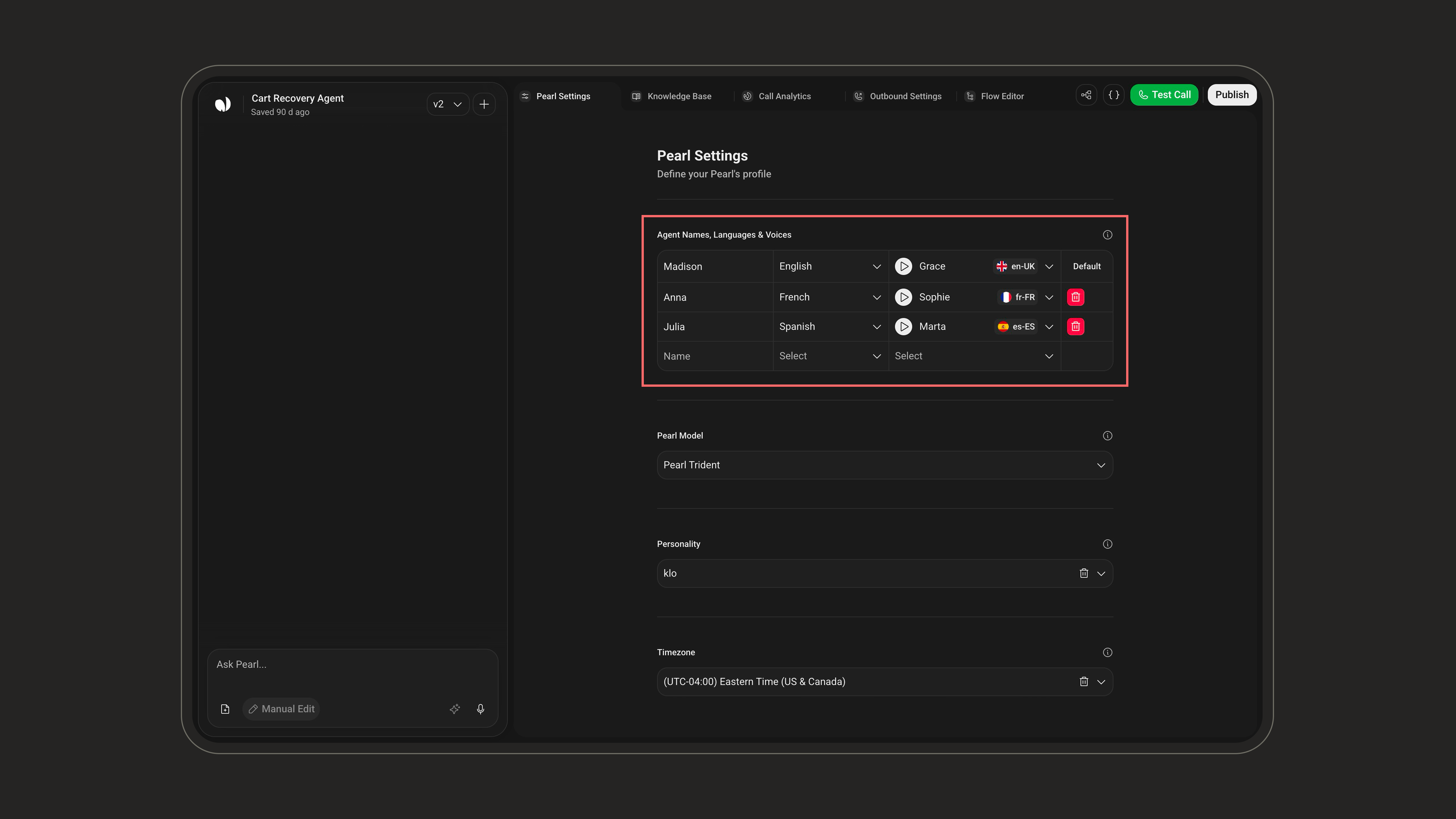 Fill in the empty row at the bottom of the table to add a new agent:
* **Name**: the name the agent uses during conversations in that language.
* **Language**: pick a language from the supported list.
* **Voice**: pick a voice for that language.
Each language can be assigned to **only one agent**. A language that's already in use won't be selectable for another agent.
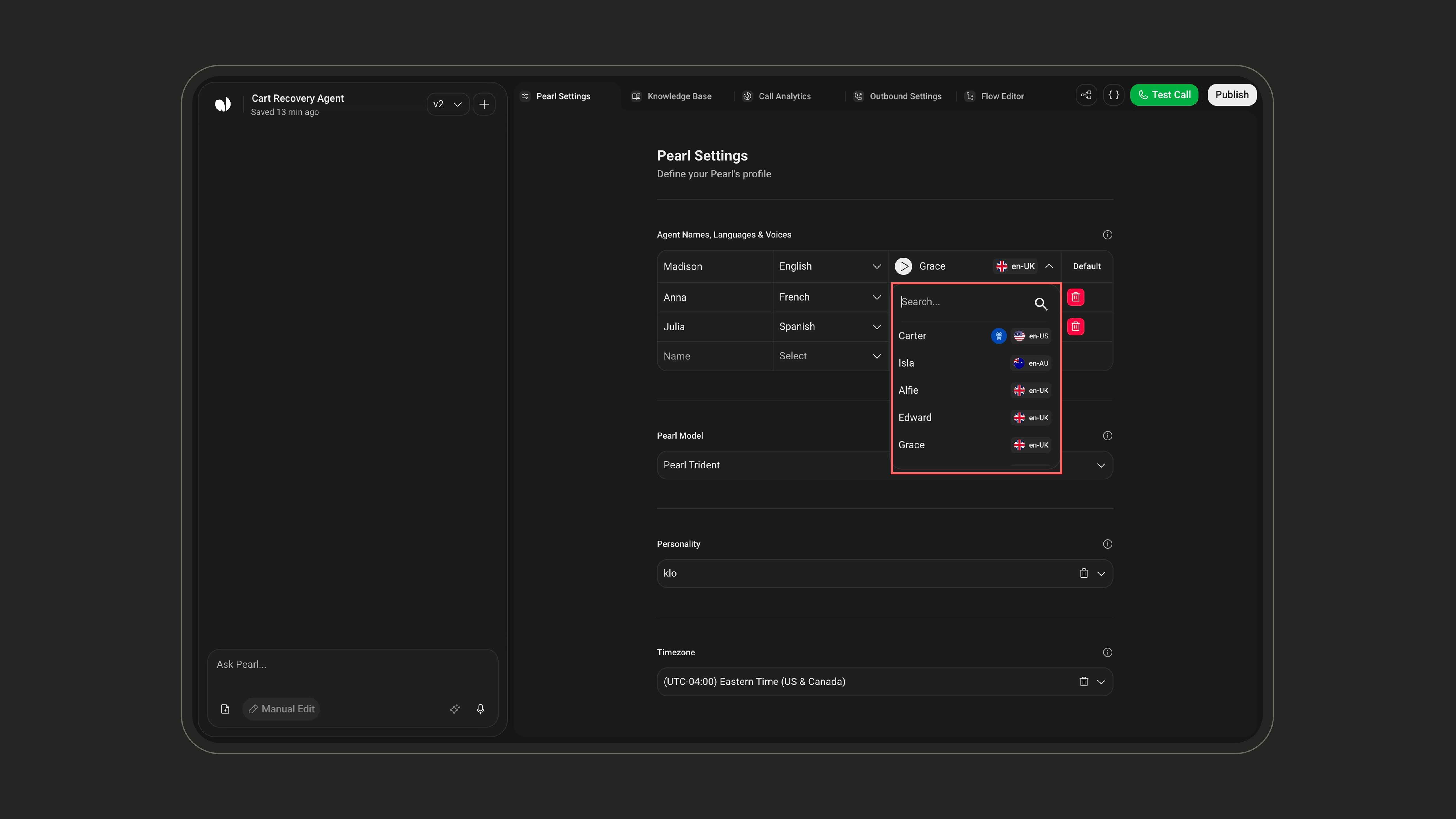
Open the **Voice** dropdown to browse the available voices. Use the **search** box to filter, and check the **accent label** next to each voice (e.g. `en-US`, `en-UK`) to match your target audience. Click the **play button** next to a voice to hear a sample before selecting it.
Fill in the empty row at the bottom of the table to add a new agent:
* **Name**: the name the agent uses during conversations in that language.
* **Language**: pick a language from the supported list.
* **Voice**: pick a voice for that language.
Each language can be assigned to **only one agent**. A language that's already in use won't be selectable for another agent.
Open the **Voice** dropdown to browse the available voices. Use the **search** box to filter, and check the **accent label** next to each voice (e.g. `en-US`, `en-UK`) to match your target audience. Click the **play button** next to a voice to hear a sample before selecting it.
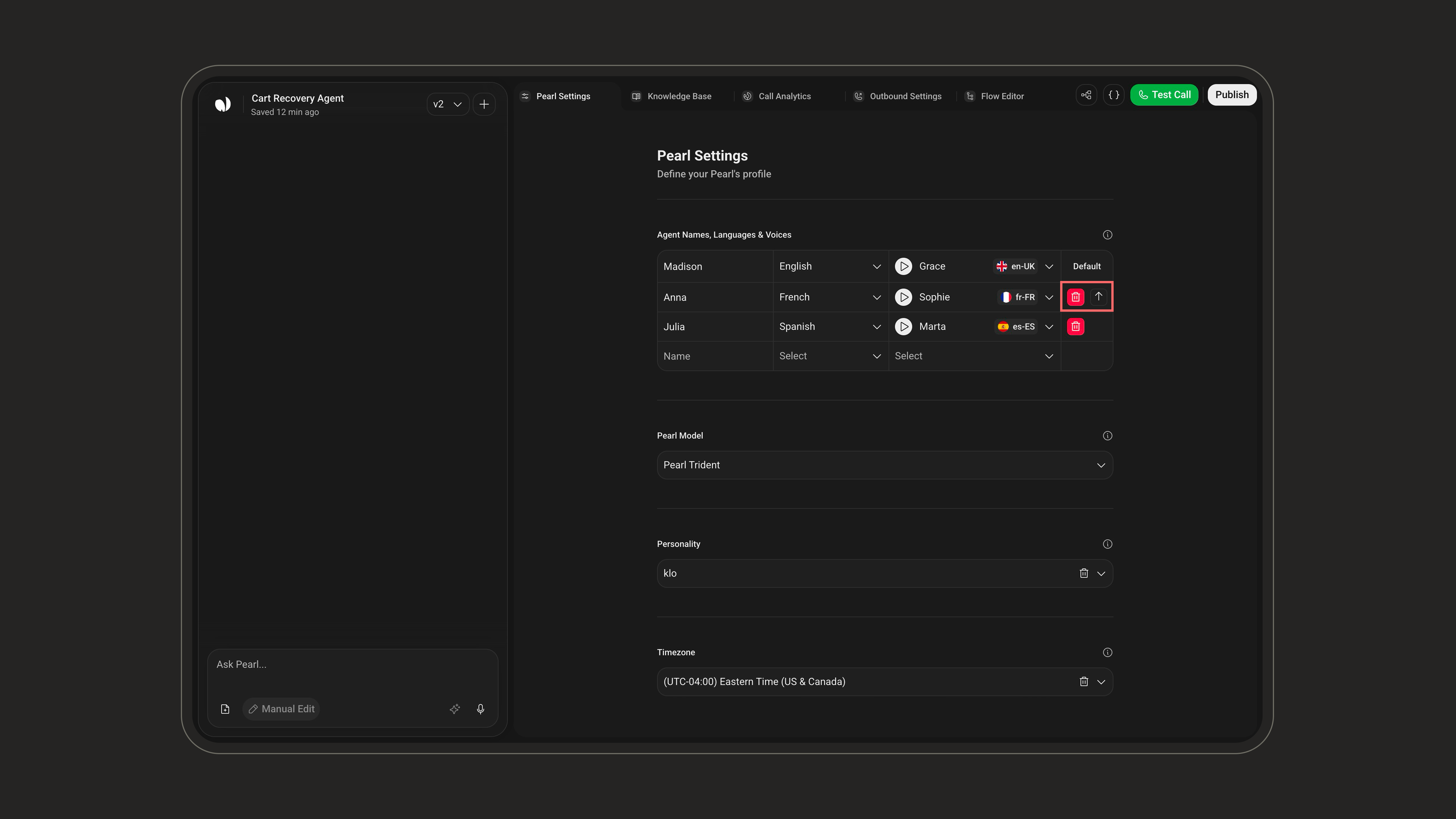
 The agent marked **Default** is the one your Pearl uses to open the conversation. The first agent you add becomes the default automatically.
To change it, hover over the agent you want and click the **Set as default** (↑) button. Use the **delete** icon to remove an agent.
The agent marked **Default** is the one your Pearl uses to open the conversation. The first agent you add becomes the default automatically.
To change it, hover over the agent you want and click the **Set as default** (↑) button. Use the **delete** icon to remove an agent.
 Switching Languages During a Call
* If, during the conversation, the caller requests to switch to another language, and you've added that language to your agent configurations, Pearl will smoothly handle the transition.
* The agent will inform the caller that they will be transferred to a representative who speaks the requested language.
* The conversation will then continue with the agent configured for that language.
***
### Supported Languages and Accents
Currently, NLPearl.AI supports the following languages and accents:
| **Language** | **Accent(s)** | **Locale Code(s)** |
| -------------- | -------------------------------------------------------------- | ---------------------------------------------------- |
| **English** | American, Australian, British, South African, Indian, Scotland | `en-US`, `en-AU`, `en-UK`, `en-ZA`, `en-SC`, `en-HI` |
| **French** | French, Canadian French | `fr-FR`, `fr-CA` |
| **Italian** | Italian | `it-IT` |
| **Spanish** | Spanish, Argentine, Colombian, Mexican | `es-ES`, `es-AR`, `es-CO`, `es-MX` |
| **Dutch** | Dutch | `nl-NL` |
| **German** | German | `de-DE` |
| **Hindi** | Hindi | `hi-IN` |
| **Japanese** | Japanese | `ja-JP` |
| **Mandarin** | Chinese Mandarin | `zh-CN` |
| **Korean** | Korean | `ko-KR` |
| **Russian** | Russian | `ru-RU` |
| **Portuguese** | Brazilian Portuguese, European Portuguese | `pt-BR`, `pt-PT` |
| **Turkish** | Turkish | `tr-TR` |
| **Vietnamese** | Vietnamese | `vi-VN` |
| **Polish** | Polish | `pl-PL` |
| **Arabic** | Levantine Arabic | `ar-LEV` |
| **Greek** | Greek | `el-GR` |
| **Hebrew** | Hebrew | `he-IL` |
| **Indonesian** | Indonesian | `id-ID` |
***
### Important Notes
* **Language Consistency**:
* Ensure that your conversational flow and scripts are consistent with the languages you've configured.
* For example, if you have English and Spanish agents, provide scripts in both languages.
* **Default Language**:
* The default language is crucial as it determines how the conversation begins.
* Make sure the default language aligns with the expectations of your target audience.
* **Accents and Regional Variations**:
* Choose accents that best match your audience to enhance the user experience.
***
### Expanding Language Support
We are continuously working to expand our range of supported languages and accents to meet the diverse needs of our users. Stay tuned for updates as we grow our offerings.
Feedback and Requests
If you have specific language or accent requirements that are not currently supported, please reach out to our support team. We are committed to accommodating your needs and will consider your requests as we expand our capabilities.
***
Learn how to create a Pearl and configure multiple languages and voices.
Contact our support team to request additional languages or accents.
Switching Languages During a Call
* If, during the conversation, the caller requests to switch to another language, and you've added that language to your agent configurations, Pearl will smoothly handle the transition.
* The agent will inform the caller that they will be transferred to a representative who speaks the requested language.
* The conversation will then continue with the agent configured for that language.
***
### Supported Languages and Accents
Currently, NLPearl.AI supports the following languages and accents:
| **Language** | **Accent(s)** | **Locale Code(s)** |
| -------------- | -------------------------------------------------------------- | ---------------------------------------------------- |
| **English** | American, Australian, British, South African, Indian, Scotland | `en-US`, `en-AU`, `en-UK`, `en-ZA`, `en-SC`, `en-HI` |
| **French** | French, Canadian French | `fr-FR`, `fr-CA` |
| **Italian** | Italian | `it-IT` |
| **Spanish** | Spanish, Argentine, Colombian, Mexican | `es-ES`, `es-AR`, `es-CO`, `es-MX` |
| **Dutch** | Dutch | `nl-NL` |
| **German** | German | `de-DE` |
| **Hindi** | Hindi | `hi-IN` |
| **Japanese** | Japanese | `ja-JP` |
| **Mandarin** | Chinese Mandarin | `zh-CN` |
| **Korean** | Korean | `ko-KR` |
| **Russian** | Russian | `ru-RU` |
| **Portuguese** | Brazilian Portuguese, European Portuguese | `pt-BR`, `pt-PT` |
| **Turkish** | Turkish | `tr-TR` |
| **Vietnamese** | Vietnamese | `vi-VN` |
| **Polish** | Polish | `pl-PL` |
| **Arabic** | Levantine Arabic | `ar-LEV` |
| **Greek** | Greek | `el-GR` |
| **Hebrew** | Hebrew | `he-IL` |
| **Indonesian** | Indonesian | `id-ID` |
***
### Important Notes
* **Language Consistency**:
* Ensure that your conversational flow and scripts are consistent with the languages you've configured.
* For example, if you have English and Spanish agents, provide scripts in both languages.
* **Default Language**:
* The default language is crucial as it determines how the conversation begins.
* Make sure the default language aligns with the expectations of your target audience.
* **Accents and Regional Variations**:
* Choose accents that best match your audience to enhance the user experience.
***
### Expanding Language Support
We are continuously working to expand our range of supported languages and accents to meet the diverse needs of our users. Stay tuned for updates as we grow our offerings.
Feedback and Requests
If you have specific language or accent requirements that are not currently supported, please reach out to our support team. We are committed to accommodating your needs and will consider your requests as we expand our capabilities.
***
Learn how to create a Pearl and configure multiple languages and voices.
Contact our support team to request additional languages or accents.
