> ## Documentation Index
> Fetch the complete documentation index at: https://developers.nlpearl.ai/llms.txt
> Use this file to discover all available pages before exploring further.

# Call Analytics

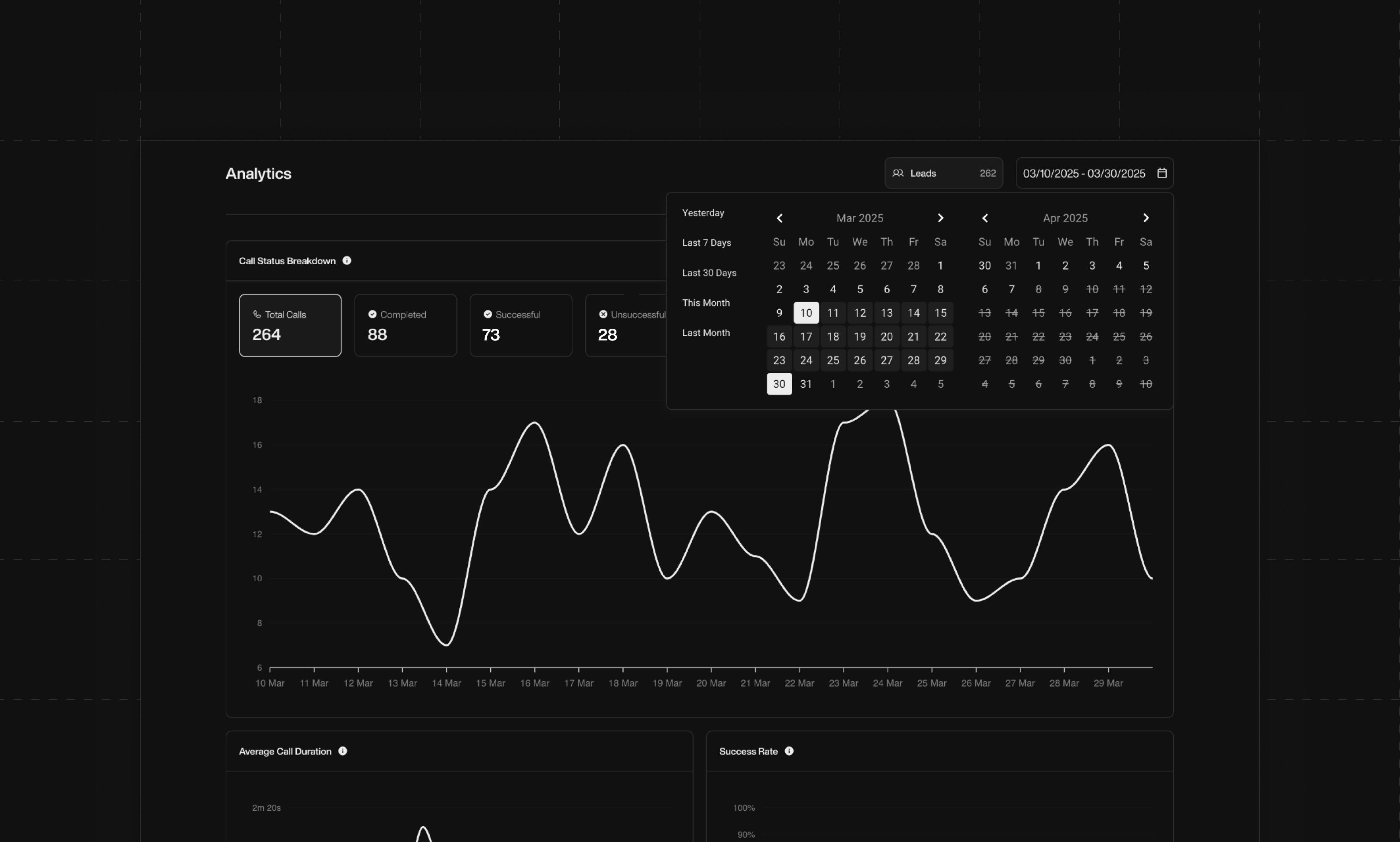
> NLPearl provides detailed analytics for every campaign, helping you track performance, understand Pearl's activity, and optimize your strategy in real time.

<div className="block dark:hidden">
  <Frame>
    <div className="p-1">
      <img src="https://mintcdn.com/nlpearl/5m7CLiudjrqxiyho/images/light_mode/analytics-page.jpg?fit=max&auto=format&n=5m7CLiudjrqxiyho&q=85&s=02243b04877d865b972d323bcea7773b" alt="Send Email action interface on light mode" className="rounded-[14px]" width="3822" height="2300" data-path="images/light_mode/analytics-page.jpg" />
    </div>
  </Frame>
</div>

<div className="hidden dark:block">
  <Frame>
    <div className="p-1">
      <img src="https://mintcdn.com/nlpearl/ek92yQlpTyrjmvSe/images/dark_mode/analytics-page.jpg?fit=max&auto=format&n=ek92yQlpTyrjmvSe&q=85&s=e95fce6b50f41ca7cc07442a6f327f01" alt="Send Email action interface on dark mode" className="rounded-[14px]" width="3822" height="2300" data-path="images/dark_mode/analytics-page.jpg" />
    </div>
  </Frame>
</div>

<br />

<Card icon="circle-info" iconType="light">
  <b>How this dashboard works</b>:

  Outbound campaigns (initiated by Pearl) offer more data, while inbound campaigns show a lighter set of insights. All data reflects Pearl’s automated voice interactions — not human agents.
</Card>

***

### Key Metrics Overview

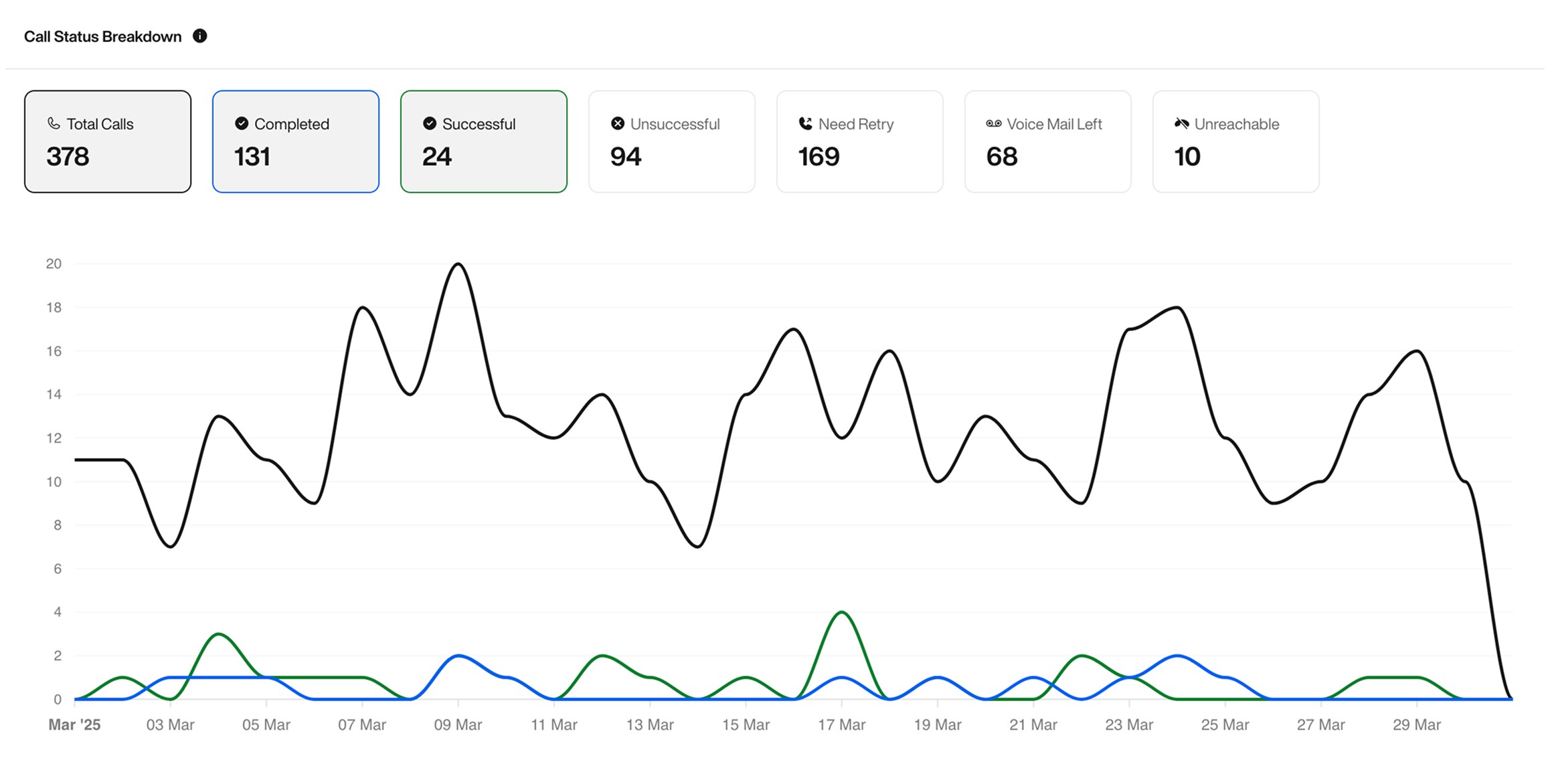
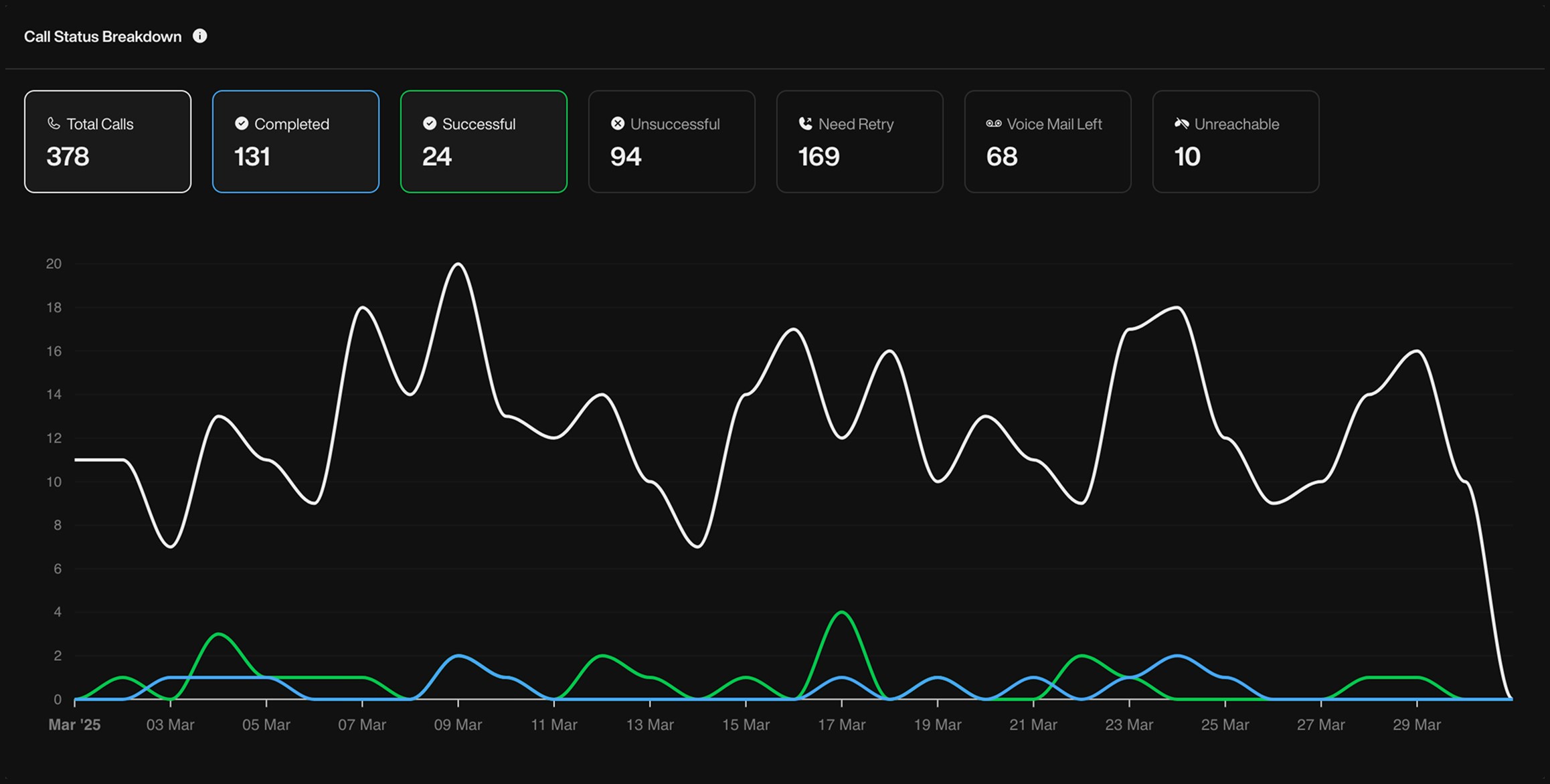
* `Total Calls` : Number of call attempts made during the selected period.
* `Completed` : Calls where someone picked up and interacted with Pearl, regardless of outcome.
* `Successful` : Calls that achieved the success condition defined for the Pearl (e.g. booking, confirmation, etc).
* `Unsuccessful` : The conversation happened, but the user declined or failed to reach the intended outcome.
* `Need Retry` : The lead picked up, but the conversation was interrupted or incomplete. These are flagged for retry.
* `Voice Mail Left` : Pearl left a voicemail.
* `Unreachable` : No one picked up or the number was unreachable.

<div className="block dark:hidden">
  <Frame>
    <div className="p-1">
      <img src="https://mintcdn.com/nlpearl/5m7CLiudjrqxiyho/images/light_mode/analytics_call-status-breakdown.jpg?fit=max&auto=format&n=5m7CLiudjrqxiyho&q=85&s=4824c54e9e9c2031153dc8fb02e384f0" alt="Send Email action interface on light mode" className="rounded-[14px]" width="2316" height="1172" data-path="images/light_mode/analytics_call-status-breakdown.jpg" />
    </div>
  </Frame>
</div>

<div className="hidden dark:block">
  <Frame>
    <div className="p-1">
      <img src="https://mintcdn.com/nlpearl/ek92yQlpTyrjmvSe/images/dark_mode/analytics_call-status-breakdown.jpg?fit=max&auto=format&n=ek92yQlpTyrjmvSe&q=85&s=82d9d2468c76f5f193024ad3f5766b09" alt="Send Email action interface on dark mode" className="rounded-[14px]" width="2316" height="1172" data-path="images/dark_mode/analytics_call-status-breakdown.jpg" />
    </div>
  </Frame>
</div>

***

### Average Call Duration

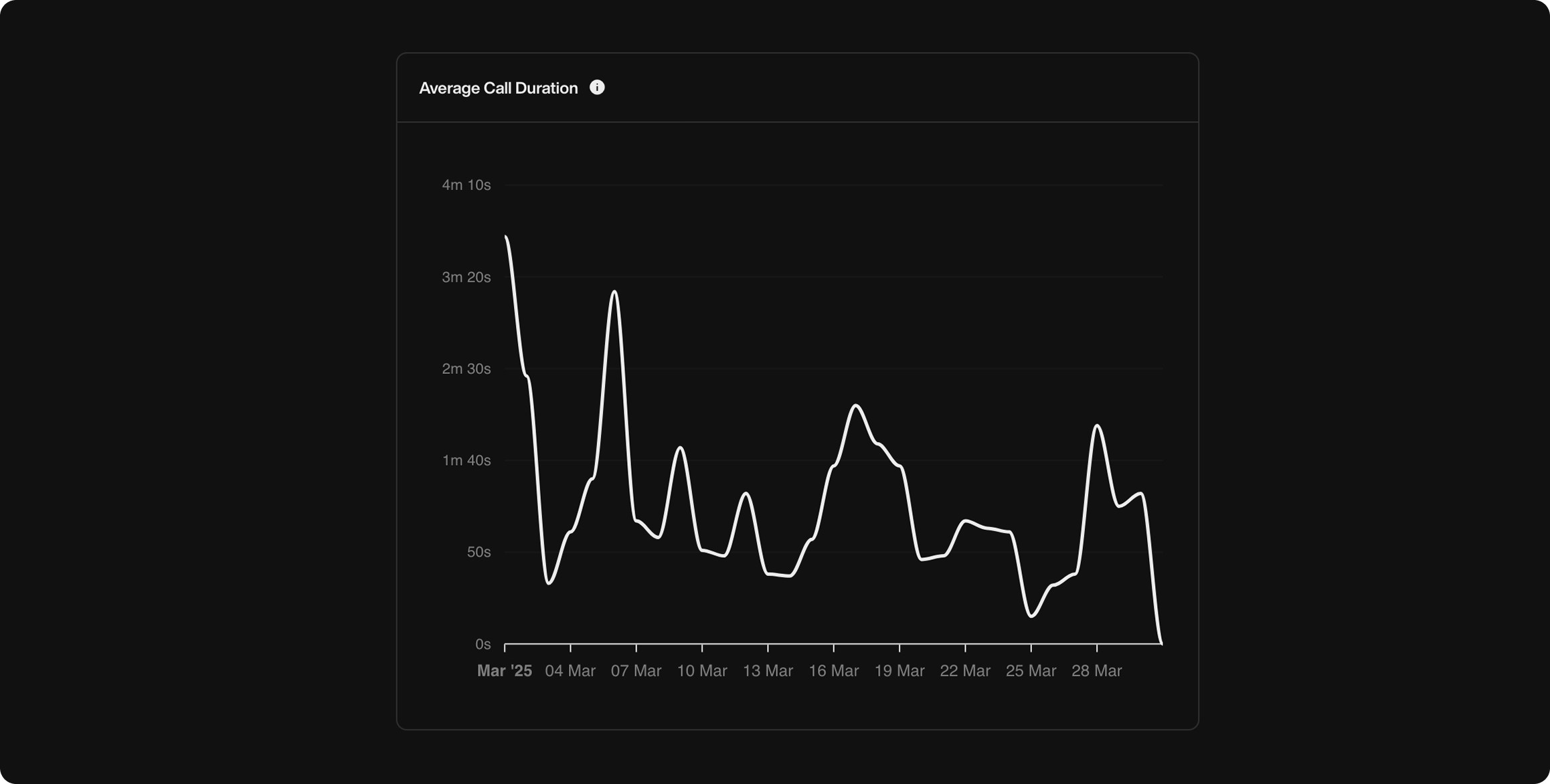
This graph shows the **average duration of calls from the moment the person picks up or starts interacting with Pearl**. Useful to:

* Detect drop-offs
* Monitor engagement quality
* Measure attention span

<div className="block dark:hidden">
  <Frame>
    <div className="p-1">
      <img src="https://mintcdn.com/nlpearl/5m7CLiudjrqxiyho/images/light_mode/analytics_call-duration.jpg?fit=max&auto=format&n=5m7CLiudjrqxiyho&q=85&s=e7082e550bd84f4345203ebeabbc644c" alt="Send Email action interface on light mode" className="rounded-[14px]" width="2316" height="1172" data-path="images/light_mode/analytics_call-duration.jpg" />
    </div>
  </Frame>
</div>

<div className="hidden dark:block">
  <Frame>
    <div className="p-1">
      <img src="https://mintcdn.com/nlpearl/ek92yQlpTyrjmvSe/images/dark_mode/analytics_call-duration.jpg?fit=max&auto=format&n=ek92yQlpTyrjmvSe&q=85&s=7c42167c2e4e7a0fd94f66f63a5c4917" alt="Send Email action interface on dark mode" className="rounded-[14px]" width="2316" height="1172" data-path="images/dark_mode/analytics_call-duration.jpg" />
    </div>
  </Frame>
</div>

***

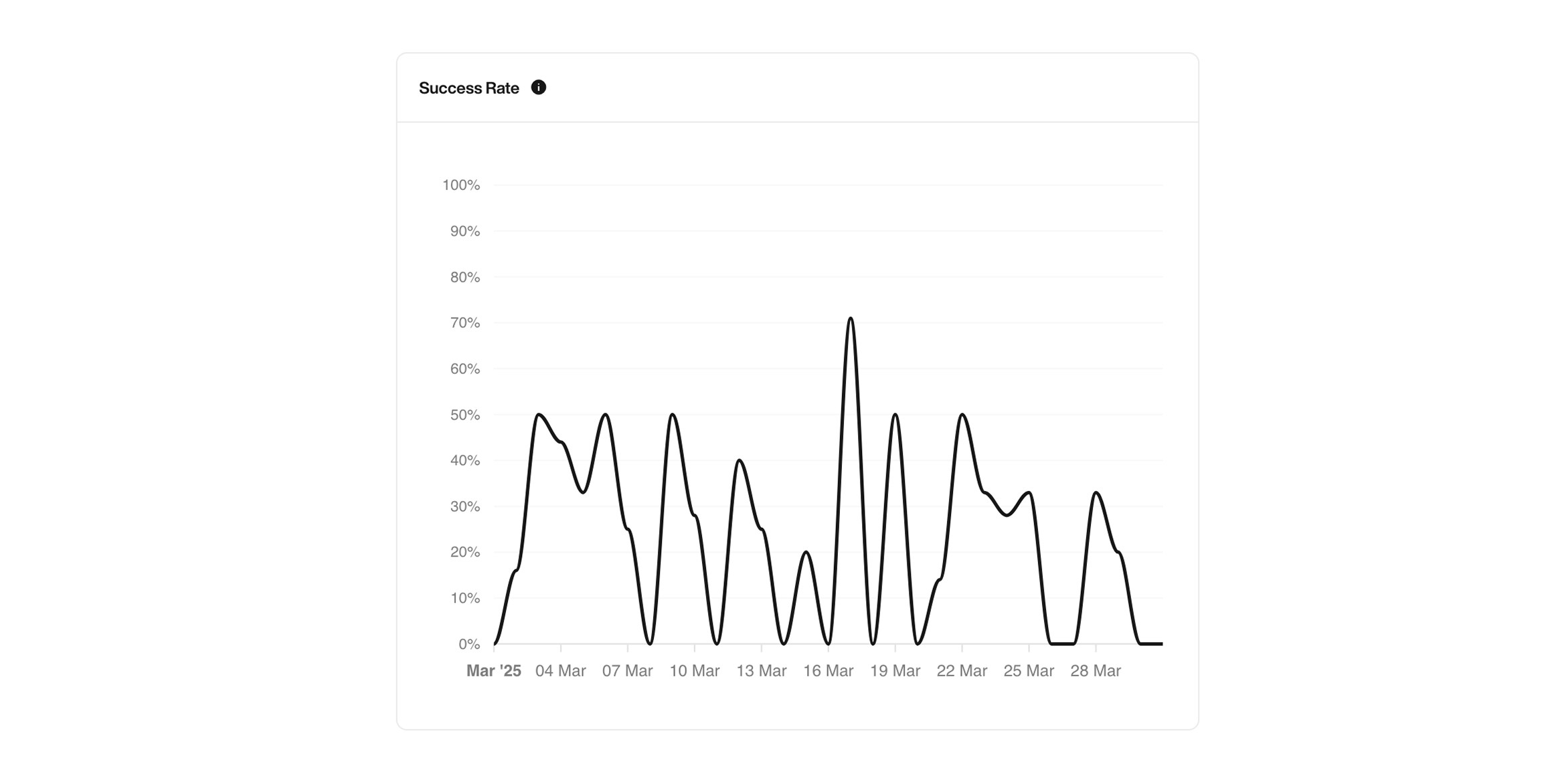
### Success Rate

This shows the **percentage of calls that achieved the goal you defined when creating your Pearl** — like booking a meeting, confirming information, or anything else you set as a success.

<Tip>
  Combine success rate with call duration to get insights into how efficient your conversations are.
</Tip>

<div className="block dark:hidden">
  <Frame>
    <div className="p-1">
      <img src="https://mintcdn.com/nlpearl/5m7CLiudjrqxiyho/images/light_mode/analytics_success-rate.jpg?fit=max&auto=format&n=5m7CLiudjrqxiyho&q=85&s=40c84f244db96497956181077e20e03d" alt="Send Email action interface on light mode" className="rounded-[14px]" width="2316" height="1172" data-path="images/light_mode/analytics_success-rate.jpg" />
    </div>
  </Frame>
</div>

<div className="hidden dark:block">
  <Frame>
    <div className="p-1">
      <img src="https://mintcdn.com/nlpearl/ek92yQlpTyrjmvSe/images/dark_mode/analytics_success-rate.jpg?fit=max&auto=format&n=ek92yQlpTyrjmvSe&q=85&s=bf1270628f200996f93b20ff87f5831c" alt="Send Email action interface on dark mode" className="rounded-[14px]" width="2316" height="1172" data-path="images/dark_mode/analytics_success-rate.jpg" />
    </div>
  </Frame>
</div>

***

### Events Triggered

See **all the actions triggered by Pearl during conversations** — and how many times each one occurred. For example:

* **Call Transferred**
* **SMS Sent**
* **Message Taken**
* **Calendar Booked**
* **Email Sent**

These help you understand how much your agent is actually doing during calls.

<div className="block dark:hidden">
  <Frame>
    <div className="p-1">
      <img src="https://mintcdn.com/nlpearl/5m7CLiudjrqxiyho/images/light_mode/analytics_events.jpg?fit=max&auto=format&n=5m7CLiudjrqxiyho&q=85&s=189c0c0c38ca7cbeb5aa45017e7cd22d" alt="Send Email action interface on light mode" className="rounded-[14px]" width="2316" height="1172" data-path="images/light_mode/analytics_events.jpg" />
    </div>
  </Frame>
</div>

<div className="hidden dark:block">
  <Frame>
    <div className="p-1">
      <img src="https://mintcdn.com/nlpearl/ek92yQlpTyrjmvSe/images/dark_mode/analytics_events.jpg?fit=max&auto=format&n=ek92yQlpTyrjmvSe&q=85&s=7c32ec74a13e46642bce5830bf8f8b40" alt="Send Email action interface on dark mode" className="rounded-[14px]" width="2316" height="1172" data-path="images/dark_mode/analytics_events.jpg" />
    </div>
  </Frame>
</div>

***

### Tag Frequency

These are the **custom tags you defined when creating your Pearl**. They help you track key topics, intents, or outcomes during calls — like `"No"`, `"Transfer"`, or `"Link"`.

<Info>
  Tags are applied automatically based on what the user says or how the conversation flows.
</Info>

<div className="block dark:hidden">
  <Frame>
    <div className="p-1">
      <img src="https://mintcdn.com/nlpearl/5m7CLiudjrqxiyho/images/light_mode/analytics_labels.jpg?fit=max&auto=format&n=5m7CLiudjrqxiyho&q=85&s=c2039579c2e0bd3476e8d7f44ff3b184" alt="Send Email action interface on light mode" className="rounded-[14px]" width="2316" height="1172" data-path="images/light_mode/analytics_labels.jpg" />
    </div>
  </Frame>
</div>

<div className="hidden dark:block">
  <Frame>
    <div className="p-1">
      <img src="https://mintcdn.com/nlpearl/ek92yQlpTyrjmvSe/images/dark_mode/analytics_labels.jpg?fit=max&auto=format&n=ek92yQlpTyrjmvSe&q=85&s=0645ac40eadd4b6ddbce8cb88a8e061b" alt="Send Email action interface on dark mode" className="rounded-[14px]" width="2316" height="1172" data-path="images/dark_mode/analytics_labels.jpg" />
    </div>
  </Frame>
</div>

***

### Calls Heatmap

This heatmap shows you **when people are most active** — either calling you (inbound) or answering your calls (outbound).

* White = high activity
* Grey = medium
* Black = none

Use this to find the best times to call.

<div className="block dark:hidden">
  <Frame>
    <div className="p-1">
      <img src="https://mintcdn.com/nlpearl/5m7CLiudjrqxiyho/images/light_mode/analytics_heatmap.jpg?fit=max&auto=format&n=5m7CLiudjrqxiyho&q=85&s=55aaed459f46aa7d3dbd1255a6d7c744" alt="Send Email action interface on light mode" className="rounded-[14px]" width="2904" height="1172" data-path="images/light_mode/analytics_heatmap.jpg" />
    </div>
  </Frame>
</div>

<div className="hidden dark:block">
  <Frame>
    <div className="p-1">
      <img src="https://mintcdn.com/nlpearl/ek92yQlpTyrjmvSe/images/dark_mode/analytics_heatmap.jpg?fit=max&auto=format&n=ek92yQlpTyrjmvSe&q=85&s=f09786d38a531596af18017e0518ba11" alt="Send Email action interface on dark mode" className="rounded-[14px]" width="2904" height="1172" data-path="images/dark_mode/analytics_heatmap.jpg" />
    </div>
  </Frame>
</div>

***

### Pickup Rate

<Warning> Outbound only</Warning>

This graph shows the **percentage of outbound calls answered by your contacts**. It helps you understand how reachable your audience is and optimize calling hours.

<div className="block dark:hidden">
  <Frame>
    <div className="p-1">
      <img src="https://mintcdn.com/nlpearl/5m7CLiudjrqxiyho/images/light_mode/analytics_pickup-rate.jpg?fit=max&auto=format&n=5m7CLiudjrqxiyho&q=85&s=4a56b9b6d4cbb81ada35365bb7f0477f" alt="Send Email action interface on light mode" className="rounded-[14px]" width="2316" height="1172" data-path="images/light_mode/analytics_pickup-rate.jpg" />
    </div>
  </Frame>
</div>

<div className="hidden dark:block">
  <Frame>
    <div className="p-1">
      <img src="https://mintcdn.com/nlpearl/ek92yQlpTyrjmvSe/images/dark_mode/analytics_pickup-rate.jpg?fit=max&auto=format&n=ek92yQlpTyrjmvSe&q=85&s=2ca0c8713d93b7c492ef8d52a95df3f5" alt="Send Email action interface on dark mode" className="rounded-[14px]" width="2316" height="1172" data-path="images/dark_mode/analytics_pickup-rate.jpg" />
    </div>
  </Frame>
</div>

***

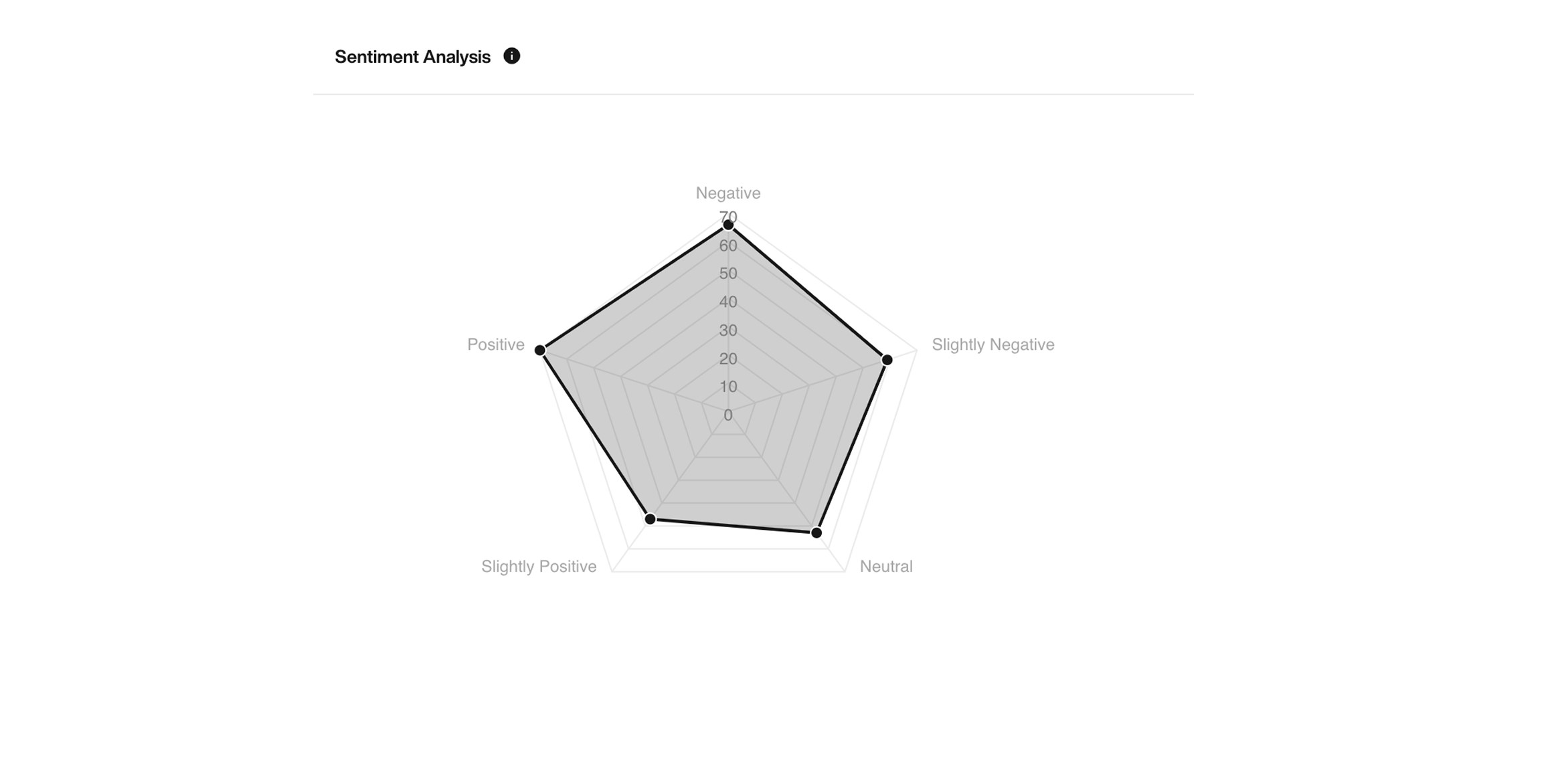
### Sentiment Analysis

This chart reveals the **emotional tone of conversations** based on customer responses:

* Negative
* Slightly Negative
* Neutral
* Slightly Positive
* Positive

Useful to monitor user satisfaction and adjust tone.

<div className="block dark:hidden">
  <Frame>
    <div className="p-1">
      <img src="https://mintcdn.com/nlpearl/5m7CLiudjrqxiyho/images/light_mode/analytics_sentiments.jpg?fit=max&auto=format&n=5m7CLiudjrqxiyho&q=85&s=9c24c900e94c0f2bc43414e5d9ce9e3f" alt="Send Email action interface on light mode" className="rounded-[14px]" width="2316" height="1172" data-path="images/light_mode/analytics_sentiments.jpg" />
    </div>
  </Frame>
</div>

<div className="hidden dark:block">
  <Frame>
    <div className="p-1">
      <img src="https://mintcdn.com/nlpearl/ek92yQlpTyrjmvSe/images/dark_mode/analytics_sentiments.jpg?fit=max&auto=format&n=ek92yQlpTyrjmvSe&q=85&s=f7200a408c2be8135a4fa945593bdf85" alt="Send Email action interface on dark mode" className="rounded-[14px]" width="2316" height="1172" data-path="images/dark_mode/analytics_sentiments.jpg" />
    </div>
  </Frame>
</div>

***

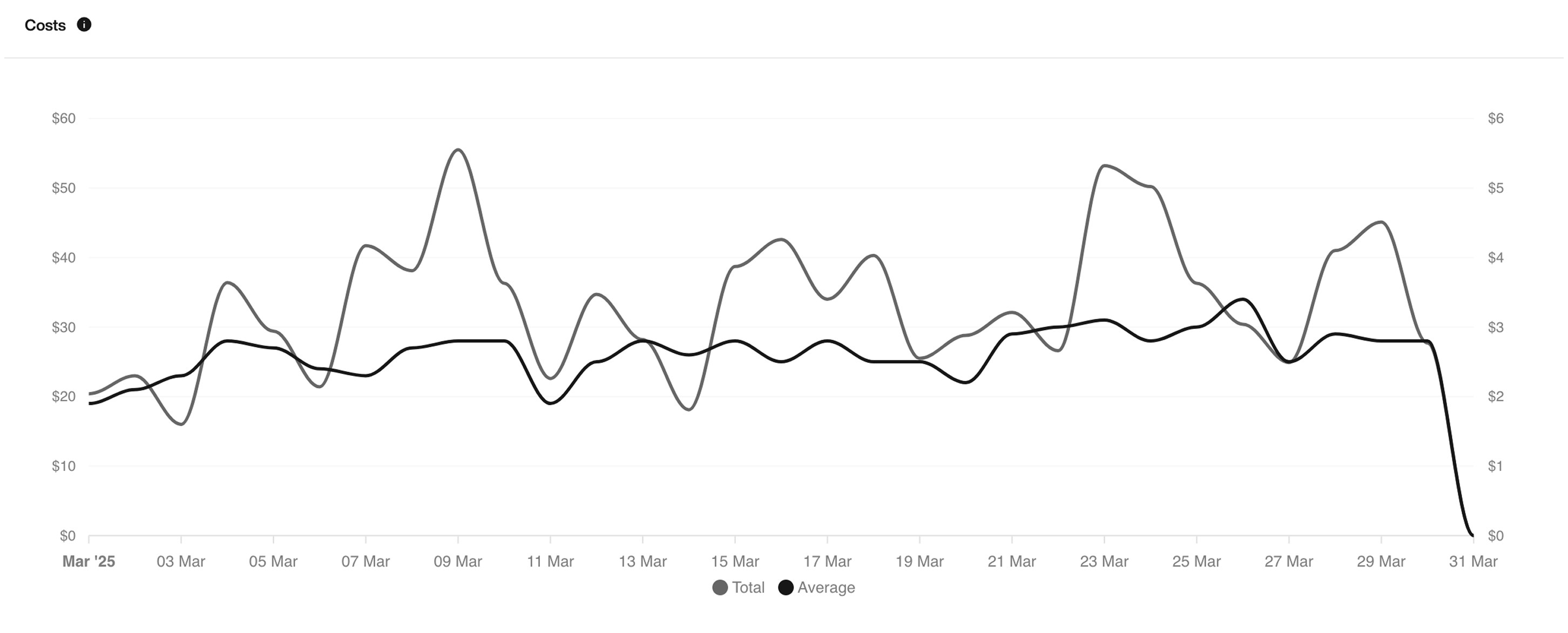
### Cost Breakdown

See your **total and average call costs over time** to understand how your usage impacts your credit.

<Warning>
  This graph only reflects costs deducted from your available credit. Calls covered by your included minutes are not shown.
</Warning>

<div className="block dark:hidden">
  <Frame>
    <div className="p-1">
      <img src="https://mintcdn.com/nlpearl/5m7CLiudjrqxiyho/images/light_mode/analytics_cost.jpg?fit=max&auto=format&n=5m7CLiudjrqxiyho&q=85&s=3c0e24931781398195ace48387a43475" alt="Send Email action interface on light mode" className="rounded-[14px]" width="2904" height="1172" data-path="images/light_mode/analytics_cost.jpg" />
    </div>
  </Frame>
</div>

<div className="hidden dark:block">
  <Frame>
    <div className="p-1">
      <img src="https://mintcdn.com/nlpearl/ek92yQlpTyrjmvSe/images/dark_mode/analytics_cost.jpg?fit=max&auto=format&n=ek92yQlpTyrjmvSe&q=85&s=ab7f9666cce9f3b159eb1d1593725bbd" alt="Send Email action interface on dark mode" className="rounded-[14px]" width="2904" height="1172" data-path="images/dark_mode/analytics_cost.jpg" />
    </div>
  </Frame>
</div>

***

### Differences: Inbound vs Outbound

| Feature            | Inbound   | Outbound  |
| ------------------ | --------- | --------- |
| Call Initiation    | By user   | By Pearl  |
| Pickup Rate        | Not shown | ✅ Visible |
| Heatmap            | ✅         | ✅         |
| Success/Retry Tags | ✅         | ✅         |
| Sentiment Analysis | ✅         | ✅         |
| Cost Breakdown     | ✅         | ✅         |

***

### Summary

With NLPearl Analytics, you have full visibility into your campaigns' performance.
Use these insights to fine-tune your strategy, maximize success rates, and optimize every conversation.
Data is power — now, it's yours to use.