> ## Documentation Index
> Fetch the complete documentation index at: https://developers.nlpearl.ai/llms.txt
> Use this file to discover all available pages before exploring further.
# OAuth 2.0
> Give an integration its own credential: a client ID and secret, only the scopes you grant it, and a secret you can rotate on your own.
Looking for the simpler scheme? An **API key** is one secret with full access
to your workspace, best for your own backend code - see [API Secret
Key](/api-reference/api_secret_key).
## Overview
An **OAuth 2.0 app** is a credential with a client ID, a client secret you can rotate, and a set of scopes that decide exactly what it may reach.
NLPearl implements the **client credentials** grant: the app authenticates with its own credentials and receives an access token limited to the scopes you granted it. There is no redirect, no login screen and no end user in the loop - it is machine-to-machine authentication.
OAuth 2.0 apps and API keys both live on the **API Access** page of your
workspace settings. Creating either one requires an active subscription.
***
## Creating an OAuth 2.0 App
Click your **profile card** at the bottom-left corner of the sidebar, open **Settings**, then select **API Access** in the settings menu. You can also go there directly: [platform.nlpearl.ai/app/settings/api](https://platform.nlpearl.ai/app/settings/api).
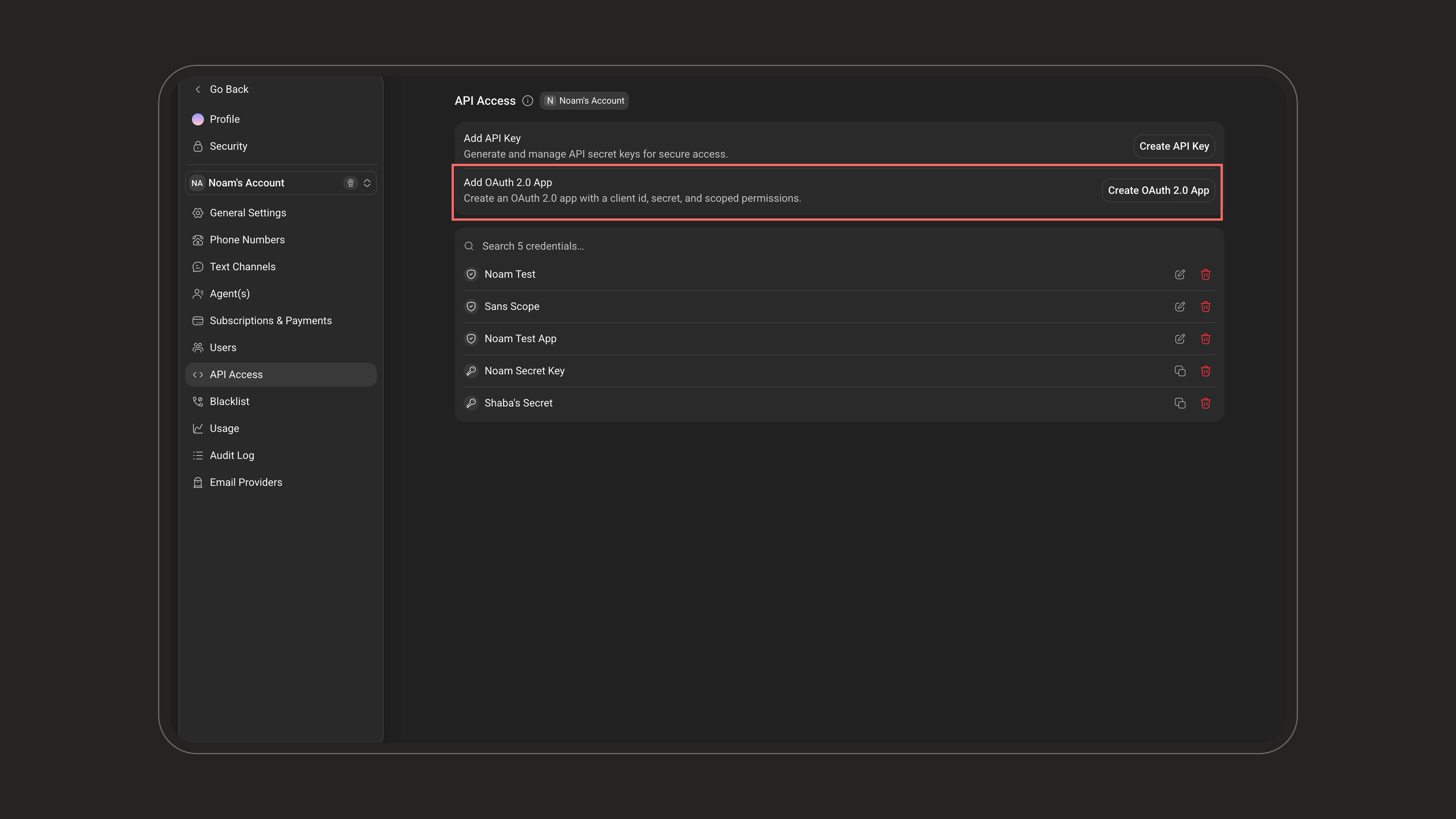 Click **Create OAuth 2.0 App**. The window that opens holds everything the app
is made of: a **Name**, its **Client ID** and **Client Secret**, and the
**Scopes** it is allowed to use.
Click **Create OAuth 2.0 App**. The window that opens holds everything the app
is made of: a **Name**, its **Client ID** and **Client Secret**, and the
**Scopes** it is allowed to use.
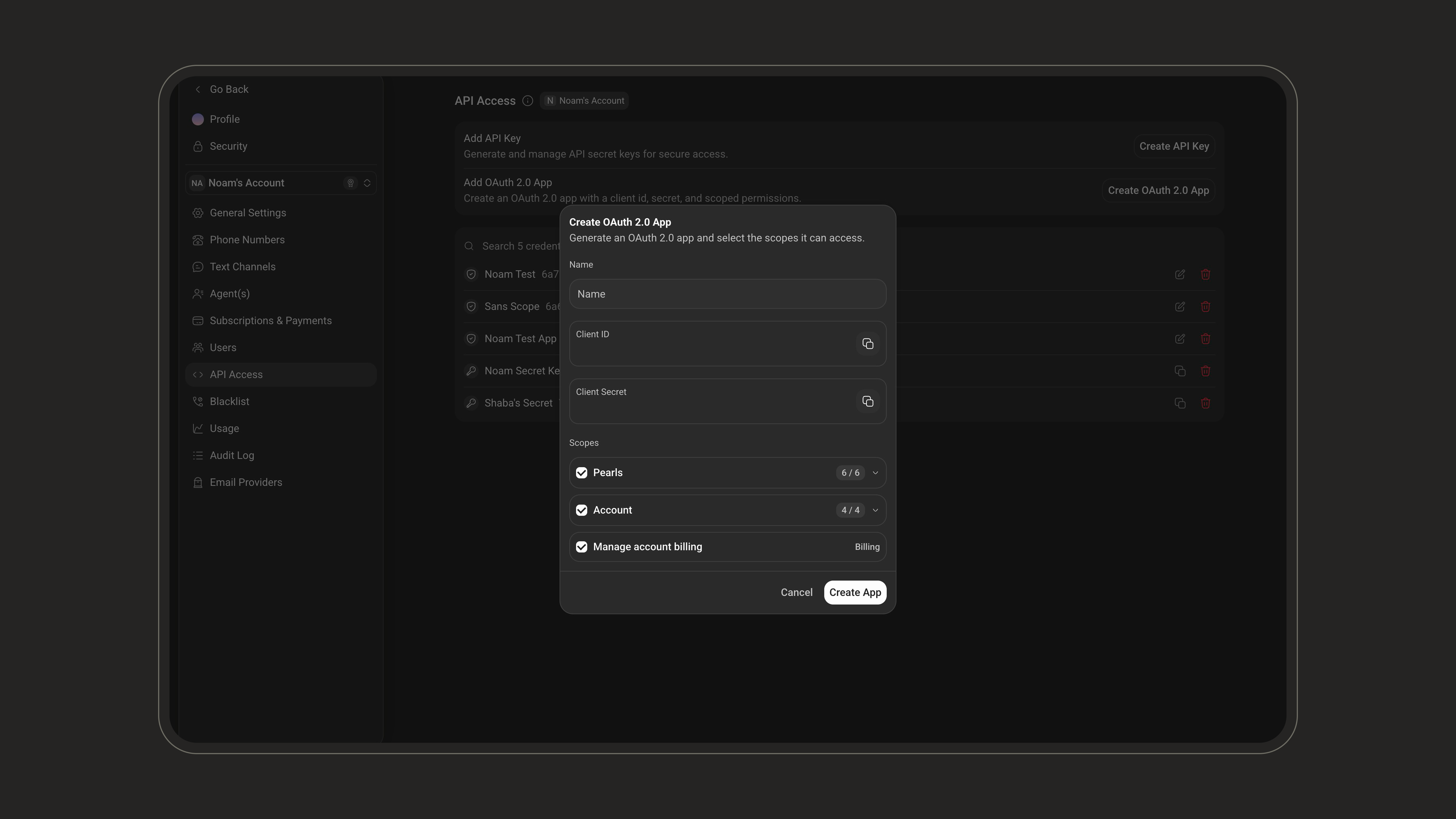 Give it a name that identifies the integration. Then select its scopes,
grouped under **Pearls**, **Account** and **Billing**. Grant the fewest the
integration actually needs.
Both are already filled in, above the scopes - copy them and only then click **Create App**.
**The client secret is shown once, in that window** - reopening the app later
shows only its first characters. Treat it as a password: keep it server-side,
never ship it in a browser, a mobile app or a public repository. If you lose
it or it leaks, [rotate it](#rotating-the-client-secret).
***
## Requesting an Access Token
```http theme={null}
POST https://api.nlpearl.ai/oauth/token
Content-Type: application/x-www-form-urlencoded
```
The token endpoint sits at the **root** of the API host. Unlike every other
Client API route, it is **not** under `/v2`.
### Request parameters
| Parameter | Required | Description |
| --------------- | -------- | --------------------------------------------------------------------------------------------- |
| `grant_type` | Yes | Must be `client_credentials`. No other grant type is supported. |
| `client_id` | Yes | Your app's Client ID. |
| `client_secret` | Yes | Your app's Client Secret. |
| `scope` | No | Space-separated list of scopes to request. Omit it to receive every scope granted to the app. |
Your credentials can be sent either in the request body or in an HTTP Basic header. Both methods are supported and issue the same token.
Also known as `client_secret_post`.
```bash theme={null}
curl -X POST "https://api.nlpearl.ai/oauth/token" \
-H "Content-Type: application/x-www-form-urlencoded" \
-d "grant_type=client_credentials" \
-d "client_id=6a6c72b69b39e6add21204e7" \
-d "client_secret=YOUR_CLIENT_SECRET"
```
Also known as `client_secret_basic`. The header value is `base64(client_id:client_secret)`.
```bash theme={null}
curl -X POST "https://api.nlpearl.ai/oauth/token" \
-H "Content-Type: application/x-www-form-urlencoded" \
-u "6a6c72b69b39e6add21204e7:YOUR_CLIENT_SECRET" \
-d "grant_type=client_credentials"
```
Send your credentials **one way or the other, never both**. A request carrying
a Basic header *and* a `client_secret` in the body is rejected with `400
invalid_request`.
### Response
```json theme={null}
{
"access_token": "eyJhbGciOiJSUzI1NiIsInR5cCI6IkpXVCJ9...",
"token_type": "Bearer",
"expires_in": 3600,
"scope": "pearls:read pearls:calls pearls:analytics"
}
```
| Field | Description |
| -------------- | --------------------------------------------------------------------------------- |
| `access_token` | The token to send on your API calls. |
| `token_type` | Always `Bearer`. |
| `expires_in` | Token lifetime in seconds - **3600**, one hour. |
| `scope` | The scopes actually granted to this token. Read it to know what the token can do. |
There is **no refresh token**. When a token expires, request a new one with
the same credentials. **Cache the token and reuse it** for its whole lifetime.
Do not request a new one on every API call.
***
## Calling the API
Send the access token as a bearer token on any `/v2` endpoint:
```bash theme={null}
curl -X GET "https://api.nlpearl.ai/v2/Pearl" \
-H "Authorization: Bearer eyJhbGciOiJSUzI1NiIsInR5cCI6IkpXVCJ9..."
```
There is no `AccountId:` prefix here, unlike the [secret key
scheme](/api-reference/api_secret_key) - the workspace the token belongs to is
already part of the token.
***
## Scopes
A scope is a permission. An app only reaches what its scopes allow; everything else is refused with `403`.
The tables below map every checkbox in the **OAuth 2.0 App** window - grouped **Pearls**, **Account** and **Billing**, exactly as the platform groups them - to the scope string it produces in the token.
### Pearls
| In the platform | Scope | What it reaches |
| ------------------------------------------------------ | ------------------ | --------------------------------------------------------------------------------------------- |
| View pearls | `pearls:read` | Listing Pearls, inbounds and campaigns, and reading one of them |
| Create and edit, including access to PearlVibe | `pearls:write` | Creating and updating Pearls, conversation flows, voice and text settings, and the voice list |
| Moderate activity status - Allow changing pearl status | `pearls:moderate` | Running and pausing a Pearl, resetting customer memory |
| View analytics | `pearls:analytics` | Pearl, inbound and outbound analytics |
| View and moderate leads | `pearls:leads` | Reading, adding, updating and deleting outbound leads |
| View calls and post-call information | `pearls:calls` | Calls and recordings, placing and deleting calls, call requests |
**Any Pearls scope also grants `pearls:read`.** Every integration needs to
list Pearls to resolve their ids, so selecting *View calls* alone still yields
`pearls:read pearls:calls` - you will see it in the token's `scope`.
### Account
| In the platform | Scope | What it reaches |
| --------------------------------------------------- | ----------------------- | --------------------------------------------- |
| Manage phone numbers | `account:phone_numbers` | The account's phone numbers and text channels |
| Manage users | `account:users` | The account's users |
| Manage advanced settings - security, sessions, etc. | `account:advanced` | The account blacklist: search, add, remove |
| View audit log | `account:audit_log` | The audit log |
`GET /v2/Account/Voices` sits under `pearls:write`, not under an account
scope: the list of voices is part of building a Pearl.
### Billing
| In the platform | Scope | What it reaches |
| ---------------------- | ----------------- | ---------------------------------------------------------- |
| Manage account billing | `account:billing` | Account information and credit balance - `GET /v2/Account` |
### Changing an app's scopes
Open the app with the **edit** button, tick or untick scopes, then click **Save Scopes**.
Give it a name that identifies the integration. Then select its scopes,
grouped under **Pearls**, **Account** and **Billing**. Grant the fewest the
integration actually needs.
Both are already filled in, above the scopes - copy them and only then click **Create App**.
**The client secret is shown once, in that window** - reopening the app later
shows only its first characters. Treat it as a password: keep it server-side,
never ship it in a browser, a mobile app or a public repository. If you lose
it or it leaks, [rotate it](#rotating-the-client-secret).
***
## Requesting an Access Token
```http theme={null}
POST https://api.nlpearl.ai/oauth/token
Content-Type: application/x-www-form-urlencoded
```
The token endpoint sits at the **root** of the API host. Unlike every other
Client API route, it is **not** under `/v2`.
### Request parameters
| Parameter | Required | Description |
| --------------- | -------- | --------------------------------------------------------------------------------------------- |
| `grant_type` | Yes | Must be `client_credentials`. No other grant type is supported. |
| `client_id` | Yes | Your app's Client ID. |
| `client_secret` | Yes | Your app's Client Secret. |
| `scope` | No | Space-separated list of scopes to request. Omit it to receive every scope granted to the app. |
Your credentials can be sent either in the request body or in an HTTP Basic header. Both methods are supported and issue the same token.
Also known as `client_secret_post`.
```bash theme={null}
curl -X POST "https://api.nlpearl.ai/oauth/token" \
-H "Content-Type: application/x-www-form-urlencoded" \
-d "grant_type=client_credentials" \
-d "client_id=6a6c72b69b39e6add21204e7" \
-d "client_secret=YOUR_CLIENT_SECRET"
```
Also known as `client_secret_basic`. The header value is `base64(client_id:client_secret)`.
```bash theme={null}
curl -X POST "https://api.nlpearl.ai/oauth/token" \
-H "Content-Type: application/x-www-form-urlencoded" \
-u "6a6c72b69b39e6add21204e7:YOUR_CLIENT_SECRET" \
-d "grant_type=client_credentials"
```
Send your credentials **one way or the other, never both**. A request carrying
a Basic header *and* a `client_secret` in the body is rejected with `400
invalid_request`.
### Response
```json theme={null}
{
"access_token": "eyJhbGciOiJSUzI1NiIsInR5cCI6IkpXVCJ9...",
"token_type": "Bearer",
"expires_in": 3600,
"scope": "pearls:read pearls:calls pearls:analytics"
}
```
| Field | Description |
| -------------- | --------------------------------------------------------------------------------- |
| `access_token` | The token to send on your API calls. |
| `token_type` | Always `Bearer`. |
| `expires_in` | Token lifetime in seconds - **3600**, one hour. |
| `scope` | The scopes actually granted to this token. Read it to know what the token can do. |
There is **no refresh token**. When a token expires, request a new one with
the same credentials. **Cache the token and reuse it** for its whole lifetime.
Do not request a new one on every API call.
***
## Calling the API
Send the access token as a bearer token on any `/v2` endpoint:
```bash theme={null}
curl -X GET "https://api.nlpearl.ai/v2/Pearl" \
-H "Authorization: Bearer eyJhbGciOiJSUzI1NiIsInR5cCI6IkpXVCJ9..."
```
There is no `AccountId:` prefix here, unlike the [secret key
scheme](/api-reference/api_secret_key) - the workspace the token belongs to is
already part of the token.
***
## Scopes
A scope is a permission. An app only reaches what its scopes allow; everything else is refused with `403`.
The tables below map every checkbox in the **OAuth 2.0 App** window - grouped **Pearls**, **Account** and **Billing**, exactly as the platform groups them - to the scope string it produces in the token.
### Pearls
| In the platform | Scope | What it reaches |
| ------------------------------------------------------ | ------------------ | --------------------------------------------------------------------------------------------- |
| View pearls | `pearls:read` | Listing Pearls, inbounds and campaigns, and reading one of them |
| Create and edit, including access to PearlVibe | `pearls:write` | Creating and updating Pearls, conversation flows, voice and text settings, and the voice list |
| Moderate activity status - Allow changing pearl status | `pearls:moderate` | Running and pausing a Pearl, resetting customer memory |
| View analytics | `pearls:analytics` | Pearl, inbound and outbound analytics |
| View and moderate leads | `pearls:leads` | Reading, adding, updating and deleting outbound leads |
| View calls and post-call information | `pearls:calls` | Calls and recordings, placing and deleting calls, call requests |
**Any Pearls scope also grants `pearls:read`.** Every integration needs to
list Pearls to resolve their ids, so selecting *View calls* alone still yields
`pearls:read pearls:calls` - you will see it in the token's `scope`.
### Account
| In the platform | Scope | What it reaches |
| --------------------------------------------------- | ----------------------- | --------------------------------------------- |
| Manage phone numbers | `account:phone_numbers` | The account's phone numbers and text channels |
| Manage users | `account:users` | The account's users |
| Manage advanced settings - security, sessions, etc. | `account:advanced` | The account blacklist: search, add, remove |
| View audit log | `account:audit_log` | The audit log |
`GET /v2/Account/Voices` sits under `pearls:write`, not under an account
scope: the list of voices is part of building a Pearl.
### Billing
| In the platform | Scope | What it reaches |
| ---------------------- | ----------------- | ---------------------------------------------------------- |
| Manage account billing | `account:billing` | Account information and credit balance - `GET /v2/Account` |
### Changing an app's scopes
Open the app with the **edit** button, tick or untick scopes, then click **Save Scopes**.
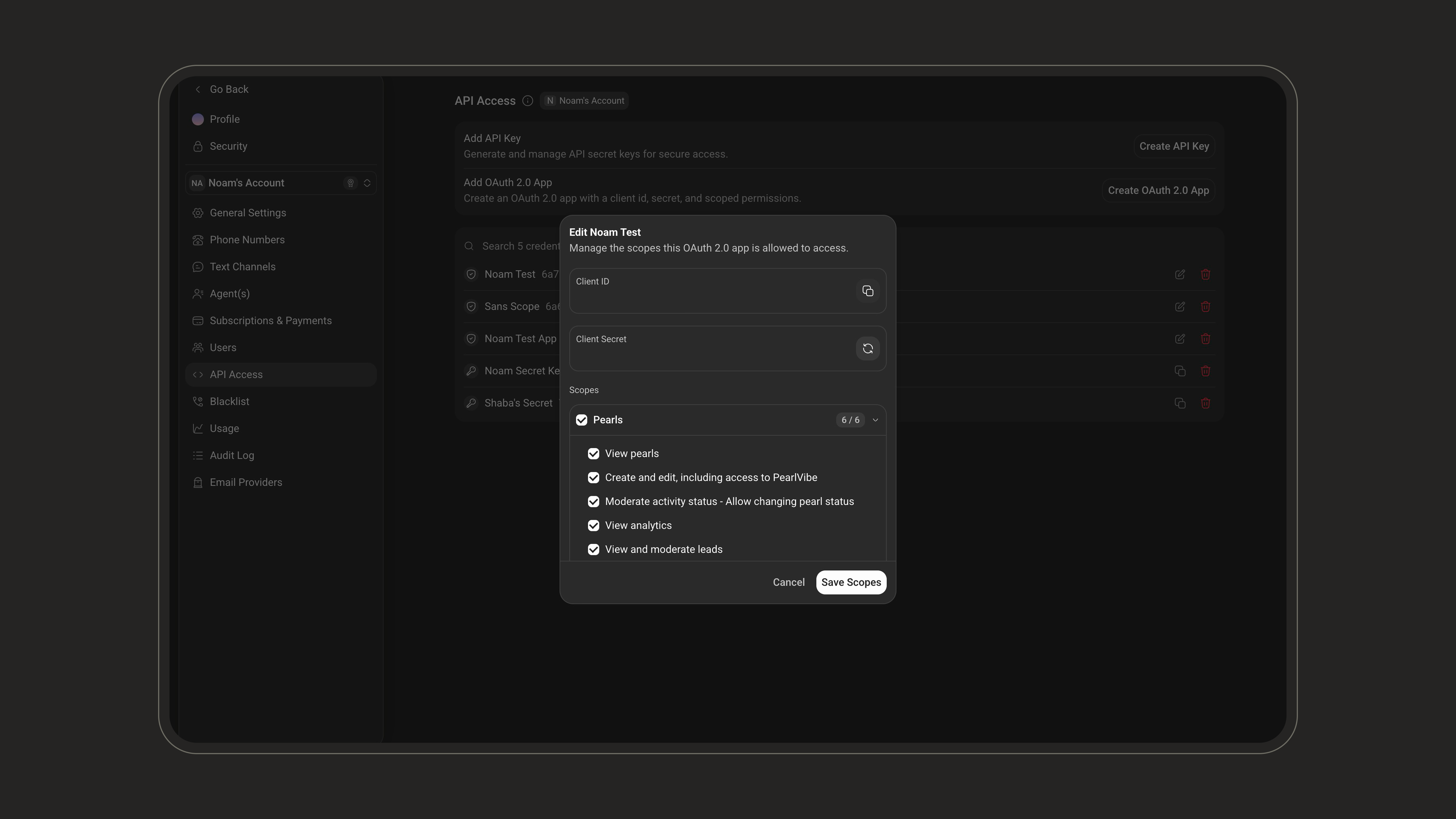 Scope changes apply to **newly issued tokens**. A token issued before the change keeps the scopes it was created with until it expires.
***
## Errors
### Token endpoint
| Status | `error` | When |
| ------ | ------------------------ | --------------------------------------------------------------------------------------- |
| `400` | `invalid_request` | `grant_type` is missing, or credentials were sent in the Basic header **and** the body. |
| `400` | `unsupported_grant_type` | `grant_type` is anything other than `client_credentials`. |
| `400` | `invalid_scope` | A requested `scope` is not a known scope string, or is one the app was not granted. |
| `401` | `invalid_client` | Unknown `client_id`, wrong `client_secret`, or the app was deleted. |
| `405` | - | The endpoint only accepts `POST`. |
Every error comes back as JSON:
```json theme={null}
{
"error": "invalid_client",
"error_description": "Client authentication failed"
}
```
### API endpoints
| Status | Meaning |
| ------ | ------------------------------------------------------------------ |
| `401` | The token is missing, malformed, or expired. Request a new token. |
| `403` | The token is valid but **lacks the scope** this endpoint requires. |
A `403` carries a challenge header and a machine-readable body:
```http theme={null}
HTTP/1.1 403 Forbidden
WWW-Authenticate: Bearer error="insufficient_scope",
error_description="The token does not carry the scope required by this endpoint"
```
```json theme={null}
{
"error": "insufficient_scope",
"error_description": "The token does not carry the scope required by this endpoint"
}
```
Handle `403` and `401` differently. A `401` means *get a new token*; a `403`
means *this app was never granted the scope* - requesting another token will
return the same result. Retrying a `403` in a loop will never succeed.
***
## Rotating the Client Secret
Rotation replaces an app's secret without changing its Client ID, its scopes, or anything else about it. Use it when a secret may have been exposed, or as routine hygiene.
On the **API Access** page, open the OAuth 2.0 app with the **edit** button.
Click the **rotate** button next to **Client Secret**.
The new secret replaces the masked one in the field - copy it before closing the window.
The previous secret stops working as soon as you rotate. Every integration
using it must be updated with the new secret, or it will start receiving `401
invalid_client`.
Access tokens that were already issued stay valid until they expire - rotation blocks new tokens, it does not revoke the ones already in circulation. To cut an integration off immediately, delete the app with the **delete** button on the API Access page.
***
## Token Format and Discovery
You do not need any of this to call the API, but it is there if your OAuth client expects it.
Access tokens are **RS256-signed JWTs**. You can verify a token's signature against the public keys published in the JWKS below.
| Claim | Value |
| -------------------------- | ---------------------------------------------------- |
| `iss`, `aud` | Both `https://api.nlpearl.ai` |
| `sub` | The **Client ID** of the app the token was issued to |
| `account_id` | The **Account ID** of your workspace |
| `scope` | The granted scopes, space separated |
| `jti`, `iat`, `nbf`, `exp` | Token id, issued-at, not-before and expiry |
| Endpoint | Purpose |
| -------------------------------------------------------------------------------------------------------------------------------- | ------------------------------------------------------------------------------------------------------- |
| [`https://api.nlpearl.ai/.well-known/oauth-authorization-server`](https://api.nlpearl.ai/.well-known/oauth-authorization-server) | Authorization server metadata: token endpoint, supported grant types and auth methods, full scope list. |
| [`https://api.nlpearl.ai/.well-known/jwks.json`](https://api.nlpearl.ai/.well-known/jwks.json) | Public keys used to verify token signatures. |
Both are public and require no authentication.
Scope changes apply to **newly issued tokens**. A token issued before the change keeps the scopes it was created with until it expires.
***
## Errors
### Token endpoint
| Status | `error` | When |
| ------ | ------------------------ | --------------------------------------------------------------------------------------- |
| `400` | `invalid_request` | `grant_type` is missing, or credentials were sent in the Basic header **and** the body. |
| `400` | `unsupported_grant_type` | `grant_type` is anything other than `client_credentials`. |
| `400` | `invalid_scope` | A requested `scope` is not a known scope string, or is one the app was not granted. |
| `401` | `invalid_client` | Unknown `client_id`, wrong `client_secret`, or the app was deleted. |
| `405` | - | The endpoint only accepts `POST`. |
Every error comes back as JSON:
```json theme={null}
{
"error": "invalid_client",
"error_description": "Client authentication failed"
}
```
### API endpoints
| Status | Meaning |
| ------ | ------------------------------------------------------------------ |
| `401` | The token is missing, malformed, or expired. Request a new token. |
| `403` | The token is valid but **lacks the scope** this endpoint requires. |
A `403` carries a challenge header and a machine-readable body:
```http theme={null}
HTTP/1.1 403 Forbidden
WWW-Authenticate: Bearer error="insufficient_scope",
error_description="The token does not carry the scope required by this endpoint"
```
```json theme={null}
{
"error": "insufficient_scope",
"error_description": "The token does not carry the scope required by this endpoint"
}
```
Handle `403` and `401` differently. A `401` means *get a new token*; a `403`
means *this app was never granted the scope* - requesting another token will
return the same result. Retrying a `403` in a loop will never succeed.
***
## Rotating the Client Secret
Rotation replaces an app's secret without changing its Client ID, its scopes, or anything else about it. Use it when a secret may have been exposed, or as routine hygiene.
On the **API Access** page, open the OAuth 2.0 app with the **edit** button.
Click the **rotate** button next to **Client Secret**.
The new secret replaces the masked one in the field - copy it before closing the window.
The previous secret stops working as soon as you rotate. Every integration
using it must be updated with the new secret, or it will start receiving `401
invalid_client`.
Access tokens that were already issued stay valid until they expire - rotation blocks new tokens, it does not revoke the ones already in circulation. To cut an integration off immediately, delete the app with the **delete** button on the API Access page.
***
## Token Format and Discovery
You do not need any of this to call the API, but it is there if your OAuth client expects it.
Access tokens are **RS256-signed JWTs**. You can verify a token's signature against the public keys published in the JWKS below.
| Claim | Value |
| -------------------------- | ---------------------------------------------------- |
| `iss`, `aud` | Both `https://api.nlpearl.ai` |
| `sub` | The **Client ID** of the app the token was issued to |
| `account_id` | The **Account ID** of your workspace |
| `scope` | The granted scopes, space separated |
| `jti`, `iat`, `nbf`, `exp` | Token id, issued-at, not-before and expiry |
| Endpoint | Purpose |
| -------------------------------------------------------------------------------------------------------------------------------- | ------------------------------------------------------------------------------------------------------- |
| [`https://api.nlpearl.ai/.well-known/oauth-authorization-server`](https://api.nlpearl.ai/.well-known/oauth-authorization-server) | Authorization server metadata: token endpoint, supported grant types and auth methods, full scope list. |
| [`https://api.nlpearl.ai/.well-known/jwks.json`](https://api.nlpearl.ai/.well-known/jwks.json) | Public keys used to verify token signatures. |
Both are public and require no authentication.